14
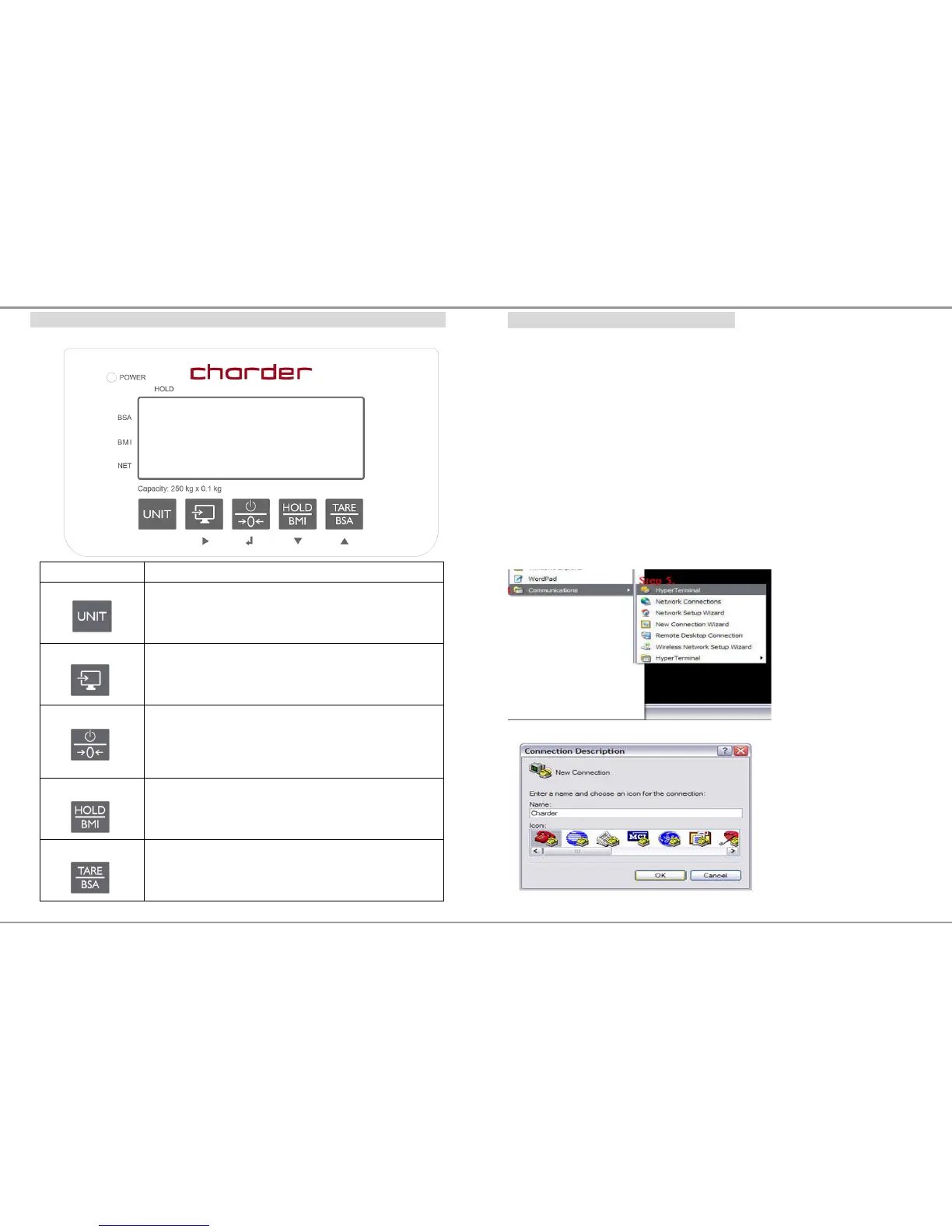
PANEL
Operation keys Functions
UNIT
For OIML approved model, only kg unit is available
SEND
Send data key.
Press to send measuring data to PC
ON/OFF/ZERO
Switch on and off.
Press button to turn it on. To turn it off, press and
hold the button for 1 second
Press once to set the scale to zero when scale is on
HOLD/BMI
Enable HOLD and BMI function
Press once to enable weight lock function
Press button and hold 3 secs to enable BMI mode
TARE/BSA
Press once to enable TARE function
When BMI is activated. Press TARE/BSA button to
display BSA[body surface area]
23
Hyper Terminal setting in PC for printout
Hyper Terminal is a freeware on PC Windows XP SP3 or lower to setup the
PC printer com-port with USB or RS232 cable connector transmission.
For use on Windows Vista or higher please download hyper terminal
software program from Charder website:
http://www.chardermedical.com/download/dlist-4.htm
4. Start Hyper Terminal
After taking the weight and BMI, run Hyper Terminal program from the
PC’s Windows OS with the following steps:
Step.1- Click on Start Button.
Step.2- Go to All Programs.
Step.3- Select Accessories.
Step.4- Find Communications.
Step.5- In Communications section click on HyperTerminal.


 To Next Page