EasyManua.ls Logo

Charter Spectrum E31U2V1 - Safety Notices; Device Grounding; Preparing for Installation; Verify Package Contents

Charter Spectrum E31U2V1
7 pages
Print Icon
To Next Page IconTo Next Page
To Previous Page IconTo Previous Page
Loading...
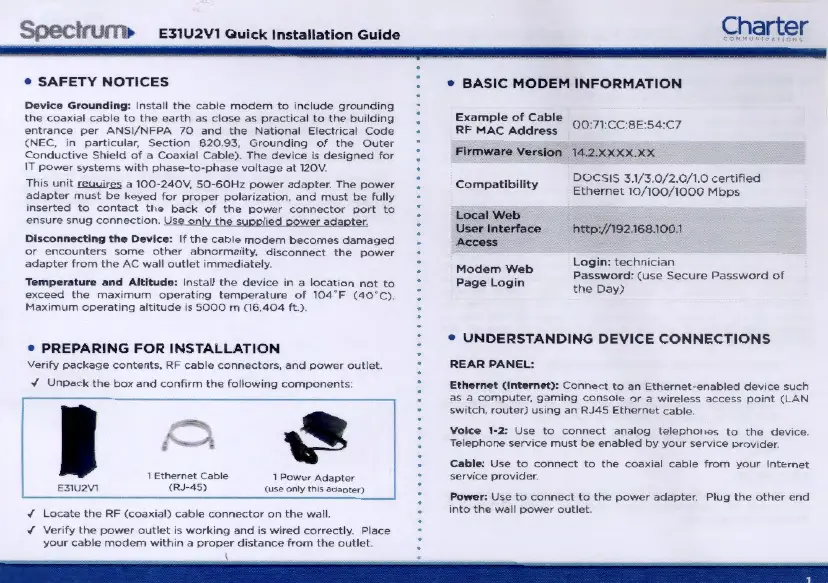
E31U2V1
Quick
Installation
Gu
ide
SAFETY
NOTICES
DeviC-e
Grounding
:
Install
the
cable
modem
to
ncl
ud
e gr
ound1ng
the
coa)(1al
cable
to
the
earth
as
close
as
practical
to
the
building
entrance
per
ANSI/NFPA
70
and
the
National
El
cc
t
ncal
Code
(NEC,
in
part•cular.
Sect
tan
820
93,
Grounding
of
the
Outer
Conduct•ve
Sh1eld
of
a Coax1al
Cable).
The
dev•ce
is
designed
for
IT
power
systems
w1th
phase-to-phase
vol
t
age
at
120V
.
Th1s
umt
~a
100·240V,
50-60Hz
power
adapter.
The
power
adapter
mu
st
be
keyed
for
proper
polanza
t1on,
and
must
be
fully
•nserted
to
contact
the
back
of
the
power
connector
port
to
ensure
sn
ug
connection.
Use
only
the
supphgd
power
adaoter
DlsconnKtlng
the
Device
:
If
the
cable
modem
becomes
damaged
or
encounters
some
other
abnormality,
d1sconnect
the
power
adapter
from
the
AC
wall
outlot
•mmcchatcly.
Temperature
and
Altitude
:
Install
t
he
dev1ce
1n
a
locat1on
not
to
exceed
the
max1mum
opcrat1ng
temperature
of
104
F
(40
.
C).
Maxtmum
operattng
alt1tude
ts
5000
m
(16,404
ft.).
PREPARING
FOR
INSTALLATION
Verify
package
contents.
RF
cable
connecto
r
s,
and
p
ower
out l
et
.
../
Unpack
t
he
box
and
co
nf1rm
the
fo
ll
ow
1
ng
componen
t
s:
I
1
Ethernet
Cable
l
Power
Adapter
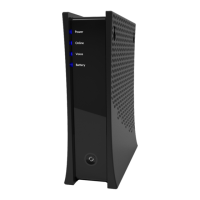
E31U2Vl
(RJ-45
_>
____
<
'-
"'"-
only
.....:.-
'"'
-'-
odo<>
__;'-'-
.,
.:.
> _
_.
.f
Locate
the
RF
(coax•al)
cable
connector
on
the
wall
.
../
Venfy
the
power
outlet
IS
wo
r
k.ng
and
ts
w~red
correctly.
Place
your
cable
modem
w1th1n a
proper
distance
from
the
outlet.
Charter
BASIC
MODEM
INFORMATION
~~a~:~e
:~;.~~~·
00:71CC8E:54:C7
Firmware
Version
14 2.
XXXX.XX
Compatibil
i
ty
Local
Web
Use
r
Interface
Access
Modem
Web
Page
Login
DOCSIS
3.1/3.0/2.0/1.0
certofied
Ethernet
10/100/1000
Mbps
htlp
://
192.168.100.1
Login
:
technician
Pa
ss
word
:
(use
Secure
Password
of
the
Day)
UNDERSTANDING
DEVICE
CONNECTIONS
REAR
PANEL
:
Ethernet
(Internet)
:
Connoc
t
to
an
Ethcrnct-enabled
device
such
as
a
compu
ter,
gam
i
ng
console
or
a w1reless
access
point
(LAN
sw1tch,
rou
t
er)
us
t
ng
an
RJ45
Ethernet
cable.
Voice
1-2
:
Use
to
connect
an
alog
te
l
ephones
to
the
device
Telephone
servtce
mus
t
be
enabled
by
your
scrv1ce
provtdcr
Ca
ble
:
Use
to
connec
t
to
the
coax1al
cable
from
your
Internet
serv1ce
prov1der
Power:
Use
to
connect
to
the
power
adapter
Plug
t
he
ot
her
end
1nto
the
wall
power
outlet

Related product manuals