EasyManua.ls Logo

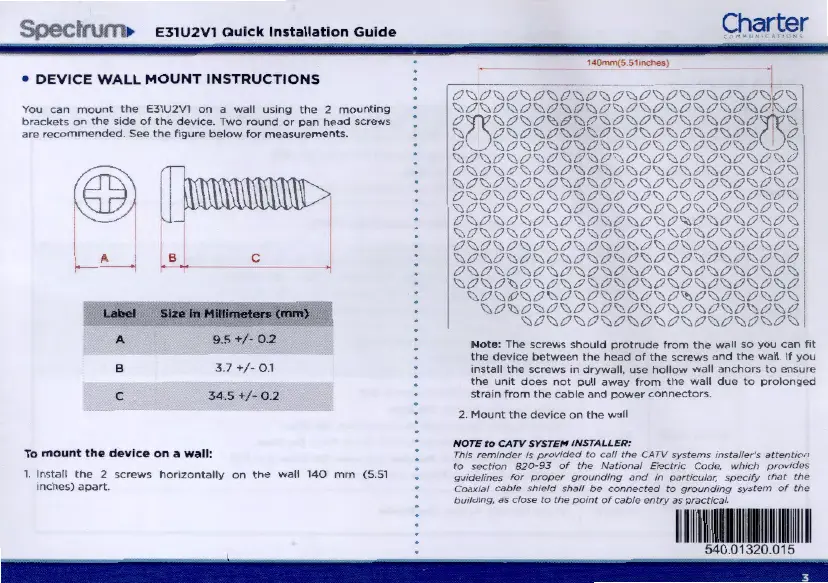
Charter Spectrum E31U2V1 - Device Wall Mount Instructions; Screw Specifications for Mounting

Charter Spectrum E31U2V1
7 pages
Print Icon
To Next Page IconTo Next Page
To Previous Page IconTo Previous Page
Loading...
SpeclnJtn
E31U2V1
Quick
Installation
Guide
DEVICE
WALL
MOUNT
INSTRUCTIONS
You
can
mount
the
E31U2V1
on
a
wall
ustng
the
2
mountmg
brackets
on
the
stde
of
the
devtce
Two
round
or
pan
head
screws
are
recommended
See
the
figure
below
f
or
measurements.
A B c
$Ia
In
Mlllloi-...
(IIIII\)
A 9.5
..
;.
0 .2
B
3.7
..
;.
0.1
c
34
.5 +
0 .2
To m o
unt
the
device
on
a
wall
:
1.
Install
the
2
screws
hortzontally
on
the
wall
140
mm
(5
.51
•nchcs)
apart
.
Charter
1~
5
5tww::r.)
N
ote
:
The
screws
should
protrude
from
the
wall
so
you
can
ftt
tho
dcvtce
between
the
head
of
the
scr
ews
and
the
wall.
If
you
tnstall
the
screws
.n
drywull,
usc
hollow
wall
anchors
to
ensure
the
unit
does
not
pull
away
fr
om
tho
wall
due
to
prolonged
stra
tn
from
t
he
cable
and
power
connectors
2.
Mount
the
device
on
the
wall
NOTE
to
CATV
SYSTEM
I
NSTAL
LER
:
This
remmder
IS
provK/ed
to
calf
t,.,.
CATV
systems
mstaller's
attentK>n
to
sectiOn
820-93
of
the
NiJttOni!l
E/cctoc
Code.
whiCh
provldfls
gu~fmes
for
proper
groundmg
and
1n
particular.
spcc1fy
th.Jt
thfl
COiJxli!ff CiJble sh1ekJ
shalf
be
connected
to
grounding
system
of
the
/xJ11dmg,
~s
close
to
the
pomt
of
c.,Oie
fHltry
.,s
pra<:tteaf.
11
111
1
11
1
111111
1
1111
1
11
11
1111
540.01320.Q1 5
-- ------------------------------------------------------ ---
3

Related product manuals