EasyManua.ls Logo

Charter Spectrum E31U2V1 - LED Behavior; Power LED Status; Online LED Status; Voice LED Status

Charter Spectrum E31U2V1
7 pages
Print Icon
To Next Page IconTo Next Page
To Previous Page IconTo Previous Page
Loading...
Spec~
E31U2V1
Quick
Installatio
n G
uide
Charter
e
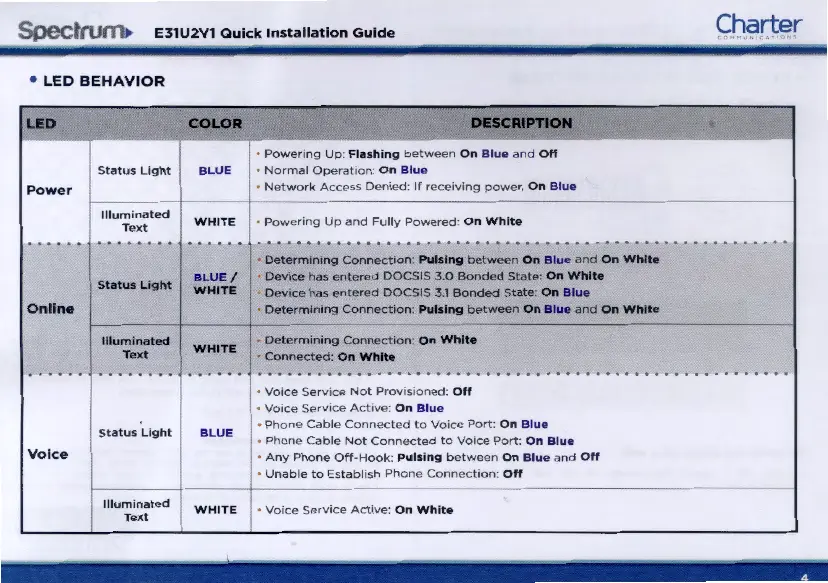
LED
BEHAVIOR
LaD
COLOR DIESCRIPI'10N
-
P
owen
ng U
p:
Fla
s
hin
g
be
t
ween
On
Blue
a
nd
Off
Status
Light
BLUE
Normal
Ope
rat1on: O n
Blue
Power
Ne
tw
ork
Access
Denied
:
If
rccctving
power.
On
Blue
Illuminated
WHITE
Powering
Up
and
Fully
Powered:
On
Whit
e
Text
. . . . . .
. . . . . . . . . . . . . . .....
.................................................
Determ1
n1
ng
Connect
i
on
: Pulsing
be
t
wee
n
On
Blue
and
On
White
Statu
s
Light
BLUE
/
Device
has
ente
r
ed
DOCSIS
30
Bonded
St
ate:
On
White
WHITE
Dev1ce
has
entered
DOCSIS
3.1
Bonded
State
On
Blu
e
Online
L-
Determ1n1ng
Connect1on
· Pulsing
between
On
Blue
and
On
White
---
----
Illuminated
WHITE
Dete
rm t
ntng
Conncct&on
·
On
White
Text
Connected:
On
White
...... . . . . . . . . . . . . . . . ... .
.................................................
Voice
Se
r
vice
Not
Prov•s
oned:
Off
Vo•ce
Sc
rv&cc
Ac
t
ive
: On
Blue
Status
Light
BLUE
Phone
Cable
Connected
to
Vo1ce
Port
:
on
Blue
P
hone
Cable
N
ot
Connected
to
Voice
Port:
O n
Blue
Vo
ice
·
Any
Phone
Off-
H
ook
:
Pu
ls
ing
between
O n
Blue
and
Off
U
na
bl
e to
Es
tabli
sh
Phone
Con
n
ec
t
io
n:
Off
1-
Il
lum
inat
ed
WHITE
Voice
Service
Active:
O n
Wh
ite
T
ex
t

Related product manuals