EasyManua.ls Logo

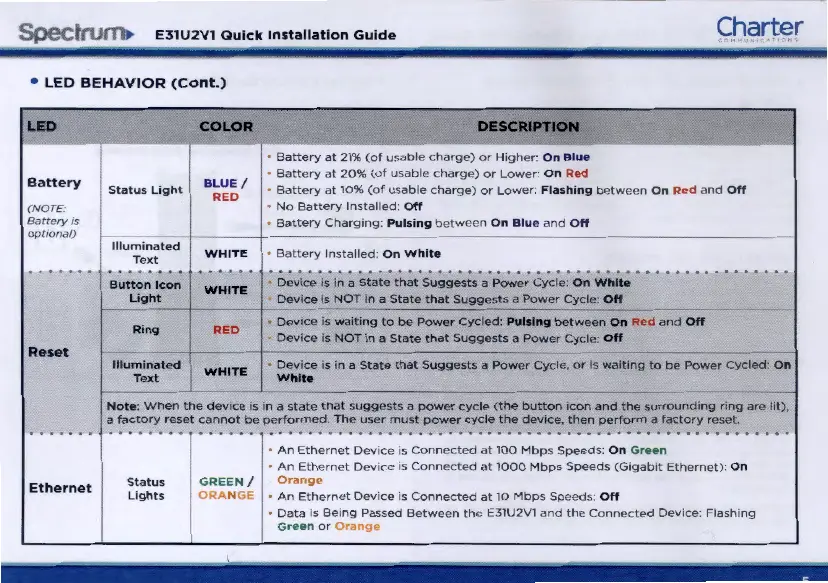
Charter Spectrum E31U2V1 - LED Behavior (Cont.); Battery LED Status; Reset Button LED Status; Ethernet LED Status

Charter Spectrum E31U2V1
7 pages
Print Icon
To Next Page IconTo Next Page
To Previous Page IconTo Previous Page
Loading...
Spec~
E31U2V1
Quick
Installation
Guide
Charter
LED
BEHAVIOR
(Cont.)
LED
Battery
(
NOTE
:
Battery1
s
o
ptional
)
Reset
Ethernet
I
Status
Light
Ill
u
mina
t
ed
T
ext
COLOR
--
BLUE
/
RED
WHITE
Battery
at
21%
(of
usable
charge)
or
Higher·
On
Blu
e
Battery
at
20%
(of
usable
charge)
or
Lower
: O n
Red
Battery
at
10%
(of
usable
charge)
or
Lower
.
Fl
as
hi
ng
between
On
Red
and
Off
No
Battery
Installed
: O
ff
Battery
Charging:
Pul
s
ing
between
On
Blu
e
and
O
ff
Battery
In
stalled:
On
Whit
e
Button
Icon
WHITE
Dcvoce
os
on
a
State
tha
t
Suggests
a P
ower
Cycle:
On
White
Light
1 I Devoce
os
NOT
on
a
State
that
Suggests
a
Power
Cycle
Off
.
8Devoce
os
wai
t
ing
to
be
Power
Cycle
d :
Pulsing
between
On
R~d
and
Off
Ror19
RED
Devoce
is
NOT
in
a
State
that
Su
gg
ests
a
Po
wer
Cycle:
Off
lllu;'!~:ted
WHITE
~;~
e
is
in
a State
tha
t
Sugges
t s a
Powe
r
Cycle,
or
is
wai
t
ong
to
be
Power
Cycled:
On
Note
:
When
the
d
evice
IS m a
state
t
hat
suggests
a
powe
r
cycle
(the
button
icon
and
the
surroundmg
ring
are
lit),
a
factory
reset
cann
ot
be
performed
.
The
user
must
power
cycle
the
dcvtce
,
then
perform
a
factory
reset
Stat
us
Lights
An
Ethernet
Device
os
Connected
at
100
Mbps
Speeds
:
On
Green
An
Ethernet
Device
os
Connected
at
1000
Mbps
Speeds
(Gogabot
Ethernet):
On
GREEN
/
Or
ORANGE
An
Ethernet
Device
is
Co
nn
ected
at
10 M
bps
Speeds
:
Off
Data
os
Being
Passed
Between
the
E3
1U2V1
and
t
he
Connected
Devoce:
Flashing
Green
or
mgj

Related product manuals