EasyManua.ls Logo

Charter Spectrum E31U2V1 - Understanding Device Connections (Cont.); Front Panel Controls; Installing the Modem; Connect Coaxial Cable

Charter Spectrum E31U2V1
7 pages
Print Icon
To Next Page IconTo Next Page
To Previous Page IconTo Previous Page
Loading...
Spectrum.
E31U2V1
Quick
Installation
Guide
UNDERSTANDING
DEVICE
CONNECTIONS
(Cont
.)
FRONT
PANEL
:
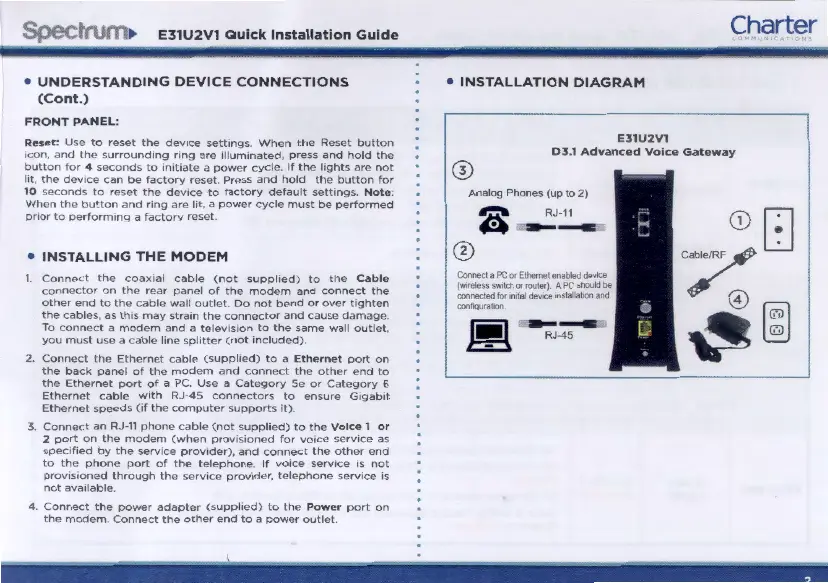
Reset :
Use
to
reset
the
device
sett1ngs
When
the
Reset
button
icon,
and
the
surrounding
nng
are
1llum•nated,
press
and
hold
the
button
for
o4
seconds
to
initiate
a
power
cycle.
If
the
ltghts
arc
not
l1t,
the
dov1ce
can
be
factory
reset.
Press
and
hold
the
button
for
10
seconds
to
reset
the
dcv•cc
to
factory
default
settings.
Not
e
When
the
bu~ton
and
nng
are
lit,
a
power
cycle
must
be
performed
pnor
to
oerform1nq
a
factory
reset
INSTALLING
THE
MODEM
Connect
the
coax1al
cable
(not
supplied)
to
the
Cable
connector
on
the
rear
panel
of
the
modem
and
connect
the
other
end
to
the
cable
wall
outlet.
Do
not
bend
or
over
tighten
the
cables, as th•s
may
stra1n
the
connector
and
cause
damage.
To
connect
e
modem
and
a
television
to
the
same
wall
outlet.
you
must
use
a
cable
hne
sphtter
(not
1
ncluded)
2.
Connect
the
Ethernet
cable
(supphcd)
to
a
Eth
er
n
et
port
on
the
back
panel
of
the
modem
and
connect
the
other
end
to
the
Ethernet
port
of
a PC.
Usc
a
Category
Sc
or
Category
6
Ethernet
cable
w1th
RJ-45
connectors
to
ensure
G1gab1t
Ethernet
speeds
(1f
the
computer
supports
It)
3
Connect
an
RJ-11
phone
cable
(not
supplied)
to
the
Voice
1
or
2
port
on
the
modem
(when
prov1s1oned
for
vo1ce
serv•ce
as
spec1hed
by
the
servtce
provtder),
and
connect
the
other
end
to
the
phone
port
of
the
telephone
If
vo•ce
scrvtce
1s
not
provtstoned
through
the
serv1ce
provtder,
telephone
service
is
not
ava1lable.
4
Connect
the
power
adapter
(supplied)
to
the
Power
port
on
the
modem
Connect
the
other
end
to
a
power
outlet
Charter
INSTALLATION
DIAGRAM
E31U2V1
~
03
.1
Advanced
Voice
Gateway
I
Analog Phones
(up
to
2)
RJ-11
-
CcMict
a
PC
or
Ehmlt
a'rlbllld dlw::e
l~twltdtor,...,)
APCihol.tdbl
oonnedld
b'
.-...
dew::e
nst~~~M~on
n
l
"il
----

Related product manuals