EasyManua.ls Logo

Chattanooga Group TX 4759 - User Manual

Chattanooga Group TX 4759
43 pages
Print Icon
To Next Page IconTo Next Page
Loading...
Moving
Rehabilitation
Forward
ISO 13485 CERTIFIED
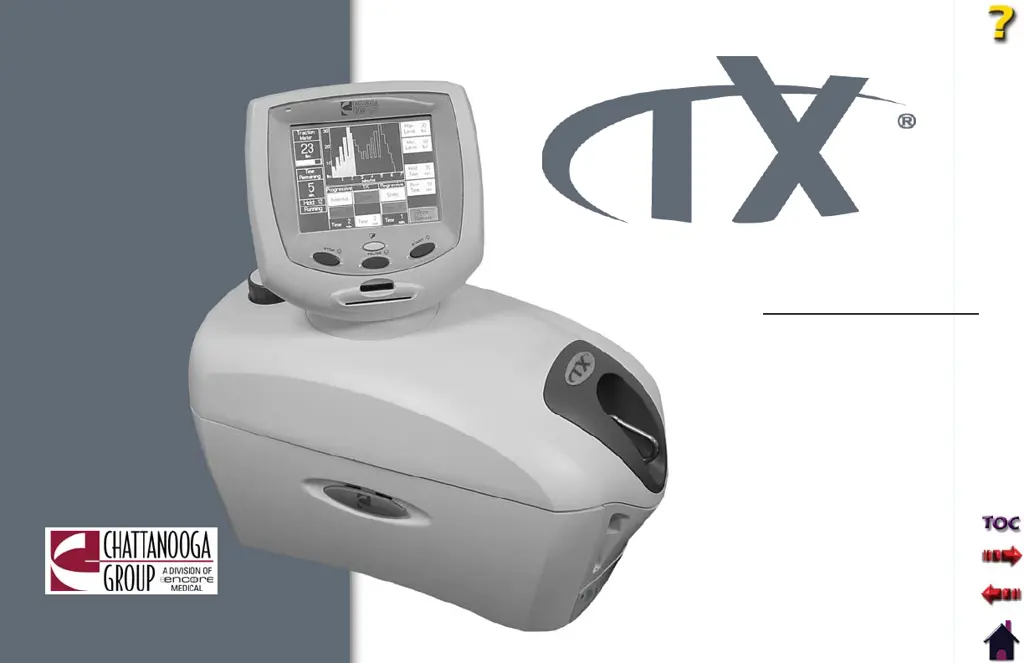
User Manual
Model 4759
TX® Traction Unit

Questions and Answers

  • R
    Randy BellAug 12, 2025
    What to do if nothing is displayed on the screen of my Chattanooga Group Medical Equipment?
    • S
      Shannon GordonAug 12, 2025
      If nothing appears on the screen, the unit might be in Screen Saver Mode. Try touching the screen or any button to reactivate the unit.
  • J
    Jeffrey CrossAug 15, 2025
    What to do if the Patient Interrupt Switch is not working on my Chattanooga Group TX 4759 Medical Equipment?
    • J
      James BrownAug 16, 2025
      If the Patient Interrupt Switch isn't working, check the following: * Ensure the Patient Interrupt Switch is correctly connected to the Patient Interrupt Switch Receptacle. * If a patient is attached, have them move towards the traction head to release tension. * Shake the Traction Cord while holding down the Rope Release button. * If the problem persists, turn the unit off and return it to Chattanooga Group for repair.
  • K
    Kenneth HamptonAug 19, 2025
    What to do if the LCD displays confusing wording on my Chattanooga Group Medical Equipment?
    • J
      James AndradeAug 19, 2025
      If nothing is displayed on the LCD, or the LCD displays confusing wording, the LCD contrast may need adjustment. Use the Adjustment knob on the back of the LCD Display to resolve this.
  • S
    Sandra JohnsonAug 23, 2025
    What to do if the Rope Release will not work on my Chattanooga Group Medical Equipment?
    • C
      Claudia BarrettAug 23, 2025
      If the Rope Release isn't working, release all tension on the Traction Cord.
  • R
    Rebekah HickmanAug 27, 2025
    What to do if I am unable to properly read Patient Data Card on my Chattanooga Group TX 4759?
    • R
      rileyjeanetteAug 27, 2025
      If you're unable to properly read a Patient Data Card: * Ensure you properly insert the Patient Data Card. * Try using a Patient Data Card that is known to be good. * If the problem continues, contact Chattanooga Group for service.
  • J
    Jessica LongAug 31, 2025
    What to do if Patient Data Card is full on my Chattanooga Group TX 4759 Medical Equipment?
    • C
      Chad RowlandAug 31, 2025
      If your Patient Data Card is full, you have a couple of options: * Purchase additional Patient Data Cards from an authorized Chattanooga Group dealer. * Save the data to the Patient Data Management System (PDMS).
  • M
    Michael GreenSep 4, 2025
    What to do if I pressed START, but has not yet set the Max Level value to a value greater than zero on my Chattanooga Group TX 4759 Medical Equipment?
    • K
      Kaylee TorresSep 4, 2025
      If you've pressed START without setting the Max Level value above zero, complete the Treatment Setup before pressing Start.
  • M
    Maria MilesSep 8, 2025
    What to do if I pressed HOME button from treatment review screen while a treatment was running on my Chattanooga Group Medical Equipment?
    • D
      Darlene RodriguezSep 8, 2025
      If you pressed the HOME button from the treatment review screen while a treatment was running, press Stop To End Treatment before pressing Home.

Summary

ABOUT TRACTION THERAPY

General Cautions

Lists essential safety precautions for operating, transporting, and storing the unit to prevent damage, malfunction, or injury.

Safety Precautions and Warnings

Details critical safety guidelines, warnings, and prohibited uses, emphasizing supervision and proper connections for safe operation.

Danger Warnings

Highlights severe hazards and immediate risks, including incorrect voltage connection and cord damage, requiring immediate cessation of use.

SETUP

Initial Unit Setup and Configuration

Guides initial unit setup: setting clinic name, volume, units of measure, and date/time for proper operation and personalization.

Initial Unit Setup Continued

Covers resetting unit defaults, selecting the display language, and restoring factory settings for user protocols on the TX unit.

OPERATION

Patient Preparation for Traction Therapy

Outlines essential steps and precautions for preparing a patient, including attaching the interrupt switch and powering on the unit.

Patient Preparation Continued

Continues patient preparation: positioning on table, fitting harness, managing slack, and pulling traction cord for therapy setup.

Adjusting Traction During Treatment

Explains how to start, pause, stop, and manage traction adjustments during a patient session, including power loss scenarios.

Saving Treatment to Patient Data Card

Explains saving patient therapy data, including pain profiles, to a data card and setting up new patient data card entries.

TROUBLESHOOTING

General Troubleshooting and Error Codes

Provides common problems, possible remedies, and an overview of error code categories (1xx, 2xx, 3xx) for unit issues.

Troubleshooting Error Messages

Details specific error codes, definitions, probable causes, and possible solutions for unit malfunctions and warning messages.

Critical Error Warnings

Advises immediate action for errors/warnings starting with 2 or 3, indicating internal problems, potential injury, or extensive unit damage.

MAINTENANCE

WARRANTY

Chattanooga Group TX 4759 Specifications

General IconGeneral
BrandChattanooga Group
ModelTX 4759
CategoryMedical Equipment
LanguageEnglish

Related product manuals