22
Fluidotherapy® - Dry Heat Therapy
SETUP
PREFERENCE MODE DEFAULT PARAMETERS (CONTINUED)
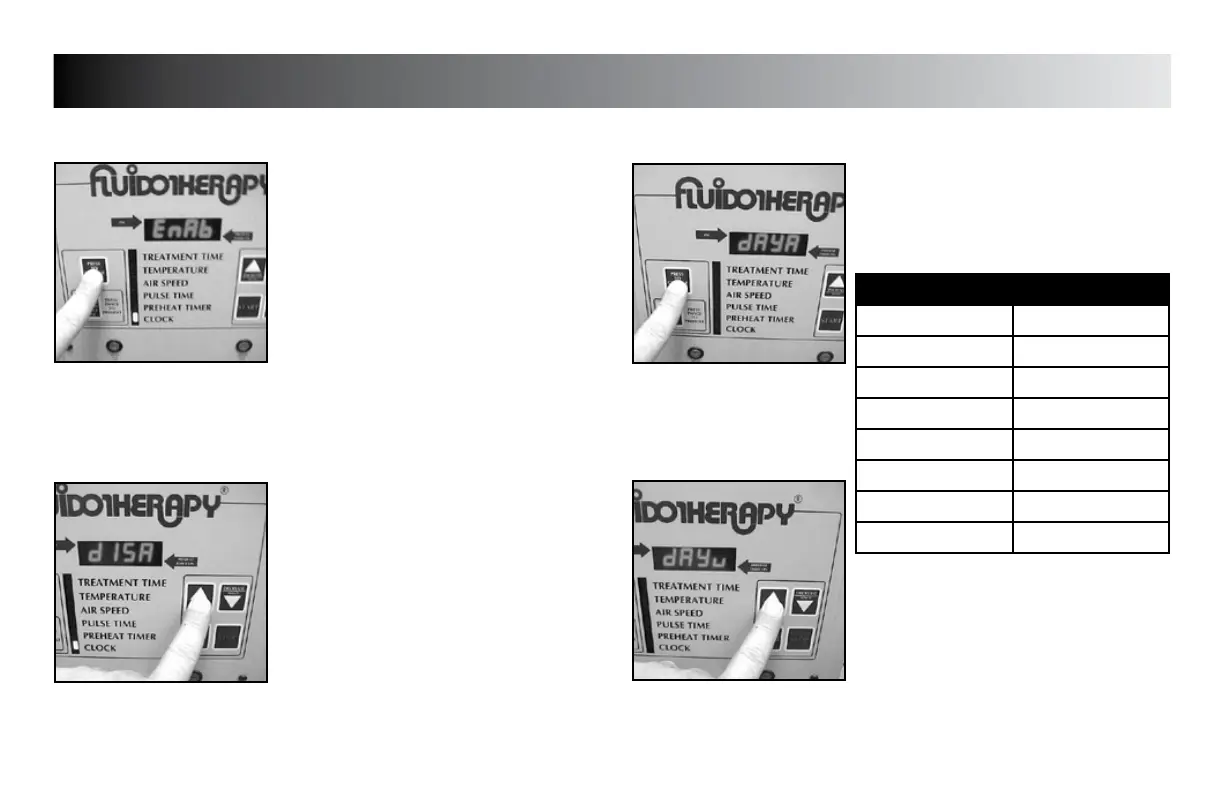
CLOCK (Enable/Disable)
Press the “PRESS TO CHANGE MODE”
button until the indicator light is flashing
beside “CLOCK”.
“EnAb” (enable) or “dISA” (disable)
will display.
Press the “INCREASE” button to set unit to
display “EnAb” or “dISA” as desired.
Press the “PRESS TO CHANGE MODE”
button to save the new setting.
NOTE:
If Clock is disabled, the “PREHEAT TIMER”
will automatically be disabled.
Press the “INCREASE” or “DECREASE” button
to set unit to display the desired day code.
Press the “PRESS TO CHANGE MODE” button
to save the new setting.
SETTING DAY OF WEEK
Press the “PRESS TO CHANGE MODE”
button until “dAy__” (__= day code) is
displayed.
DAY CODE CHART
WEEKDAY DAY CODE
Sunday dAyu
Monday dAyn
Tuesday dAyE
Wednesday dAyd
Thursday dAyr
Friday dAyF
Saturday dAyA








 To Next Page