EN
| Intelect
®
Legend 2 - Service Manual DOMESTIC 36
REPAIR OPERATION
7.4. TOP SUB ASSEMBLY
ESD equipment is required to open the device
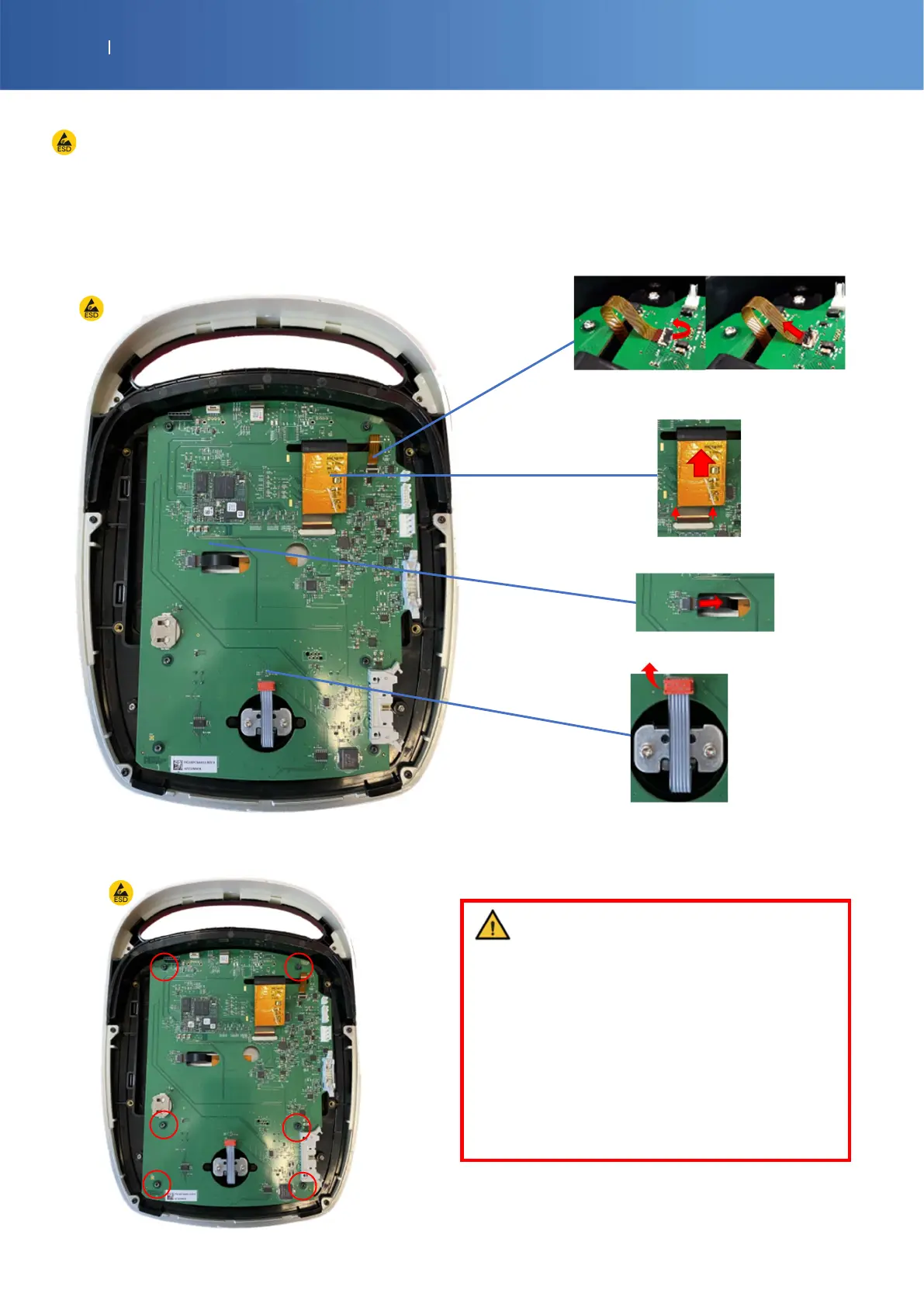
CONTROL BOARD
SP-G16-0011 IL2 CONTROL PCBA
14-1043-SP M3X8 TORX SCREW x 5
1) To remove the control board, disconnect all
ribbon cables.
Back light: Open the connector before disconnecting the
ribbon cable horizontally.
LCD: Open the connector (booth side in the same time)
before disconnecting the ribbon cable horizontally
Touch screen: Pull the ribbon cable horizontally.
Knob: Pull the connector vertically
2) Unscrew these 6 screws (Torx T10)
If you need to change the control board,
you must have the Serial and the model of
the device.
You need this info to program correctly each
new control board.
(Enovis repair center only)
Please check the procedure 2000.1395















 To Next Page