EasyManua.ls Logo

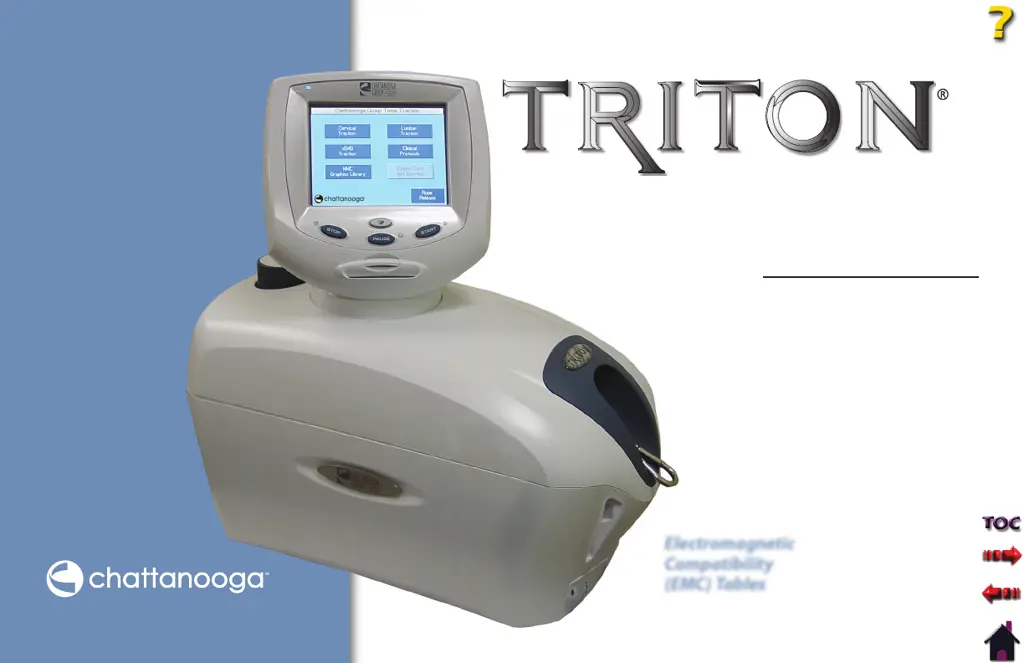
Chattanooga Triton 4749 - User Manual

Chattanooga Triton 4749
60 pages
Print Icon
To Next Page IconTo Next Page
Loading...
Moving
Rehabilitation
Forward™
User Manual
Model 4749 - Triton® Traction Unit
Model 4798 - Triton® DTS Traction Unit
Electromagnetic
Compatibility
(EMC) Tables
ISO 13485 Certified

Questions and Answers

  • M
    mcdanielvanessaAug 1, 2025
    What to do if the Rope Release on my Chattanooga Medical Equipment will not work?
    • N
      Nicholas ArnoldAug 1, 2025
      If the Rope Release on your Chattanooga Medical Equipment isn't working, first release all tension on the Traction Cord. If there is more than 2kg (5 lbs or 19N) of tension, the Rope Release button is disabled. If the patient is attached, have them move towards the traction head to release tension. You can also try shaking the Traction Cord while holding down the Rope Release button. If none of these steps work, turn the unit off and return it to DJO LLC for repair.
  • N
    Nancy WilliamsAug 5, 2025
    How to fix a Chattanooga Triton 4749 Medical Equipment that won't turn on?
    • J
      Joseph MartinAug 5, 2025
      If your Chattanooga Medical Equipment doesn't power on even when the switch is in the 'ON' position, verify that the Mains Power Cord is properly connected to the power supply outlet. If the problem persists, contact your dealer or DJO, LLC for service.
  • K
    Kristie WatkinsAug 10, 2025
    What to do if my Chattanooga Triton 4749 Medical Equipment is unable to read the Patient Data Card?
    • S
      Shannon WadeAug 10, 2025
      If your Chattanooga Medical Equipment is unable to properly read the Patient Data Card, make sure that you properly insert a Patient Data Card. Try using a known good Patient Data Card. If the problem continues, contact your dealer or DJO, LLC for service.
  • K
    Kristen LevineAug 13, 2025
    Why is my Chattanooga Triton 4749 Medical Equipment LCD display blank or showing confusing wording?
    • M
      mitchellleonAug 14, 2025
      If the LED Indicator (Power On/Off) light is on but the LCD screen on your Chattanooga Medical Equipment is blank or shows confusing wording, check that the voltage from the power supply of the electrical outlet matches what's listed on your Voltage Rating and Serial Number Plate.
  • Y
    yrossAug 18, 2025
    How to fix a Patient Interrupt Switch that is not working on Chattanooga Triton 4749 Medical Equipment?
    • J
      Jermaine ManningAug 18, 2025
      If the Patient Interrupt Switch on your Chattanooga Medical Equipment is not working, make sure it is properly connected to the Patient Interrupt Switch Receptacle.
  • K
    kimberly26Aug 22, 2025
    What to do if the LED Indicator is blinking on my Chattanooga Triton 4749 Medical Equipment?
    • P
      pjohnsonAug 22, 2025
      If the LED Indicator (Power On/Off) on your Chattanooga Medical Equipment is blinking and nothing is displayed on the screen, the unit might be in Screen Saver Mode. Touch the screen or any button to reactivate the unit.
  • D
    Daniel YatesAug 27, 2025
    Where to buy additional Patient Data Cards for my Chattanooga Triton 4749?
    • W
      William HenryAug 27, 2025
      If the Patient Data Card for your Chattanooga Medical Equipment is full, purchase additional Patient Data Cards from an authorized DJO, LLC dealer.

Summary

About Traction Therapy

Precautionary Instructions

Explains safety symbols (Caution, Warning, Danger) and their definitions for potential hazards.

Setup

Initial Unit Setup

Guides the user through the initial setup of the unit, including clinic name, volume, and units.

Operation

Patient Preparation

Outlines the steps for preparing a patient for traction therapy.

Operating Controls - Home Screen

Describes the functions of the Home Screen buttons and interface.

Operating Controls - Treatment Screen

Details the controls and display elements of the treatment screen.

sEMG Traction Treatment

Explains how to prepare for and administer sEMG-triggered traction therapy.

Starting, Pausing and Stopping Treatment

Details the procedures for initiating, pausing, and terminating a traction treatment.

Troubleshooting

Common Problems and Remedies

Lists common operational problems and their possible solutions.

Error Messages

Details error codes, definitions, probable causes, and possible remedies.

Maintenance

Service

Details procedures for obtaining service and warranty repair for the unit.

Warranty

Product Warranty Coverage

Explains the two-year warranty for the product and 180-day warranty for accessories.

Chattanooga Triton 4749 Specifications

General IconGeneral
BrandChattanooga
ModelTriton 4749
CategoryMedical Equipment
LanguageEnglish

Related product manuals