iGage X9x User Manual page 25 of 53
Provisioning GSM SIM Card in Data Collector
A network connection is required to use an X9x receiver in an RTK Network. You can use many methods to connect a rover to the
network:
MiFi Wireless Hotspot
cell phone Hotspot
GSM SIM card directly the head
CDMA modem in the data collector
GSM SIM card in the data collector
This section describes the last method: “GSM SIM card in the data collector.”
If you choose to install the SIM card in the data collector, you will need to do a one-time provisioning to get the data collector ‘on
the internet.’
Step-by-step instructions follow.
1. Procure an activated GSM SIM card.
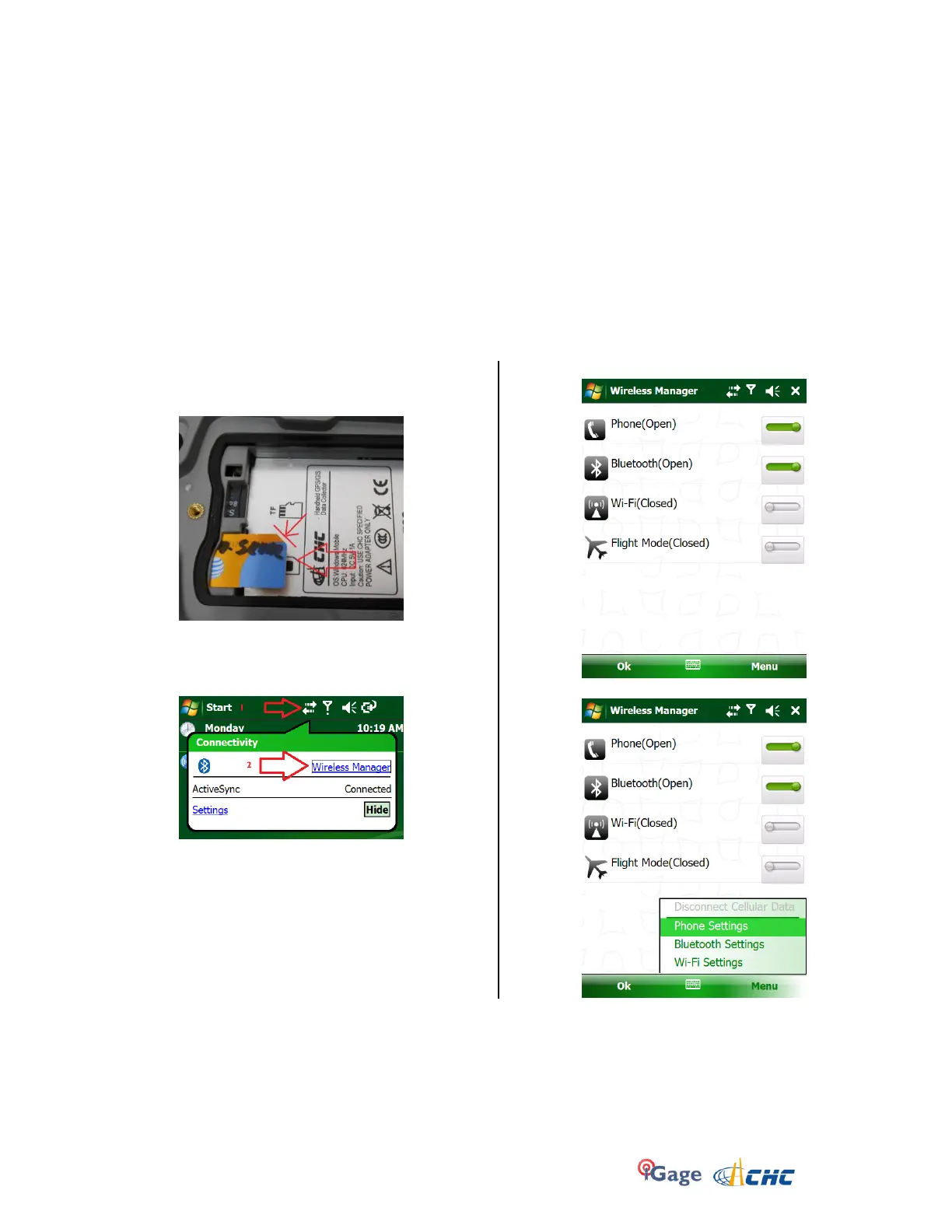
2. Turn off the data collector, remove the battery and
insert your SIM card:
Note the gold contacts are down and the clipped
edge goes in last on the LT30. Other data
collectors may have a different card orientation.
3. Click on the ‘Connections’ icon (1):
then on the ‘Wireless Manager’ link (2).
4. Make sure the Phone is enabled (On or Open):
5. Click on ‘Menu’, then ‘Phone Settings’:


 To Next Page