iGage X9x User Manual page 21 of 53
Configuring a UHF Rover
1. Attach the head to a range-pole, attach the data
collector to the pole.
2. Turn on the head, then turn on the data collector.
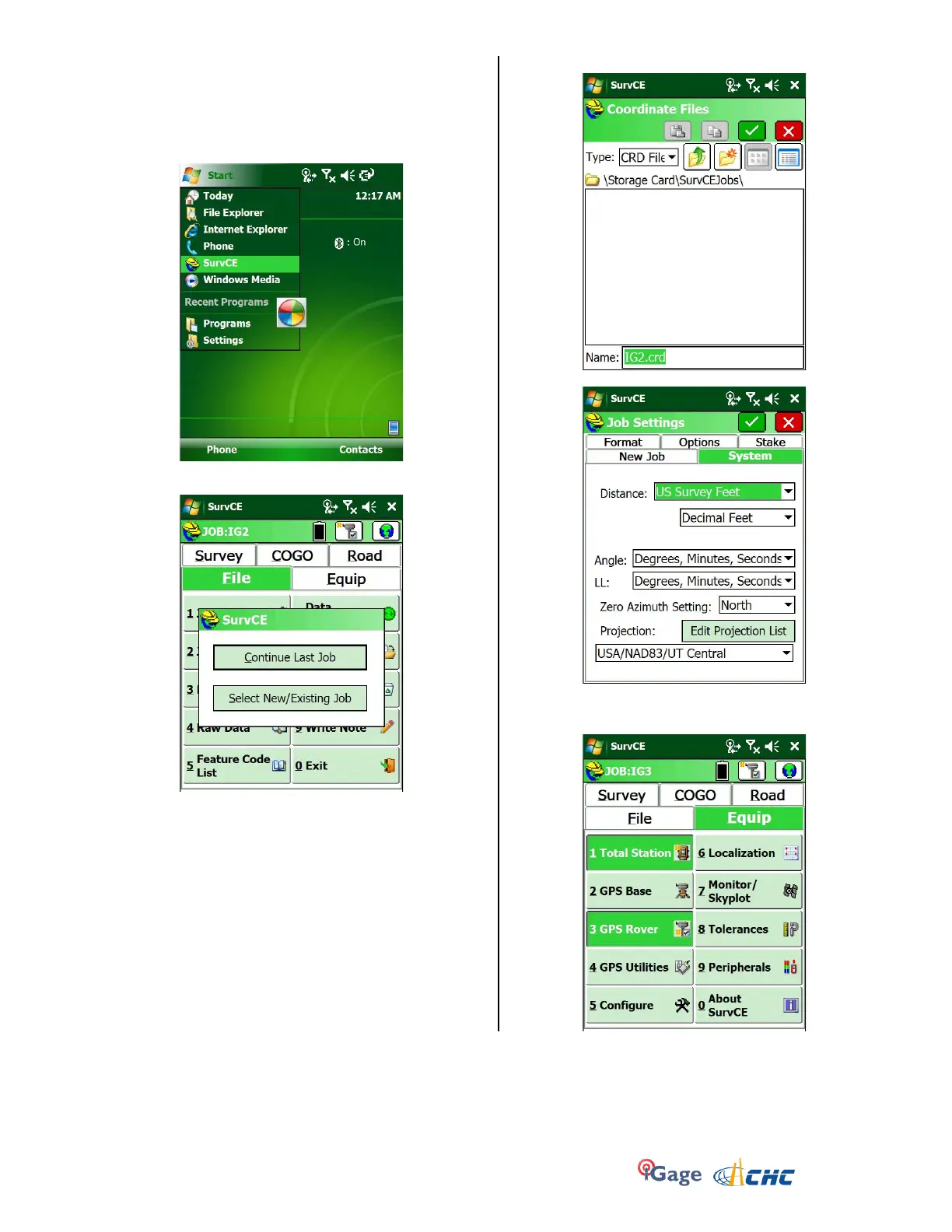
3. From the main screen on the data collector:
click on ‘Start’, then SuvCE.
4. After a moment, click on “Select New/Existing Job”
5. Navigate to the Storage Card and make a folder (or
select an existing folder) to hold your job.
HINT: If you keep your job on the Storage Card
(SD) you may be able to mount the GPS as a Disk
Drive and avoid using Windows Mobile Device
Center.
6. Enter a job name and click the green check mark.
7. Choose an appropriate projection and distance
units. Then click the green check mark at the top,
next click on the Equip tab:


 To Next Page