iGage X9x User Manual page 29 of 53
Connect to Every Wi-Fi Access Point, NOT!
One of the annoying features of Windows CE is the automatic suggestion that you connect to Wi-Fi hotspots.
Even if you are connected to your own Wi-Fi hotspot, the data collector by default will continuously suggest that you
connect to new ones as you pass them.
Not only is it annoying, but it can sometimes interfere with a network correction source.
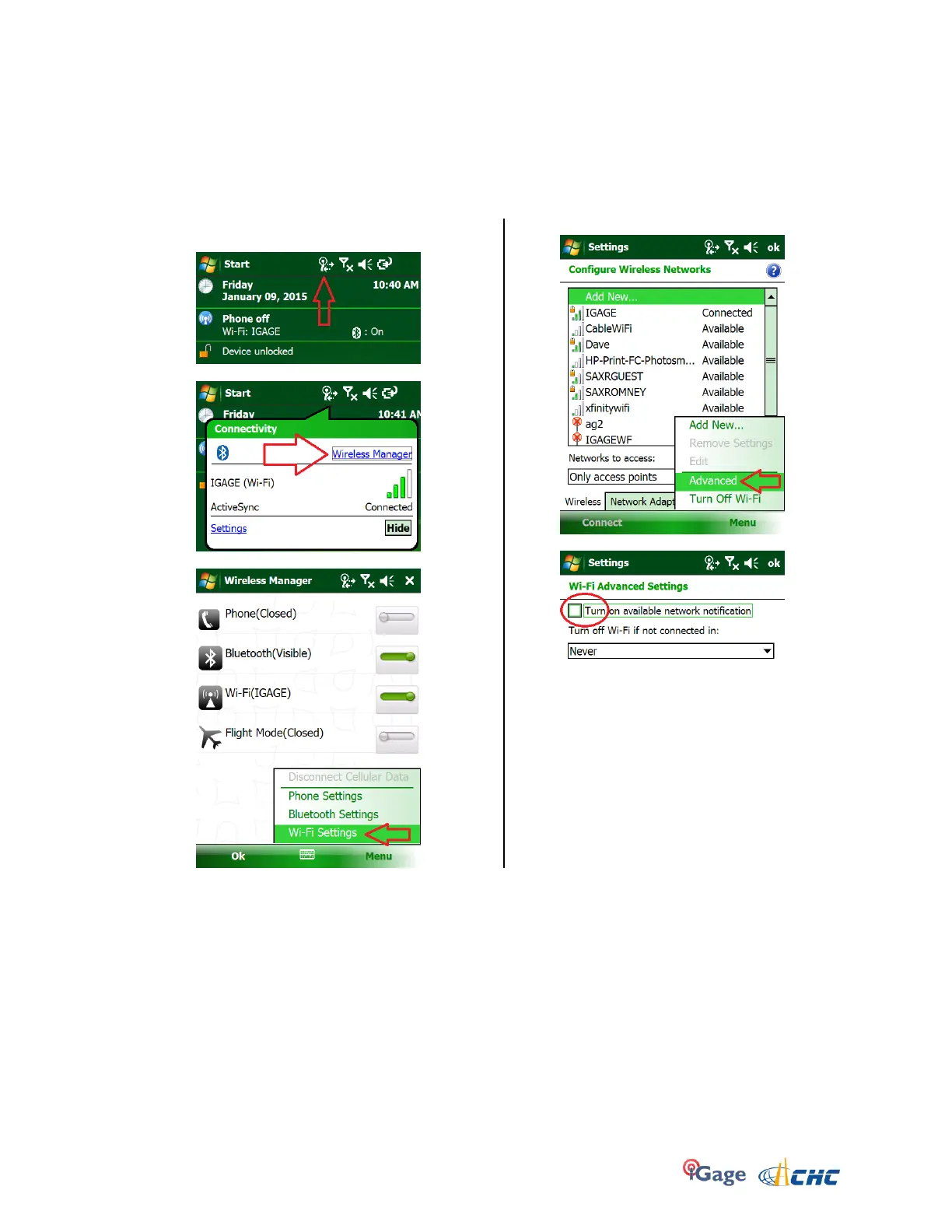
Luckily there is a simple solution:
1. From the main screen, click on the ‘Wireless
Manger’ icon on the top line:
2. Next click on the “Wireless Manager” link:
3. Click on Menu: Wi-Fi Settings:
4. Click on “Menu, Advanced”:
5. Uncheck the ‘Tuyrn on available…’ option:
6. Click OK


 To Next Page