Using the Internal GSM Modem in a X91+ or X900+ Receiver
When using the X91+ or X900+ receiver with an NTRIP network, you can make a connection to the internet:
1. Using a MiFi Hotspot (or your cellphone Hotspot) connected by WiFi to the data collector.
2. By placing a GSM SIM Card in your data collector (described earlier in this document in “Provisioning SIM Card in LT30”)
3. By placing a GSM SIM Card in the receiver head
This chapter shows how to implement the third method.
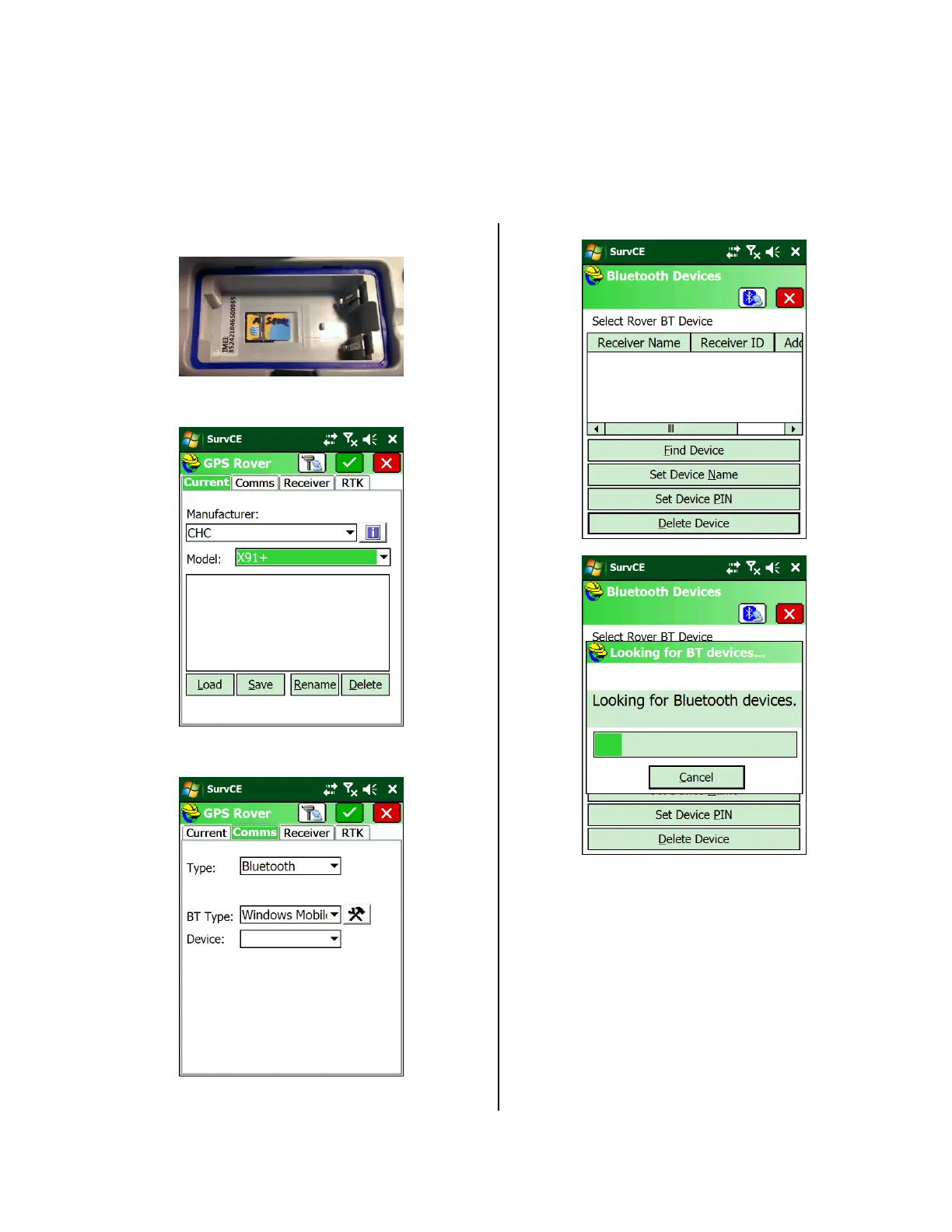
1. Remove the battery from the GPS receiver and
install an activated SIM card:
2. Replace battery and turn on head.
3. From the main SurvCE menu, select ‘Equip: GPS
Rover’:
Set the Manufacturer to ‘CHC’ and set the Model
to match your receiver (X91+ or X900+).
4. On the Comms tab:
Click on the ‘Configuration (hammer/wrench)’
button.
5. If the GPS receiver is not already listed:
Click on ‘Find Device’:
Highlight the correct device:


 To Next Page