iGage X9x User Manual page 37 of 53
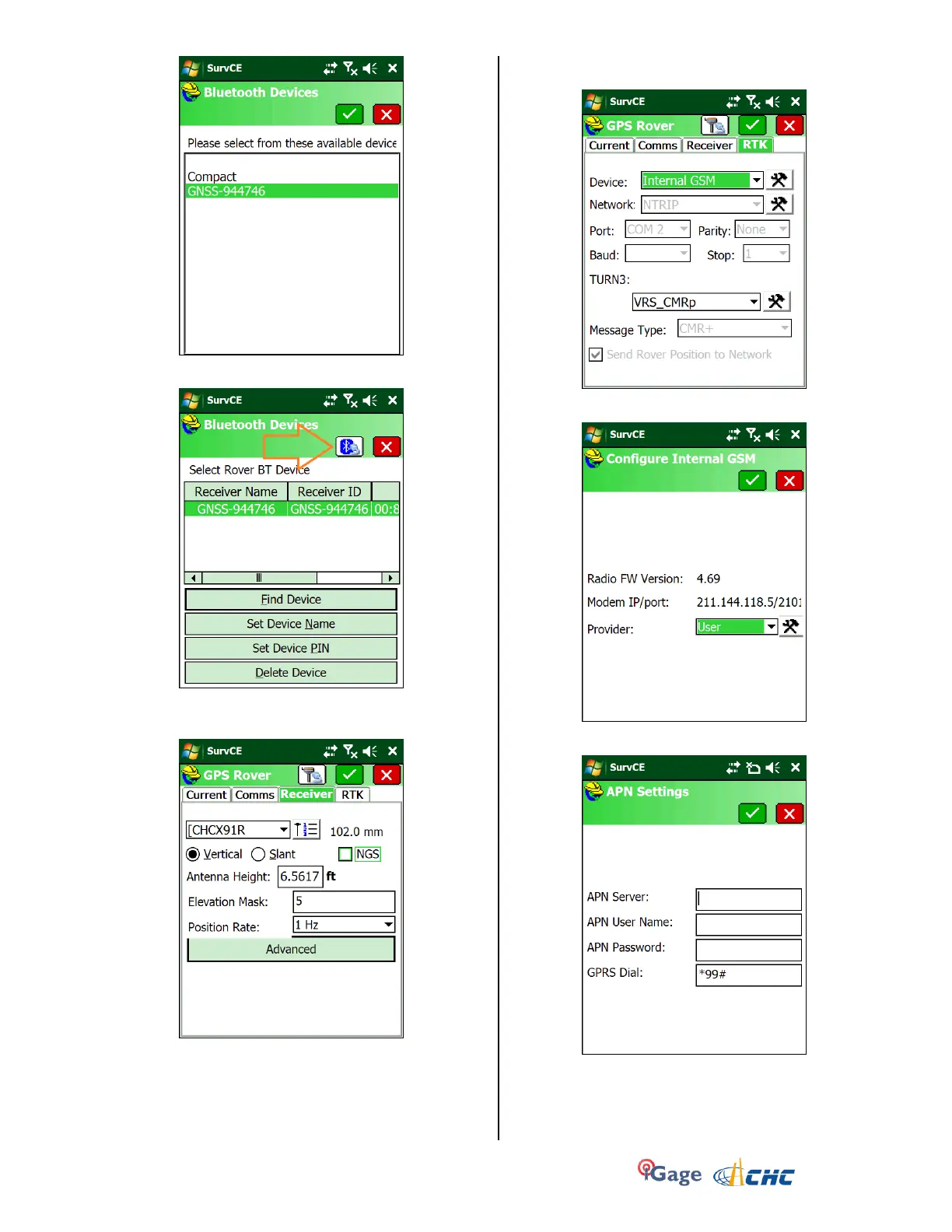
Click on the green check mark.
6. With the proper device highlighted in the grid:
click the ‘Bluetooth Connect’ button (see orange
arrow above).
7. Click on the ‘Receiver’ tab:
Configure reasonable values for antenna height
(HI) and mask angle.
8. Click on the ‘RTK’ tab, set the Device to ‘Internal
GSM’:
9. Click on the ‘Hammer/Wrench’ to the right of the
Device:
10. Select Provider = ‘User’ and click on the
‘Hammer/Wrench’ to the right of the Provider:
For our (Salt Lake City) ATT Wireless market, these
settings work perfectly and it is suggested that you
use them if possible.
11. Click on the green check mark to return to the
main ‘Configure Internal GSM’ screen, then the


 To Next Page