iGage X9x User Manual page 42 of 53
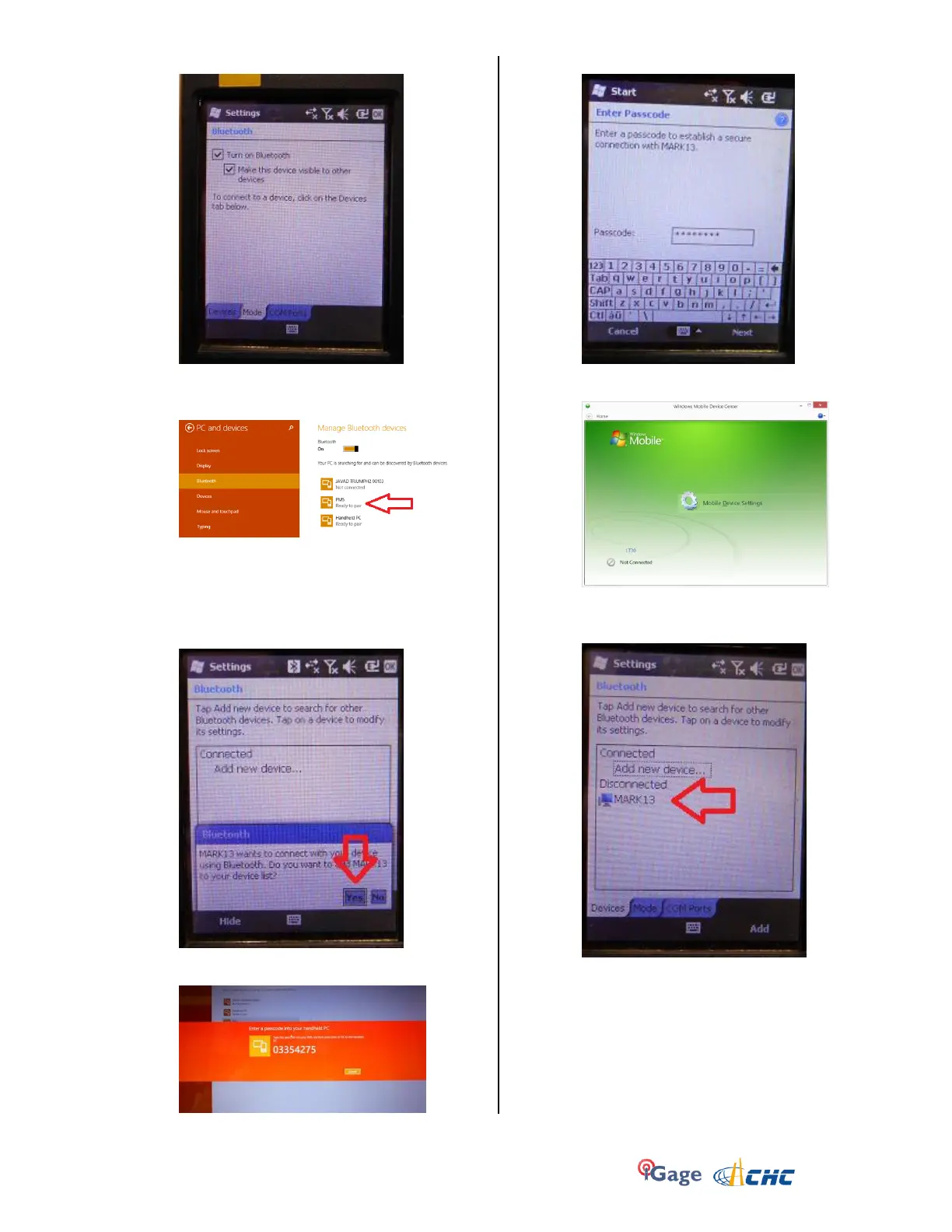
5. Click on the ‘Mode’ tab:
Then check the ‘Make the device visible to other
devices’.
6. Back on your PC:
You should be able to see the PM5 device, shown
as ‘Ready to pair’. (Wait 20 seconds if needed.)
Click on the PM5 device, and then click on the
‘Pair’ button.
7. On the mobile device, you will be prompted to
pair:
Click on ‘Yes’.
8. Your PC will display a secret passcode:
9. Quickly enter this number on your mobile device:
and then click ‘Next’.
10. Start Windows Mobile Device Center
You will be ‘Not Connected’.
11. On the mobile device, navigate to the Bluetooth
Settings dialog:
Click-and-hold on your computer name (mine’s
name is MARK13)
12. A pop-up dialog will be shown:


 To Next Page