Introduction
CHCNAV NX510 PRO USER MANUAL | 2021-08 P a g e | 6
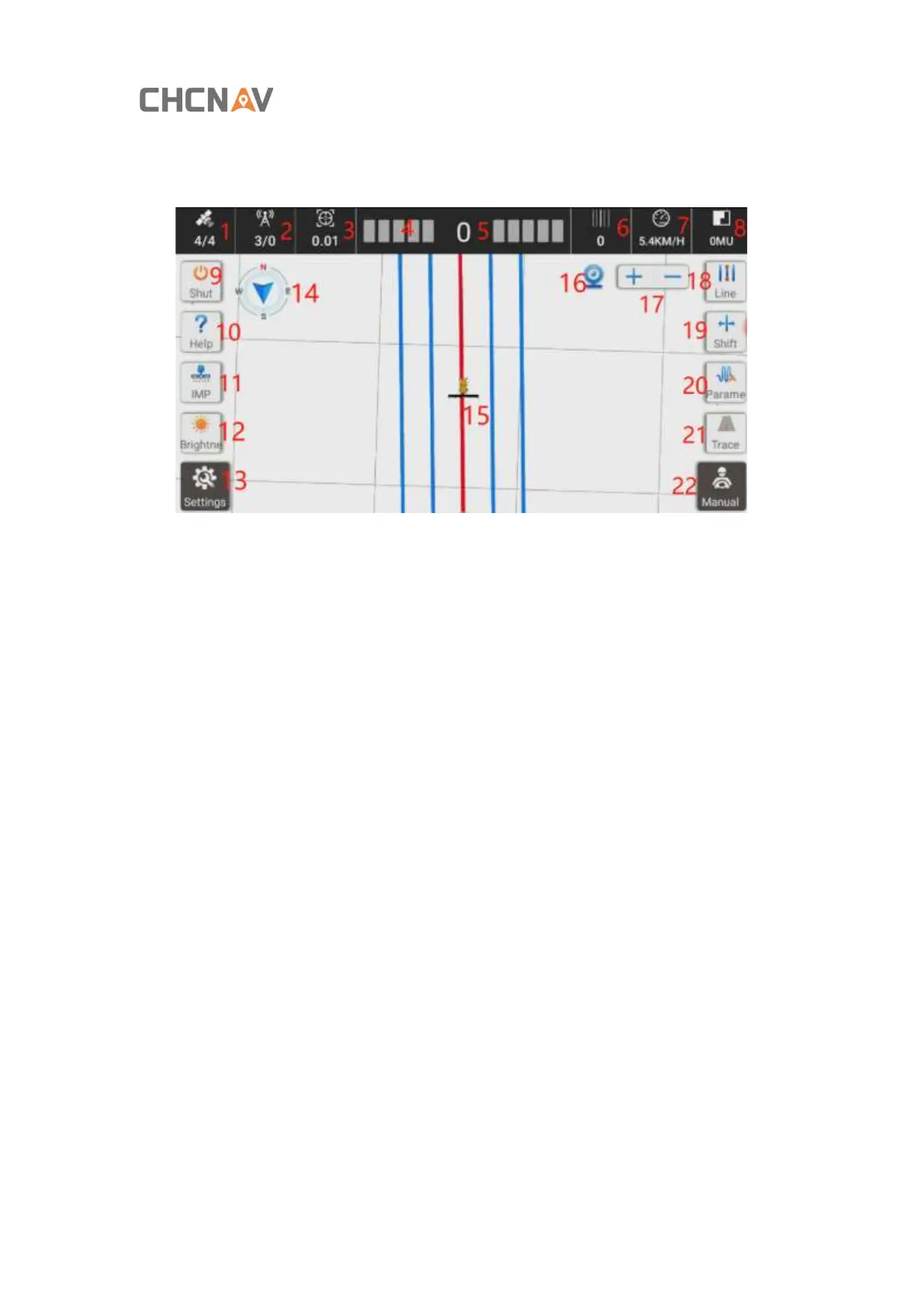
1.2. Software interface
1. Satellite information: There are two numbers, displayed in the form of X / Y. X
represents the number of tracked satellites, and Y represents the number of used
satellites, and Y= 4 refers to RTK fixed.
2. The status of the base station: There are two numbers, displayed in the form of X / Y. X
represents the signal latency. If you are using the radio mode, Y is the current number of
channels. If you are using network mode, Y will change to “NET”;
3. Positioning accuracy;
4. Horizontal deviation display bar (the default is 1cm per grid, adjustable);
5. Lateral deviation, the tractor is negative on the left side of the navigation line and
positive on the right side of the line;
6. The current number of lines where the tractor is located (the original line is 0);
7. Real-time speed;
8. Operating area (default unit is mu, adjustable);
9. Shut down button;
10. Help, including one-click help, alignment guidance, center offset guidance, plow width
guidance;



 To Next Page