EasyManua.ls Logo

Check Point Power-1 - Front Panel Overview

Check Point Power-1
31 pages
Print Icon
To Next Page IconTo Next Page
To Previous Page IconTo Previous Page
Loading...
Front Panel Components
Power-1 Hardware Page 16
Front Panel Components
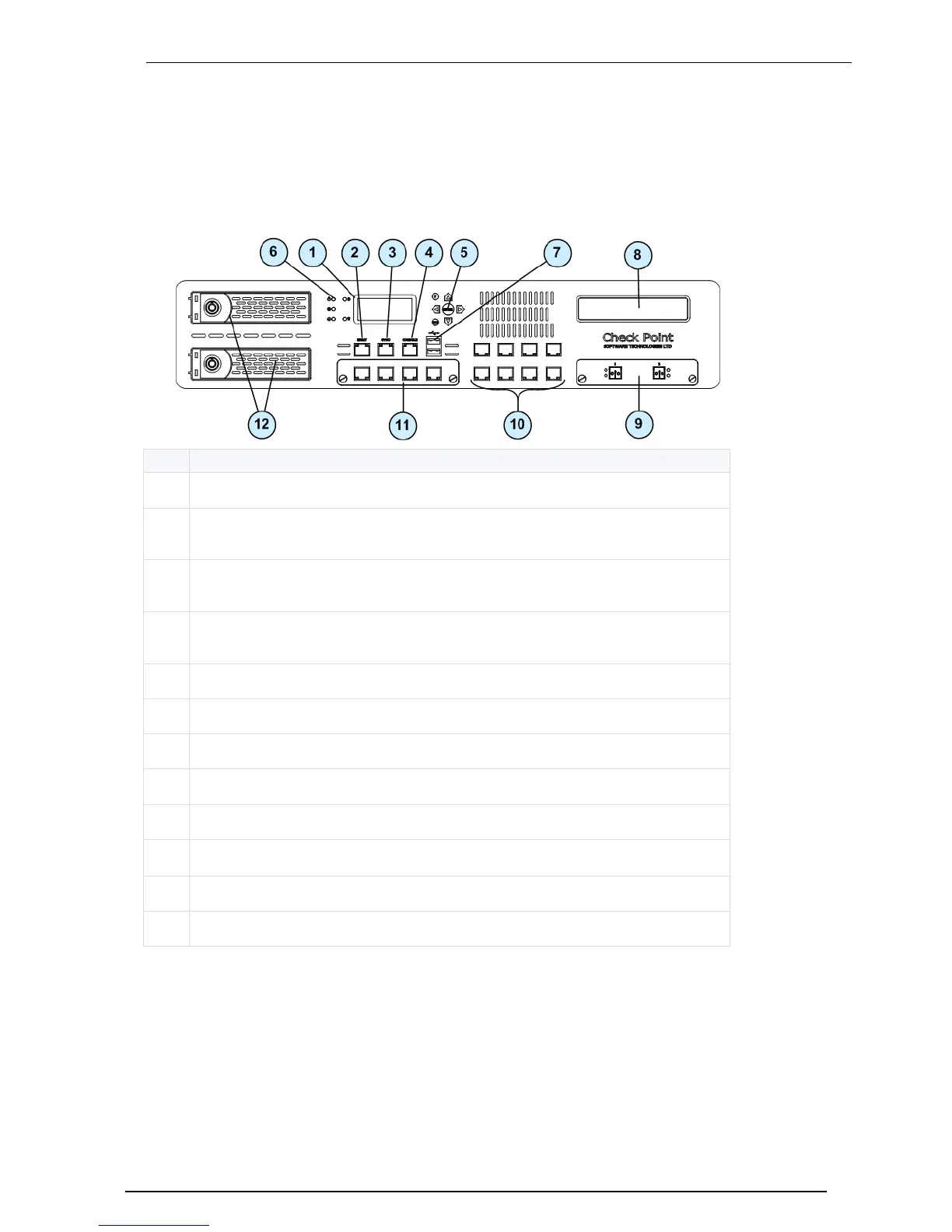
This section describes the features and components located on the appliance front panel.
Power-1 11000 Series Front Panel
Key
Description
1
LCD display screen
2
Management connection port - Ethernet connection to a remote management
workstation
3
Synchronization port - for synchronizing with cluster members or a high
availability peer
4
Console port - for a serial connection to the appliance using a terminal emulation
program such as HyperTerminal
5
Keypad
6
Power indicator LED
7
USB ports
8
Future expansion slot
9
Expansion line card exp1 (2 or 4 ports)
10
Built in Ethernet ports (Lan1 - Lan8)
11
Expansion line card exp2 (2 or 4 ports)
12
Hard disk drive

Related product manuals