English - 6
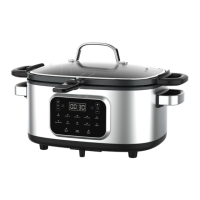
USING YOUR MULTI-COOKER
NOTE: Cooking time and temperature can be adjusted before cooking is complete by
pressing + or - associated with the time and/or by pressing + or - associated with the
temperature. See the table below for the default cooking time in each cooking mode.
COOKING MODES
Slow Cooking/Stew:
1. Place food directly on the cooking pot.
2. Press the Slow Cook or Stew function. The LED light will flash and the default time and
temperature will appear on the screen.
3. To set the desired cooking time, press the + or - . The time can be set for up to 12 hours.
4. To set the desired cooking temperature, press the + or - . The temperature can be adjusted
between 185°F and 205°F for Slow cook or 195°F and 215°F for Stew.
5. Press START/CANCEL to begin cooking. When “ON”, the preset light will be lit with a solid
light.
6. Once cooking is complete, the unit will beep before switching to keep warm automatically.
Steaming:
1. Fill the cooking pot with water up to the MIN line.
2. Place food directly on the steam rack in a single layer and place the rack in the cooking pot,
then place the lid on the pot.
3. Press the Steam function. The LED light will flash and the default time and temperature
will appear on the screen.
4. To set the desired cooking time, press the + or - associated with the time. The time can be
set for up to 1 hour.
5. The temperature can not be adjusted when using the steam function. The cooking
countdown will begin.
6. Press START/CANCEL to begin cooking. The selected preset button will flash to indicate it
1. Plug the power cord into wall outlet. The multi-cooker will beep 3 times.
2. Press the desired presets. The LED light will flash ON and the default time will appear on
the screen. The START/CANCEL light will flash.
3. To set the desired preset time, press the + or - . The time can be set for up to 12hrs.
4. To set the desired cooking temperature, press the + or - . The temperature can be
adjusted between 105°F to 435°F, depending on the preset you selected.
5. Press START/CANCEL to begin cooking. When ON, the preset light be lit with a solid light.
6. You can press time + or - to adjust cooking time and press temperature + or - to adjust
cooking temperature before complete preset.
7. To turn off the unit at any time during cooking, press START/CANCEL button again.


 To Next Page