7
7
Name & Function of Each Part
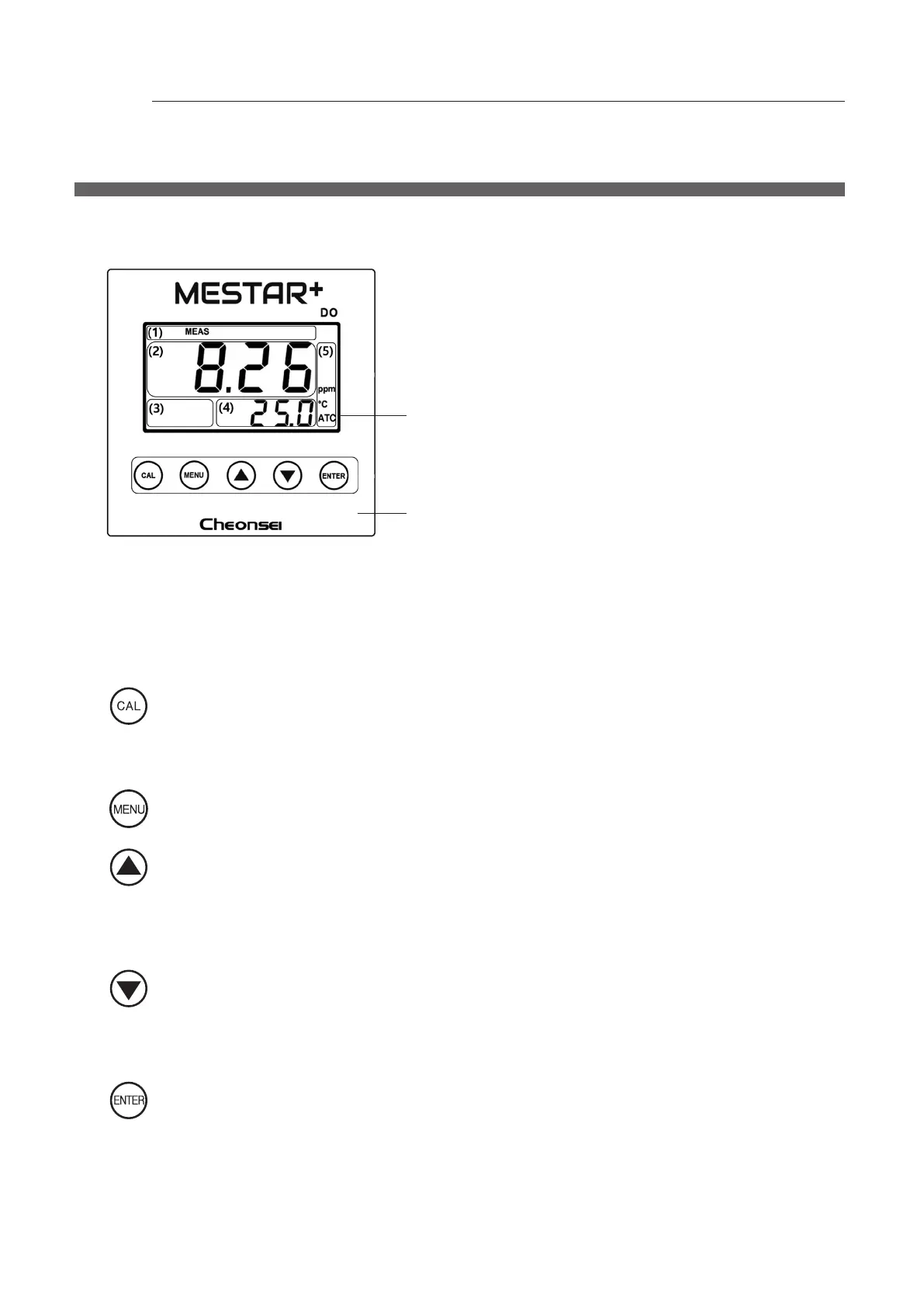
7-1 Front
Display : 3” LCD Segment
①
Status
•
SETUP : Display in setup mode
•
MEAS : Display in measurement mode
•
CAL : Display in calibration mode
•
ZERO : Display in ZERO calibration
•
SPAN : Display in SPAN calibration
②
Main display : Measured valve or setting
screen is displyed according to
Mode
③
Alarm
•
HOLD : Display in setting of measurement
value xed
•
HIGH : Display in HIGH alarm
•
LOW : Display in LOW alarm
④
Sub Display : Display temp. or display setting value when enter in setting mode or calibration
mode
⑤
Unit : Display the unit which is set
Key
: Enter Calibration Mode, if press the button for 5 seconds in Measuring Mode.
Exit the Calibration Mode, if press the button in Calibration Mode.
(Can not enter Calibration Mode when Setting Mode, displaying Error, & Setting to hold the
measured value)
: Enter the Setting Mode, if press the button in Measuring Mode.
Return to previous Mode, if press the button in Setting Mode.
: Menu is changed or Setting Value is increased, if press the button in Setting Mode or Calibration
Mode.
Setting value is fast increased, if press the button continuously.
High Alarm Setting Value is displayed for 3 seconds, if press the button for 3 seconds in
Measuring Mode.
: Menu is changed or Setting Value is decreased, if press the button in Setting Mode or Calibration
Mode.
Setting value is fast decreased, if press the button continuously.
Low Alarm Setting Value is displayed for 3 seconds, if press the button for 3 seconds in
Measuring Mode.
: Save the setting value in Setting Mode or Calibration Mode.
The buzzer will sound and all setting values will be initialized, if press the button for 5 seconds in
Measuring Mode.
(Unable to initialize when Setting Mode, Calibration Mode, & displaying Error)
※
When initialization, all calibration values and setting values will be changed to the initial setting
values before delivery from factory.



 To Next Page