10
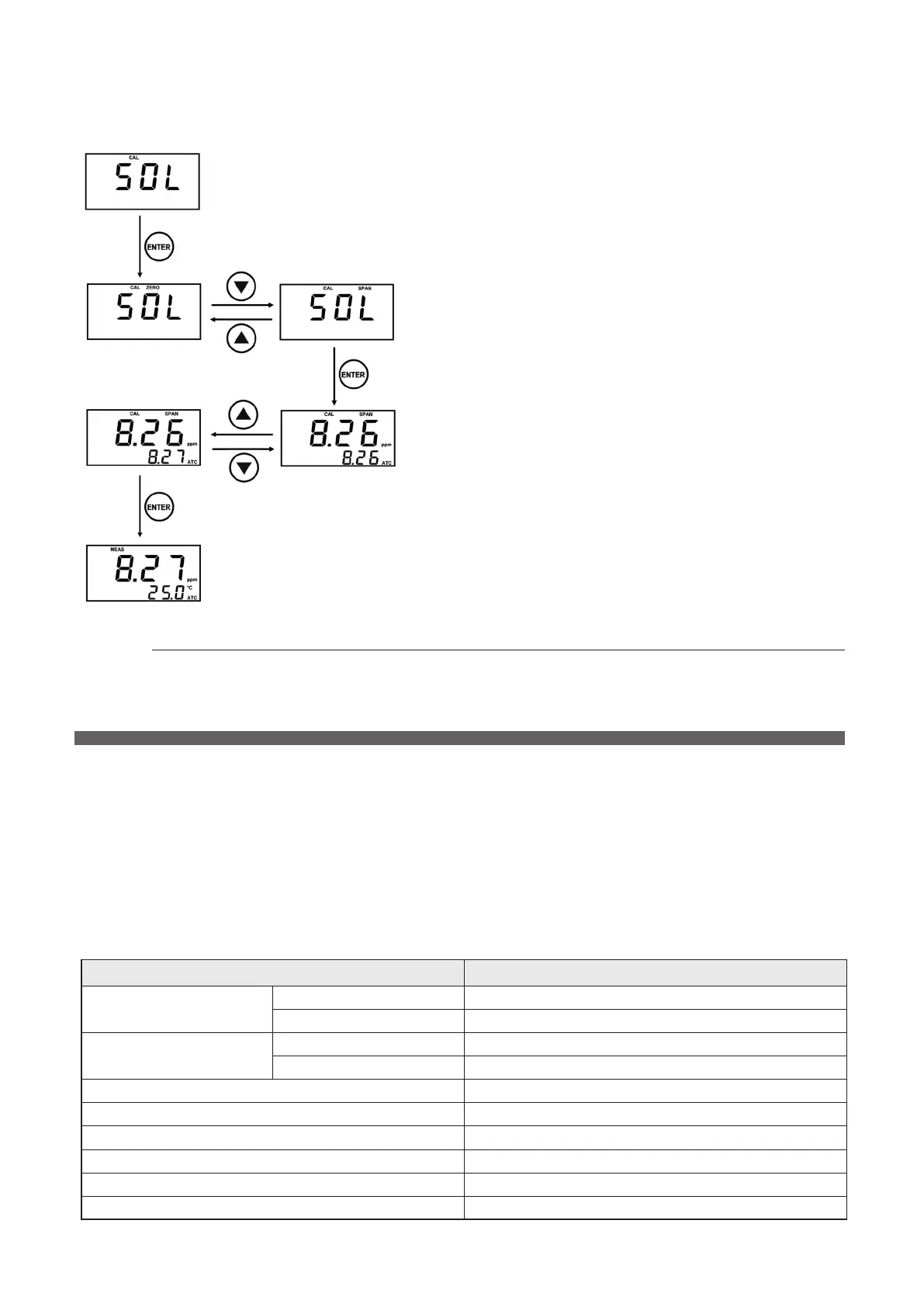
8-5 Saturated Water(Span) Calibration
Clean the electrode with distilled water.
Immerse the electrode in saturated water.
In the Measuring Mode, press the CAL key for 5
seconds to enter the Calibration Mode.
The Calibration mode appears on the main screen (AIR:
air, SOL: solution)
You can change the Calibration menu by using the
▲
and
▼
keys.
Select SOL.
The status window displays zero (0).
You can change Zero, Span calibration mode by using
the
▲
and
▼
keys.
After check SPAN in the status window, press Enter
key.
The main screen displays the current DO concentration.
The secondary screen exhibits the Span concentration
to be calibrated.
You can change calibration concentration by using the
▲
and
▼
keys.
When the controller’s concentration stays stabilized,
align it with the Span concentration to be calibrated and
then press the Enter key to save the current value.
The screen returns to the Measurement mode
automatically when the calibration is completed.
9-1 Menu setting
You can enter Menu mode by pressing the Menu key in Measuring mode, and can return to Measuring mode
by pressing Menu key in Menu mode.
In Menu mode, if there is no any keystroke for 20 seconds, return to Measuring mode without any storage of
the value that is being set.
Enter key must be pressed to save the setting value.
9-2 Standard setting value
Menu Standard setting value
Alarm setting(rEL)
High 8.00ppm
Low 2.00ppm
Unit setting(unit)
Meas ppm
Temp ℃
Dead band (d.bnd) 0.00ppm
Offset(oFS) 0.00ppm
Damping(dAn
-
p) 0.00ppm
Hold on measured value(hold) OFF
Automatic Temp. Compensation(ATC) ON
Temp. Offset(t.oFS) 0.0℃
9
Setting and Operating



 To Next Page