9
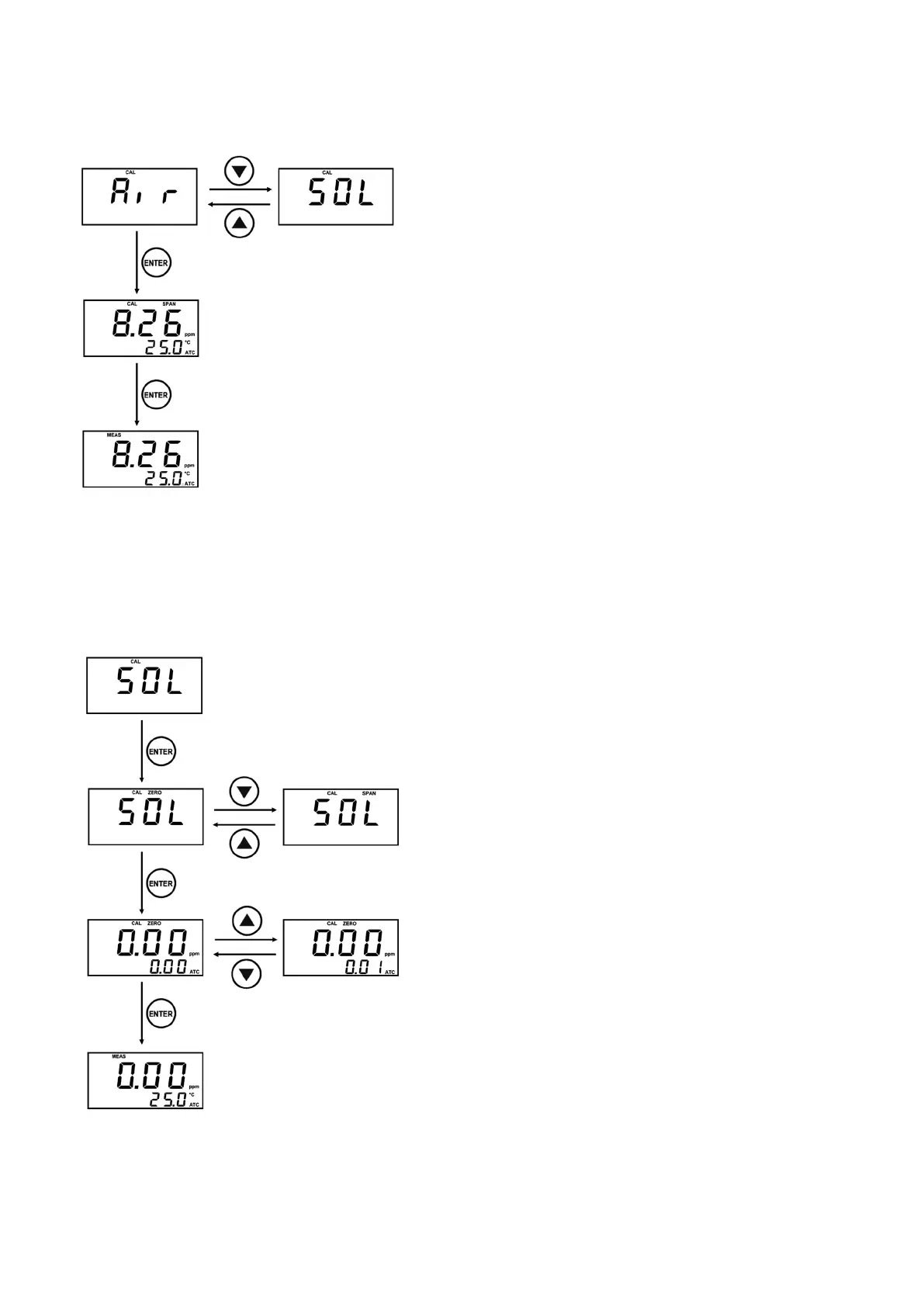
8-3 Air Calibration
Clean the electrode with distilled water.
Wipe the electrode up carefully so it is free of
moisture.
Expose the electrode to the air with its sensor
facing to the bottom.
In the Measuring Mode, press the CAL key for 5
seconds to enter the Calibration Mode.
Currently, the Calibration mode appears on the
main screen. (AIR: air, SOL: solution)
You can change settings in the Calibration mode
by using the
▲
and
▼
keys.
Select Air (the Air calibration only supports Span
calibration).
The main screen displays the current DO
concentration.
The secondary screen displays the current
temperature.
Press the Enter key to save the current value
when the controller’s concentration gets stabilized.
The screen returns to the Measurement mode
automatically when the calibration is completed.
8-4 Zero Solution Calibration
Clean the electrode with distilled water.
Immerse the electrode in a Zero solution.
In the Measuring Mode, press the CAL key for 5
seconds to enter the Calibration Mode.
the Calibration mode appears on the main screen
(AIR: air, SOL: solution)
You can change settings in the Calibration mode
by using the
▲
and
▼
keys.
Select SOL
The status window displays zero (0).
You can change the Zero and Span mode by
using the
▲
and
▼
keys.
Check the zero on the status window and press
the Enter key.
The main screen displays the current DO
concentration.
The secondary screen displays the Zero
concentration to be calibrated.
You can change settings in the Calibration
concentration by using the
▲
and
▼
keys.
When the controller’s concentration stays
stabilized, align it with the Zero concentration to be
calibrated and then press the Enter key to save the
current value.
The screen returns to the Measurement mode
automatically when the calibration is completed.



 To Next Page