72 Infotainment System
Head-Up Display (HUD)
When a route is planned the
Head-Up Display (HUD) will
display information when the
vehicle is approaching a turn.
This information displays when
the vehicle is 0.8 km (0.5 mi) away
from a turn in residential areas
and 2.0 km or 1.24 mi away from
a turn on freeways.
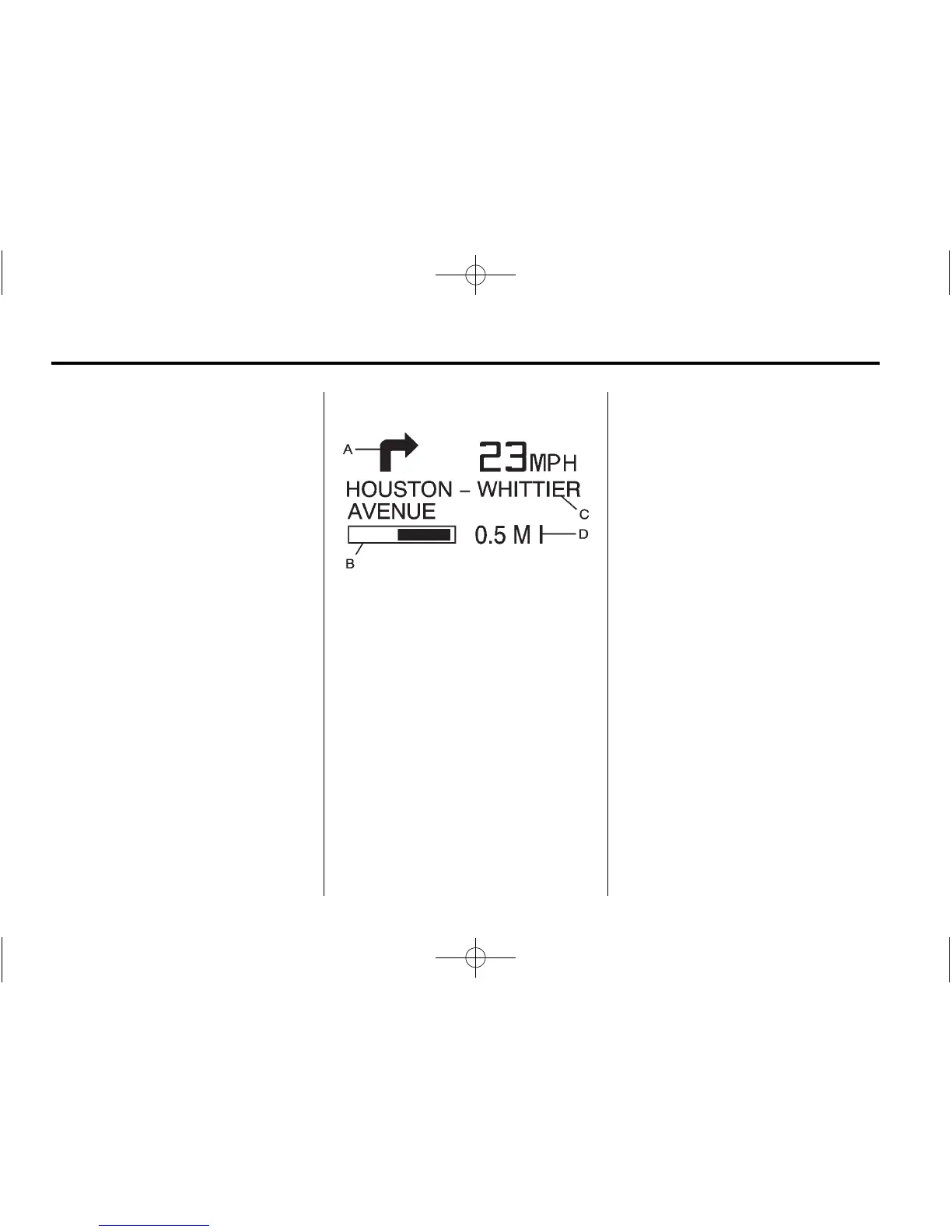
A. Directional Arrow — Displays
the direction of the next turn.
B. Distance Bar — This will
decrease as the vehicle
approaches the turn.
C. Street Name Line — Displays
the name of the street that you
will be turning on.
D. Mile/Kilometer
Scale — Indicates the
scale of the distance bar.
The scale is 0.80 km (0.5 mi)
in residential areas and
2.0 km or 1.24 mi on freeways.
This value changes as you
approach the turn.
After completing a turn, the HUD
displays the name and distance of
the next street you are turning on for
10 seconds.
When HUD is displaying the
turn-by-turn guidance information,
the vehicle's shift lever gear does
not display in the HUD. The gear
displays on the Driver Information
Center (DIC) screen. Once the
destination has been reached or
guidance is cancelled, the HUD
displays the gear information again.
See Head-Up Display (HUD) in
the Index of your vehicle's owner
manual for more information.









 To Next Page