14
If the “Low Battery” symbol is displayed
or if the exhausted battery symbol appears
On the thermometer’s LCD display or the thermometer does not function at all, immediately re-
place the battery as follows:
• Pull the battery cover straight back and upwards to remove it.
• Remove the old battery from the compartment.
• Insert the new battery with the positive (+) side up and the negative (-) side pointed down until
it snaps into place with an audible “click”.
• Replace battery cover.
Note: The “Low Battery” symbol is intended for 3V lithium (operating) battery only. The AAA bat-
teries should be replaced in case of blue light just not appears.
CAUTION: replace only with CR 2032 batteries (for example: Energizer, Varta, Panasonic).
CAUTION: The use of other types of batteries may present a risk of fire or explosion.
CAUTION: Do not recharge, disassemble, heat above 100 °C (212°F), or incinerate.
If the thermometer does not project the blue ray, replace the two AAA batteries as follows:
• remove the battery cover;
• remove the old batteries;
• insert the new batteries with the positive (+) and the negative (-) poles arranged as indicated
by the icons in the compartment.
Caution: replace only with AAA batteries (e.g.: Duracell, Energizer).
The use of other types of batteries may cause explosions or fire.
Caution: Battery may explode if mishandled. Do not recharge, disassemble, heat above
100 °C (212°F), or incinerate.
CARE AND MAINTENANCE
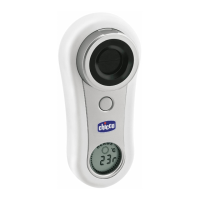
The thermometer has an infrared sensor inside the optical module. To avoid damage to the sen-
sor, when the thermometer is not used, close the thermometer by turning the ring anticlockwise.
If dust, water or other traces of dirt accumulate inside the optical module, or if it shows finger
smudges on its surface, gently clean it with a soft cloth and allow to dry before closing it again.
It is advised to occasionally clean the external part of the optical module (without touching the
sensor) with a 70% alcohol solution.


 To Next Page