29
MI300T 220V
qj
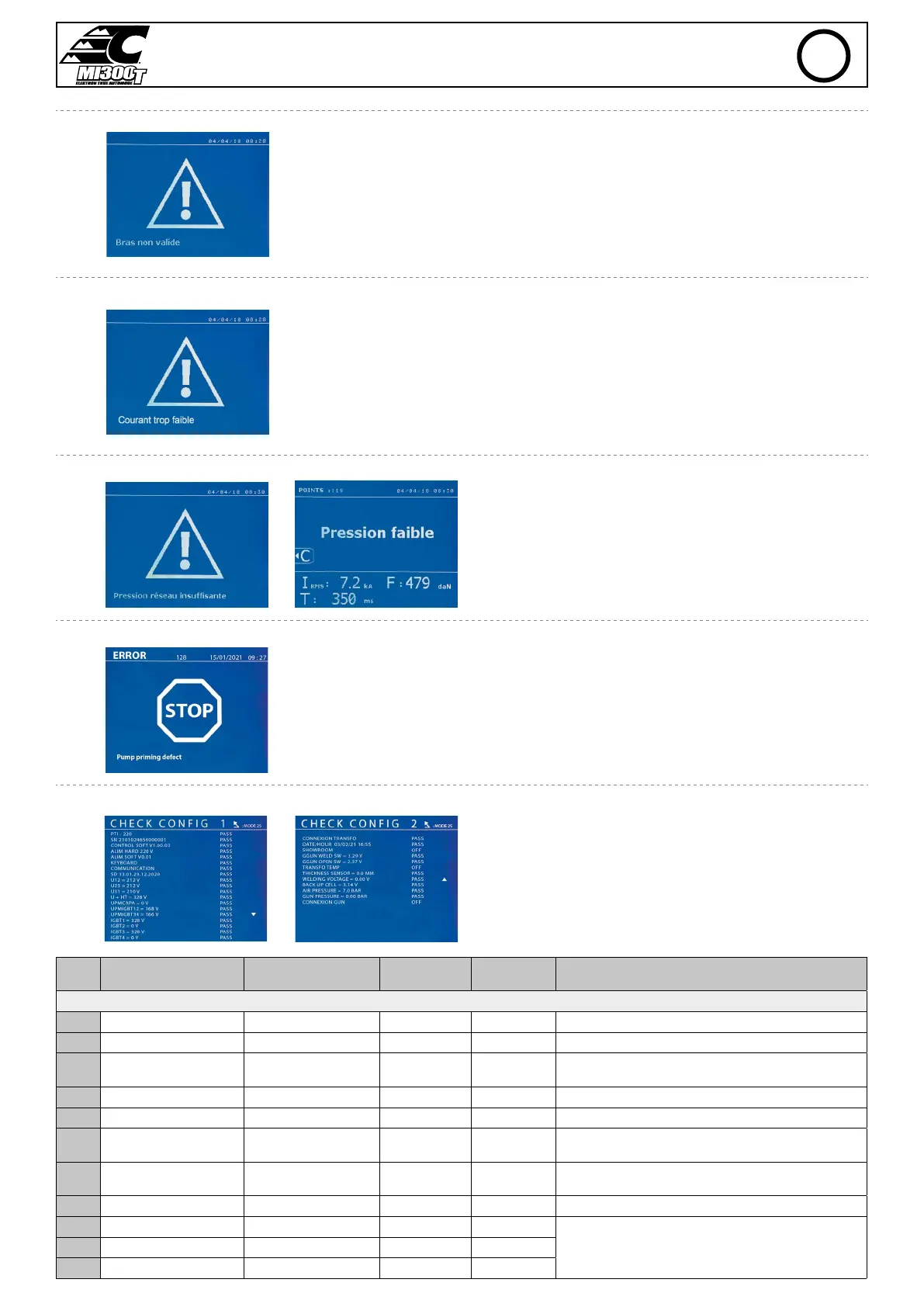
Invalid arm
The arm used is not compatible with the welding mode selected.
Current too low
1/ Check the weld
If the current obtained during a spot weld is lower than the expected value (6%), the machine dis-
plays the warning message «Low current, check the weld».
2/ Check the sheets
If the machine cannot deliver the current required, the error message «Low current, check the
sheets» is displayed. The weld does not happen and the fault must be skipped for the weld to happen.
Insucient air pressure
If the input pressure is insucient to deliver the tightening requested,
the machine beeps and displays, before the weld, the error message
«Insucient air pressure».
Pressing the trigger a second time is used to «force» the spot weld
using the available pressure. If the tightening recorded is insucient,
the machine displays «Low pressure».
«p low» is also recorded in the active report.
Pump priming
The «Pump priming fault» message appears when the cooling system pump is defused. Check the
coolant level in the tank.
Self-diagnostic
When the power is turned on, the machine performs self-diagnostics
and displays the results on the screen.
If no blocking error is present, this page is displayed for 3s and then
disappears. During this period, a short press of the MODE buttons, ▲
or ▼, leaves the CHECK pages displayed (results summarized on two
pages). A long press on MODE will exit the CHECK mode.
It is not possible to exit the CHECK pages if a blocking fault is detected,
except for a phase failure (see list below).
Line
no.
Comment Display left column
Display right
column
Type of defect In the event of a blocking fault
Page CHECK n°1
1 Name of the product MI300T PASS No blocking
2 Product serial number SN xx.xx.xxxxxx.xxxxxx PASS or FAIL No blocking
3 Secondary soft version
CONTROL SOFT Vxx.
xx.xx
PASS No blocking
4 Hard primary version ALIM HARD 400V PASS or FAIL Blocking Wrong power supply card, contact your dealer.
5 Primary soft version ALIM SOFT Vx.xx PASS, FAIL Blocking Wrong software version, contact your reseller.
6 Keyboard test KEYBOARD PASS or FAIL No blocking
Make sure that no key on the keypad or trigger is pressed, if
the fault persists contact your dealer.
7 Communication test µ COMMUNICATION PASS or FAIL Blocking
Communication problem between the cards, contact your
retailer.
8 SD card SD xx.xx.xx.xx.xxxx PASS or FAIL No blocking SD card not present.
9 Voltage phase 1 U12 = xxx V PASS or FAIL Blocking
If there is no phase, pressing MODE for 5s accesses the Setup
menu and allows the machine to operate in Showroom mode.
10 Voltage phase 2 U23 = xxx V PASS or FAIL Blocking
11 Voltage phase 3 U31 = xxx V PASS or FAIL Blocking
EN


 To Next Page