32
MI300T 220V
qj
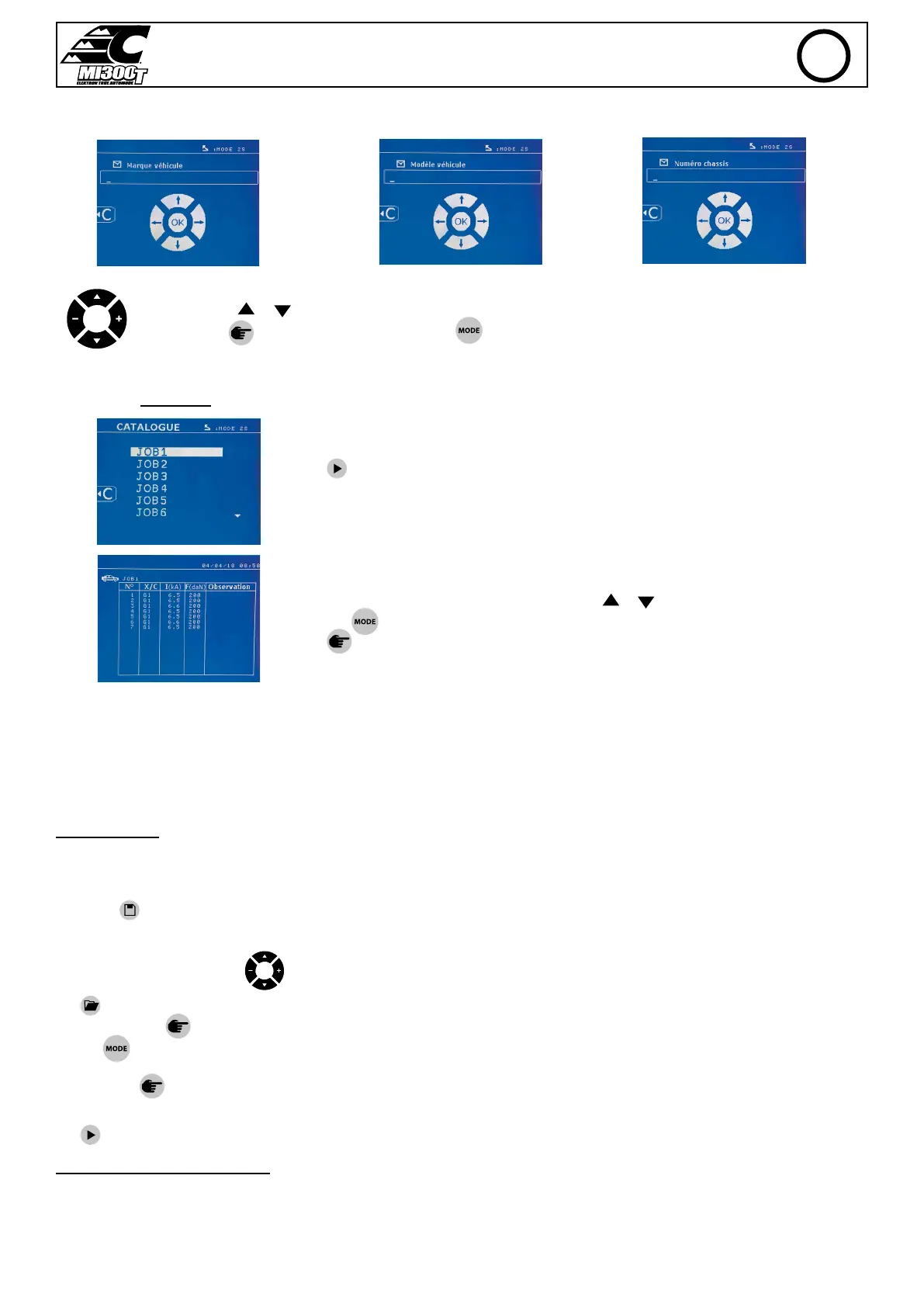
Vehicle make Vehicle model Chassis number (optional)
The arrow keys ( or ) are used to change the letters or numbers. The keys - and + are used to move the cursor inside the
eld. Press the
button briey to clear the eld. The button allows you to scroll through the elds for editing or reading.
Catalogue
The button is used to consult the repair orders. The page number is displayed (max. 13)
The keys - and + are used to change pages. The keys et are used to select previous or next
job. The
button displays the selected repair order.
The
button key is used to exit the report view mode.
• The SD card management library allows you to manage your SD cards over 2 GB..
• For each repair order, a log le xxx.dat is associated (with xxx=identier from 001 to 100). In each log, a maximum of 500 welding points can be
recorded. On consultation, the names of the repair order and the user are displayed.
• The page number is indicated at the top left..
• All repair orders are stored in the le called catalog.GYS.
• This le contains the total number of repair orders, the name of each repair order and the name of each user. There is a maximum of 100 repair
orders.
User programs
Saving the settings allows you to dene a user program in order to easily nd its settings for future use. 20 memory slots are available. Each of them
contains the following settings: tool, arm, welding power, welding time and pressure.
A program can be associated to the clamp or gun.
The button
is used to save the current settings of the manual mode (power, time and pressure). The 20 memory slots are then indicated by their
identier (for those used) or by a symbol» ---» for free slots..
The ID is entered using the 4 keys
. When entering an ID that has already been used, the machine will delete the settings that were previously
stored.
The button is used to access the settings previously saved. Choosing an empty location has no eect.
Briey pressing key
deletes the selected program from the list of saved programs.
The key
exits the program selection mode, switches the machine to manual mode with the parameters and tool saved in the program.
To deactivate a program, simply change the value of a parameter in one of the three modes manual, normal or multiplate or change the tool (clamp,
gun) using the
button.
The key allows you to view a previously saved report and read it back on the screen.
SD memory card (ref. 050914)
This card allows the user to link the machine to a PC in order to:
• Retrieve logs (reports), keep a record of the work done, and eventually send it to an insurance company.
• Update welding parameters, add new languages.
• The GYSPOT software for editing parameters on a PC is stored on the SD memory card.
• The instructions are is stored on the SD memory card.
EN


 To Next Page