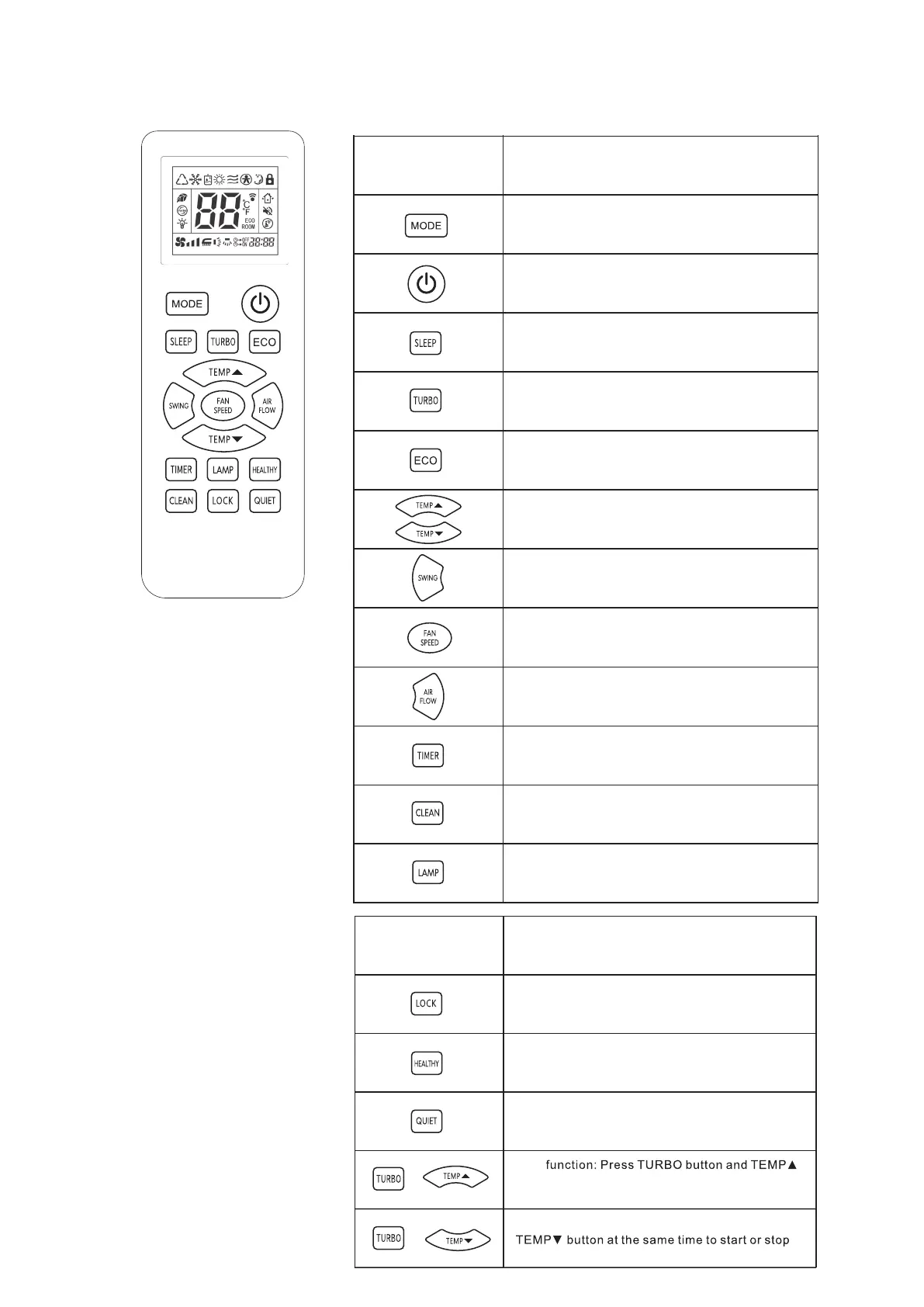
Butto n
Functio n Descriptio n
This button changes the operatio n mode:AU TO,
COOL,DRY,HEAT,FAN.
This button, when pressed starts operation and stops
when repressed.
This button changes to TURBO operation (It does not
work in AUTO,DRY,and FAN mode.)
This button changes the flap mode:natural flow,swing
or fixed wind.
This button sets the room temperature.
This button changes to SLEEP operation.
This button is used to open and close the ECO(energy
saving) operation function,remote control air-conditioning
energy saving operation mode to enter or exit.
Press this button to turn off the indications on the device.
This button set air rate.
This button used for selection of the left/right
air flow direction,
flap will swing or fix(It just works
whenever pressed the in
dimensional air flow model.)
on three-
This button is used to set the switch-on or switch-off
and the timer time.
Press this button to CLEAN when the device and
remote control are OFF.
Butto n
Functio n Descriptio n
Press this button to lock or unlock the keyboard.
This button is used to turn health functions on and off.
Pres s this butto n to make the AC kee p quiet .
+
+
℃/℉
Celsiu s temperatur e display on the remot e control.
butto n at the sam e tim e to switc h toFahrenheit or
10℃HEA Tfunction :Pres sTURB Obutto n an d
the 10℃HEAT function.
Note:
Above figure shows all
indications for the purpose of
explanation, but practically
only the pertinent parts are
indicated. When air-
conditioner is cooling-only
model, the”Heat”mode is for
Fan only.
When TURBO operation is
selected, room temperature is
not controlled with operation
being continually. If you feel
the room temperature is too
cool or too hot, please cancel
the TURBO operation.




 To Next Page