Need help?
Do you have a question about the CHORTAU B-T27 and is the answer not in the manual?
Important warnings about camera placement and obstruction of air bags.
Details on suitable SD cards and the correct formatting procedure.
Advice on monthly formatting and avoiding card removal during recording.
Information on battery use, lens care, and operating temperature limits.
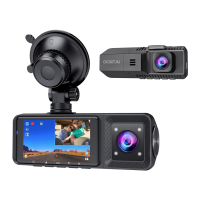
Labels for front/rear cameras and associated components (1-10).
Labels for external ports and mount connectors (11-14).
Descriptions for Power, Up, and OK buttons with their functions and shortcuts.
Details on Down, Menu buttons and their operations.
Explains Type C port, mount connector, reset button, and micro SD card slot.
Steps for attaching the mount, cleaning the windshield, and securing the camera.
Instructions for routing the power cord and connecting the car charger.
Steps to insert the charger into the car and start the recording process.
Instructions on how to charge the dash cam for the first use.
Step-by-step guide for inserting the micro SD card.
Introduction to Video Recording, Photo, and Playback modes.
Explanation of icons and status indicators on the screen.
Detailed explanation of the 14 numbered indicators in video recording mode.
Overview of Resolution, Loop Recording, HDR, and Exposure settings.
Details on Motion Detection, Audio, Gravity sensing, and Parking monitor.
Explanation of the 12 numbered indicators in photo mode.
Options for Capture mode, Resolution, Continuous shooting, and Quality.
Details on Sharpness, White Balance, Color, and ISO adjustments.
Settings for Exposure, Anti-shaking, and Date stamp options.
How to scroll through and view recorded videos/photos.
Explanation of Delete and Protection functions for files.
How to enter the system setting menu from standby or recording mode.
Settings for Screen Saver, Auto Power Off, Frequency, and Beep Sound.
Configuration for language, date/time, and memory card formatting.
Settings for IR LED lights, Default Setting, and Version check.
Explanation of dual lens recording and switching modes.
How loop recording works, its settings, and file storage.
Using motion detection and controlling IR LED lights for night vision.
Details on gravity sensing for emergency recording and audio settings.
How to use parking monitor mode and take snapshots.
Setting screen saver and accessing the picture gallery.
How to stop recording, view video list, and play/pause recordings.
Steps to connect via USB and transfer videos/photos using Mass Storage.
Notes on computer OS appearance and video playback compatibility (VLC).
Model, sensor, display, lens, resolution, format, and modes.
Supported features like gravity sensor, language, audio, memory, USB, battery, and power.
Storage and operating temperature ranges for the device.
Advice on avoiding damage from heat, extreme cold, and storage.
Solutions for failure to record/take photos or turn on the camera.
Tips for automatic recording stops, unclear videos, and color issues.
How to handle camera freezes and perform a reset.
Details on the 12-month warranty period for the dash cam.
Contact information for support and encouragement for user feedback.
 General
| Display Size | 2.7 inches |
|---|---|
| Field of View | 170 degrees |
| Battery Capacity | 300mAh |
| Loop Recording | Yes |
| G-Sensor | Yes |
| Parking Monitor | Yes |
| Night Vision | Yes |
| Resolution | 1080P |
| Screen Size | 2.7 inches |
| Video Resolution | 1920x1080 |
| Storage Support | Up to 32GB MicroSD |

 To Next Page