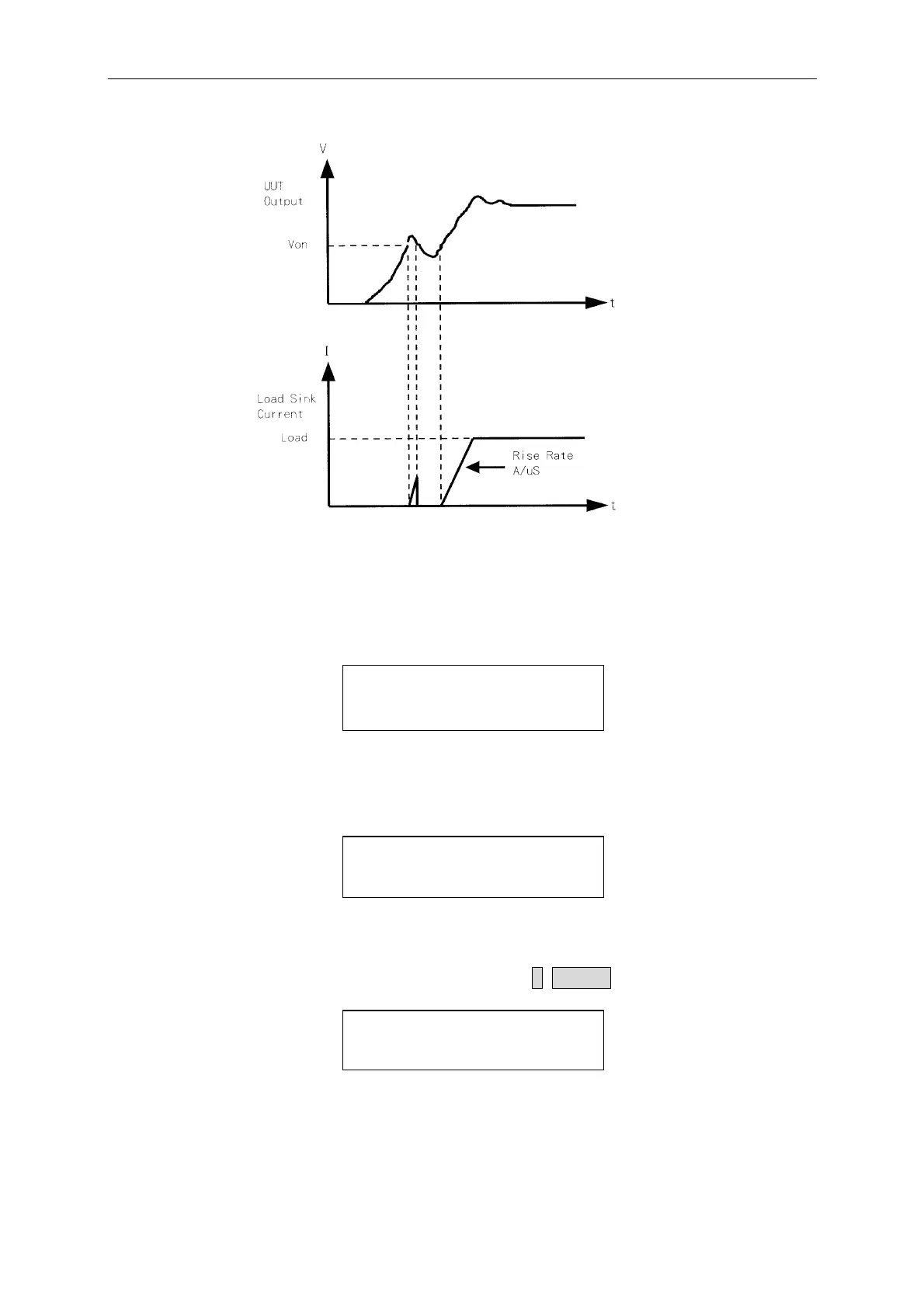
Local Operation
Figure 4-5 Von LATCH OFF Current Waveform
Set CV mode CURR_LIMIT. This function will limit the Load current sinking to protect
the UUT in CV mode. The default setting of current limit is the maximum Load current.
CV CURRENT LIMIT
CURRENT = 200.000A
Set sign of voltage for display. The Electronic Load will show minus sign of the voltage if
MINUS is selected. No sign will show if select PLUS. The default setting is PLUS.
Selecting MINUS of SIGN OF VOLT. will occupy one digit. The displayed digits are five.
SIGN OF VOLTAGE
1. PLUS 2. MINUS
Set POWER/OHM for display. The right one of the three 7-segment LEDs can be selected
to display POWER or OHM measurement data. The default setting is POWER. The LED
“OHMS” will be lighted if you select OHM by pressing 2, ENTER.
POWER / OHM SELECT
1: POWER 2: OHM
Set the specifications of entry mode. The specifications of Load can be set by VALUE or
Percentage for HIGH and LOW data. The percentage values refer to CENTER value of
specification. The default setting of SPEC entry mode is percentage.
4-15



 To Next Page