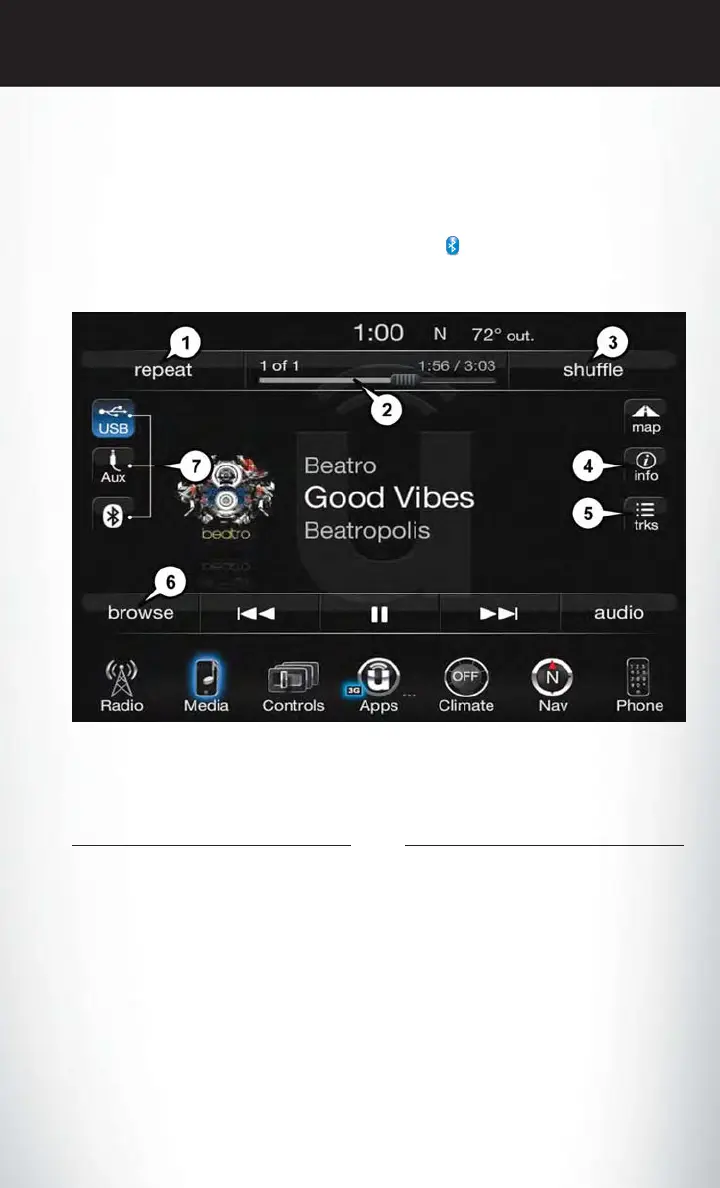
Bluetooth Streaming Audio
• If using a Bluetooth equipped device you may also be able to stream music to your vehicle's
sound system. Your connected device must be Bluetooth compatible and paired with your
system (see Uconnect Phone for pairing instructions). You can access the music from your
connected Bluetooth device by pressing the Bluetooth
button on the touchscreen while in
Media mode.
Media Controls
The controls are accessed by pressing the desired button on the touchscreen and choosing
between AUX, USB, Bluetooth or SD Card.
NOTE:
Uconnect will automatically switch to the appropriate mode when something is first connected or
inserted into the system.
Media Controls
1 — Repeat Music Track
2 — Music Track And Time
3 — Shuffle Music Tracks
4 — Music Track Information
5 — Show Songs Currently In Cue To Be
Played
6 — Browse Music By
7 — Music Source
ELECTRONICS
89















 To Next Page