240 MULTIMEDIA
PLAY A DVD/B LU-RAY™ OR USB
M
EDIA FILE FROM UCONNECT SYSTEM
1. Insert a Blu-ray™ Disc or DVD disc into the
disc player with the label facing up, or
insert a USB drive into rear Video USB port.
NOTE:
The DVD/Blu-ray™ Disc player and Video USB
port are both located under the radio controls in
the instrument panel.
2. Press the Uconnect Theater button on the
radio touchscreen Ú page 234.
3. Select Disc or USB from the source controls
(i.e. select the desired source from the
“Select Input 1” or “Select Input 2” menu
for the respective screen).
4. For DVD/Blu-ray™ disc – press the “Press to
Enter” feature in the Movie Snapshot on the
radio touchscreen, then press OK on the
following screen. The steps to start a DVD
are dependent on the steps required by that
specific DVD. For USB Media Files — Press
Music, Movie, or Folders, then select media
title from list(s).
5. To play a DVD/Blu-ray™ disc on both
screens simultaneously, select Disc from
both screen drop downs, or choose Disc
Source on one screen and push the View
Screen button on the other.
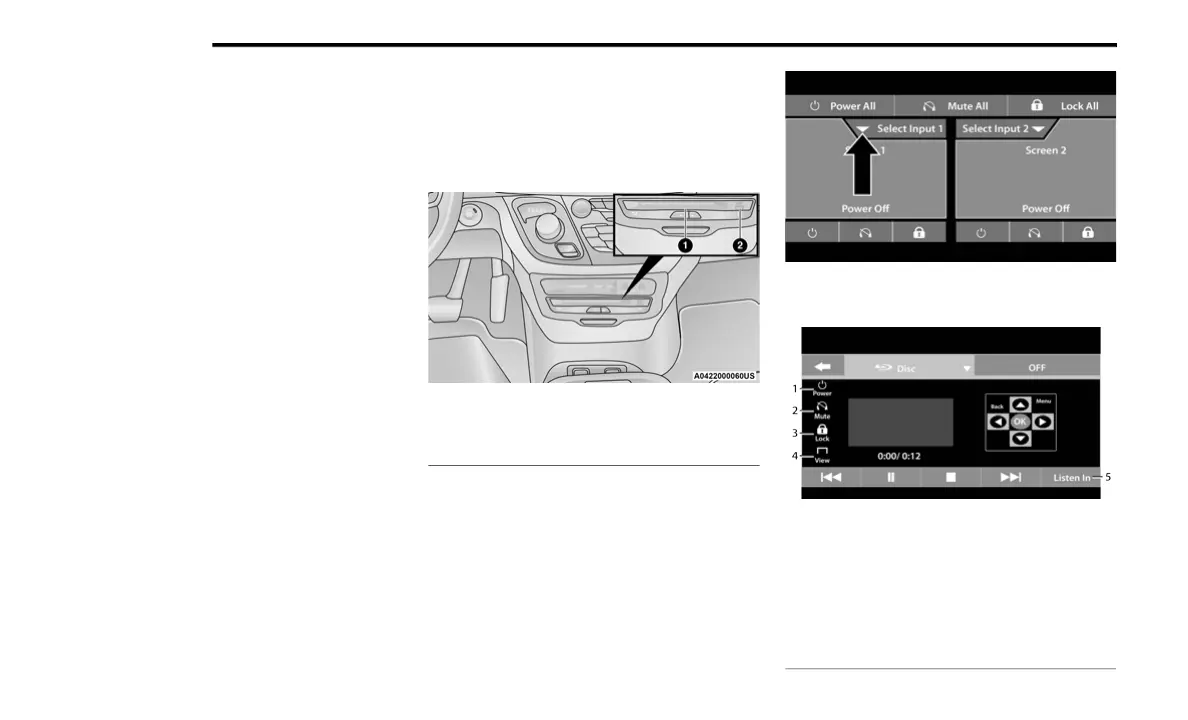
DVD/Blu-ray™ Disc Player
Source Controls From The Uconnect System —
Uconnect Theater (Front Touchscreen)
Uconnect System Media Control Screen
(Front Touchscreen)
1 — DVD/Blu-ray Player
2 — Rear Entertainment USB Ports
1 — Power Button
2 — Mute Button
3 — Screen Lock Button
4 — View Button
5 — Listen In Button
21_RUP_OM_EN_USC_t.book Page 240















 To Next Page