242 MULTIMEDIA
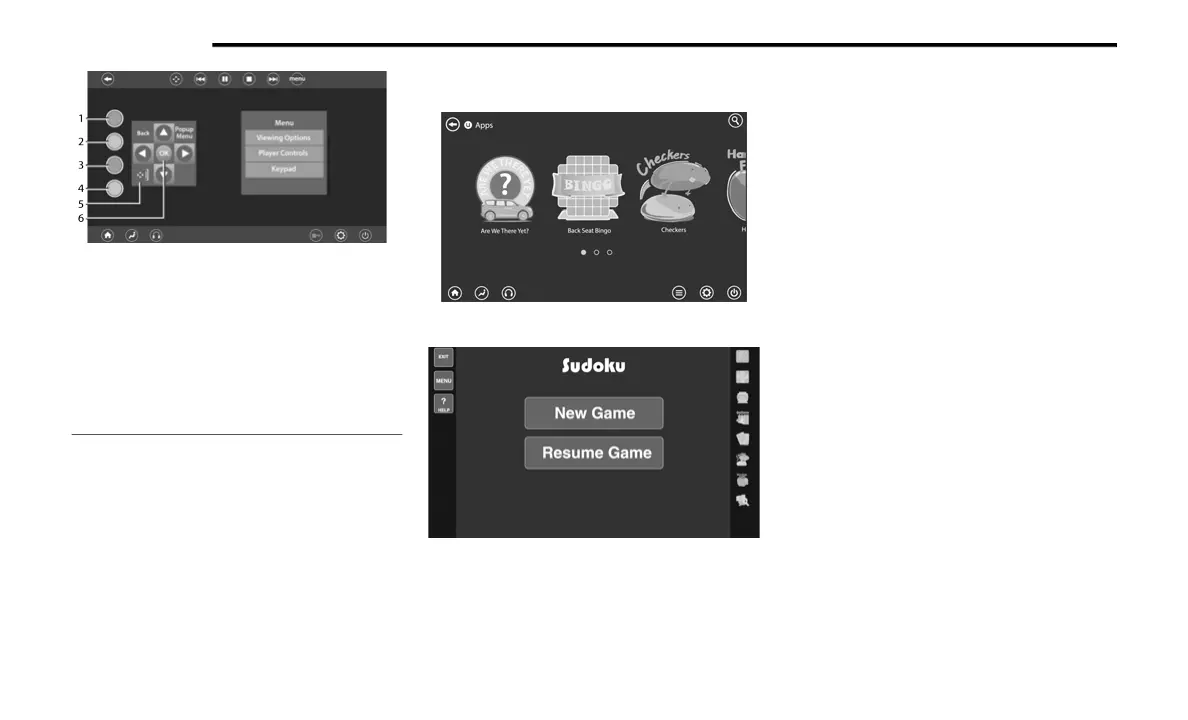
Blu-ray™ Controls – Disc Specific Functions
(Rear Touchscreen)
UCONNECT THEATER APPS
Apps Home Screen (Rear Touchscreen)
Sudoku App Home Screen (Rear Touchscreen)
Select the Apps source card to play preloaded
games. Pressing the Help button teaches users
how to play each game. Pick from games:
Back Seat Bingo
Checkers
Hanging Fruit
License Plate Game
Math Flash Cards
Solitaire
Sudoku
Tic Tac Toe
Chess
Concentration
NOTE:
To exit a game, press Exit button then Back
Arrow, or Home button on the touchscreen.
1 — Red Button
2 — Green Button
3 — Blue Button
4 — Yellow Button
5 — Move 5-Way Controls Button
6 — 5-Way Control Buttons
21_RUP_OM_EN_USC_t.book Page 242















 To Next Page