138 STARTING AND OPERATING
NOTE:
If the vehicle is driven above approximately 15 mph
(25 km/h), the instrument cluster display will instruct the
driver to slow down. If the vehicle is driven above approxi-
mately 18 mph (30 km/h), the system will cancel. The
driver must then reactivate the system by pushing the
ParkSense Active Park Assist switch.
PARALLEL /PERPENDICULAR PARKING
S
PACE ASSISTANCE OPERATION
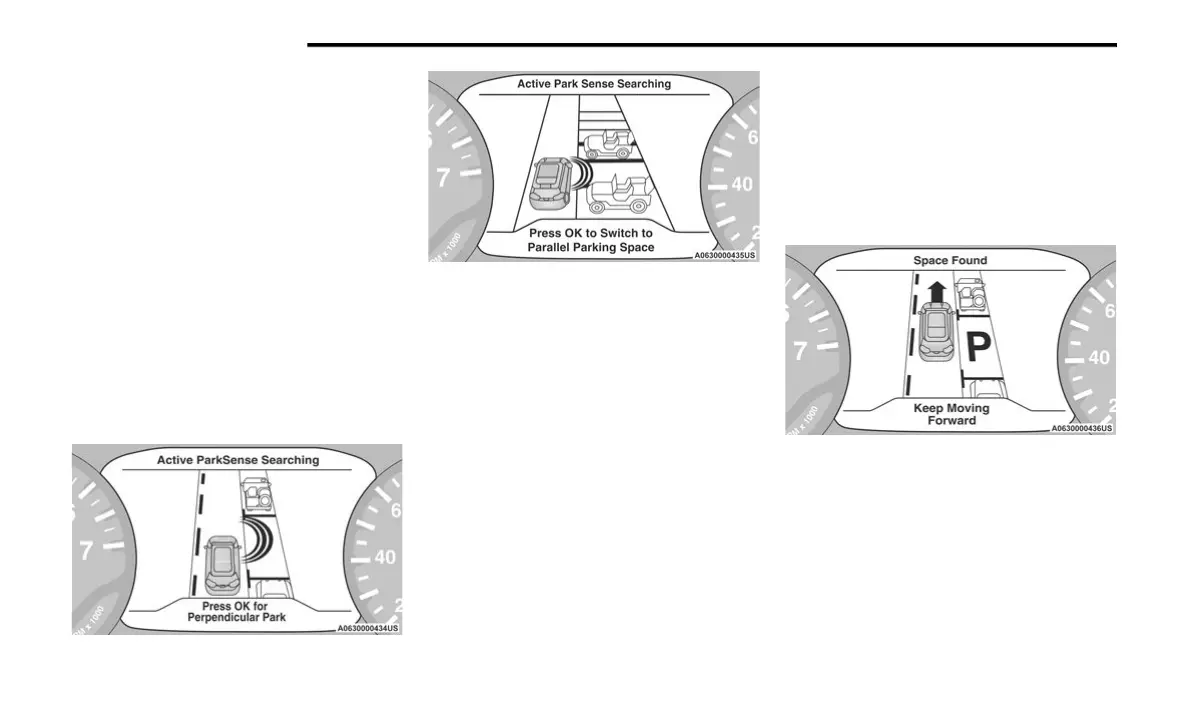
When the ParkSense Active Park Assist system is enabled
the “Active ParkSense Searching - Push OK for
Perpendicular Park” or “Active ParkSense Searching -
Push OK for Parallel Park” message will appear in the
instrument cluster display. Push the OK button on the left
side steering wheel switch to change your parking space
setting to parallel or perpendicular. Once the driver
pushes OK for a perpendicular parking maneuver, the
“Active ParkSense Searching - Push OK for Parallel Park”
message will appear in the instrument cluster display.
Active ParkSense Searching - Press OK for Perpendicular
Active ParkSense Searching - Press OK for Parallel Park
NOTE:
When searching for a parking space, use the turn
signal indicator to select which side of the vehicle you
want to perform the parking maneuver. The ParkSense
Active Park Assist system will automatically search for
a parking space on the passenger's side of the vehicle
if the turn signal is not activated.
The driver needs to make sure that the selected
parking space for the maneuver remains free and clear
of any obstructions (e.g. pedestrians, bicycles, etc.).
The driver is responsible to ensure that the selected
parking space is suitable for the maneuver and free/
clear of anything that may be overhanging or
protruding into the parking space (e.g., ladders, tail-
gates, etc., from surrounding objects/vehicles).
When searching for a parking space, the driver should
drive as parallel or perpendicular (depending on the
type of maneuver) to other vehicles as possible.
The feature will only indicate the last detected parking
space (example: if passing multiple available parking
spaces, the system will only indicate the last detected
parking space for the maneuver).
When an available parking space has been found, and the
vehicle is not in position, you will be instructed to move
forward to position the vehicle for a perpendicular or
parallel parking sequence (depending on the type of
maneuver being performed).
Space Found — Keep Moving Forward
Once the vehicle is in position, you will be instructed to
stop the vehicle’s movement and remove your hands from
the steering wheel. When the vehicle comes to a standstill
(your hands still removed from the steering wheel), you will
be instructed to place the gear selector into the REVERSE
position.
The system may then instruct the driver to wait for steering
to complete before then instructing to check surroundings
and move backward.
23_RUP_OM_EN_USC_t.book Page 138















 To Next Page