MULTIMEDIA 177
REAR SEAT ENTERTAINMENT (RSE) WITH
AMAZON FIRE TV BUILT-IN — IF EQUIPPED
OVERVIEW
Rear Seat Entertainment with Fire TV built-in is designed
to give your family years of enjoyment.
Fire TV lets passengers enjoy a wide variety of content
from popular apps (subscriptions may be required).
Stream videos, play games, listen to music, get
information, and watch downloaded programs all while on
the road. Two Voice Remotes with Alexa are included with
the system. Press the Microphone button on the Voice
Remote with Alexa to easily find, launch, and control
content. Check sports scores, play music, control smart
home devices, or see your live camera feeds (compatible
smart home device required and sold separately). In
addition to streaming and downloaded content, changing
the input in Fire TV also enables you to:
Play your favorite CDs, DVDs, or Blu-ray™ Discs.
Mirror what’s on your phone or tablet to Fire TV via
Miracast capable devices.
Plug and play a variety of standard video games or
devices into the HDMI port.
Listen to audio over wired or wireless headphones (not
included, customer will have to provide their own or
play audio through in-cabin speakers with Listen In
feature in front seat).
Plug and play a variety of devices into the front seat
Video USB port. USB ports located under the rear
screens are charge only.
Watch content individually on each rear display or
mirror across both displays to watch together.
NOTE:
Vehicle must be in an active and usable cellular range and
properly equipped with a Uconnect 5 NAV system and
Rear Seat Entertainment with Fire TV package. Streaming
requires a Wi-Fi connection and registered Amazon
account to run Fire TV in the vehicle. Streaming service
subscriptions are not included. Services and features are
subject to change or withdrawal at any time, may not be
available in all areas and languages, and may require
separate subscriptions.
GETTING STARTED
Rear Seat Entertainment For Uconnect 5/5 NAV
Factory Reset
This setting will factory reset the radio. It may cause the radio to restart multiple times
and the backup camera, radio, SOS, and several driving assistance features will not be
available. Once the system resets, you will need to turn the vehicle off then back on to
complete the process.
Setting Name Description
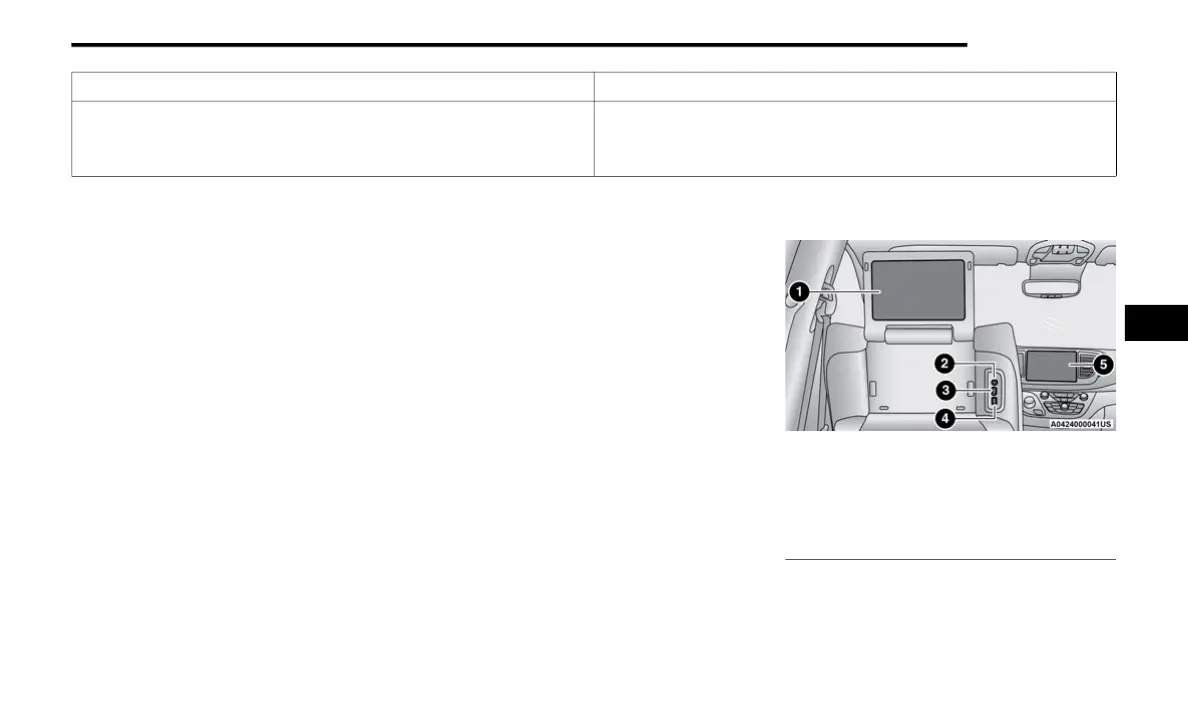
1 — Rear Seat Entertainment (Rear Touchscreen)
2 — Headphone Jack
3 — HDMI Port
4 — USB C Charging Port
5 — Uconnect System (Front Touchscreen)
5
23_RUP_OM_EN_USC_t.book Page 177















 To Next Page