180 MULTIMEDIA
A long press on the Home button can also re-pair a Voice
Remote with Alexa that has become disconnected.
NOTE:
Your vehicle is included with two Voice Remotes with
Alexa. A Voice Remote with Alexa can be paired to each
rear screen. It will function with the rear screen it was
paired with. The pairing steps will need to be done for each
rear screen.
MEDIA SOURCES INPUT (USING THE
F
RONT RADIO AND REAR SCREENS)
Front Radio Screen
Inputs available within Launch Source under “Inputs” are
“Fire TV”, “HDMI”, “Blu-ray™”, “DVD”, and “USB”.
Rear Screens
To select inputs on the rear screen, scroll down on the Fire
TV Home screen and select your desired input under
“Input”.
Inputs can also be selected from the Brand tab in the top
menu. While in this tab, scroll down to “Inputs” for
selection options.
NOTE:
The Brand tab naming in the top menu will depend on the
naming of the vehicle’s brand.
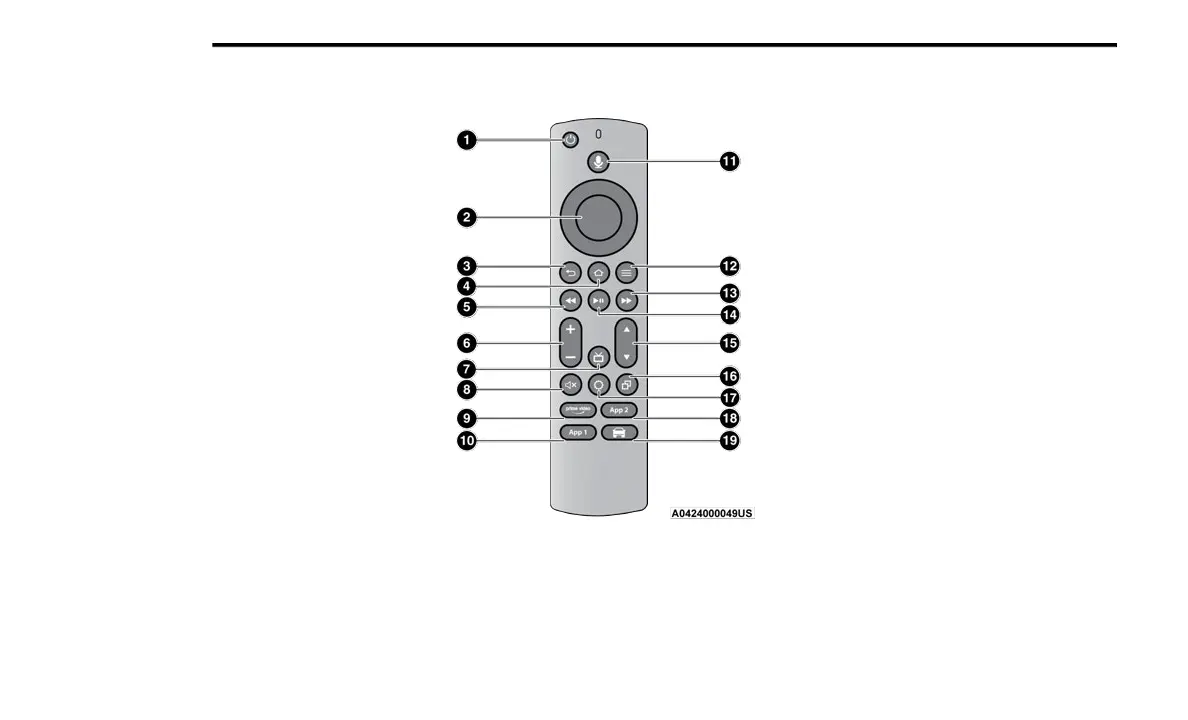
VOICE REMOTE WITH ALEXA
Voice Remote With Alexa
1.
Power Button
— Turns the screen for the selected
channel on or off.
2. 5-way Navigation Control — This control has options
by pressing the Circle button Up, Down, Left, or Right
to navigate on-screen for selections and pushing the
center button to confirm selections.
3. Back — Push to exit out of menus or return to the
previous screen.
4. Home — Push to return to the Fire TV Home screen.
5. Seek Backward/Rewind Button — Push and hold to
fast rewind through the current audio track or video
chapter. Push once to revert back to the previous
track.
6. Volume — Push the - button to decrease the volume
and + button to increase the volume.
7. Channel Guide — Push to access the channel guide
for the system.
8. Mute — Mutes headphone audio.
9. Prime Video — Push to launch Prime Video app.
10. App 1 — Push to navigate to App 1.
11. Microphone Button — Push to activate Alexa.
12. Menu — Push to access the Fire TV menu.
13. Seek Forward Button — Push and hold to fast forward
through the current audio track or video chapter.
Push once to skip to the next track.
23_RUP_OM_EN_USC_t.book Page 180















 To Next Page