144 STARTING AND OPERATING
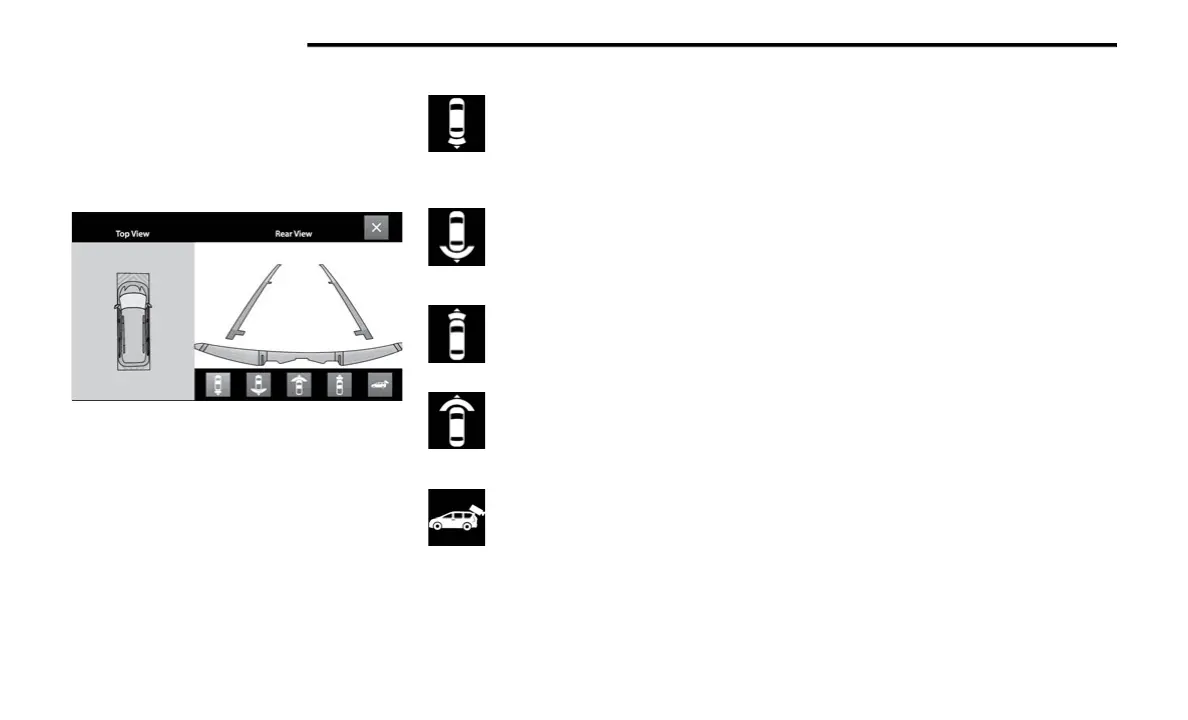
Top View
The Top View will show in the Uconnect system with Rear
View and Front View in a split screen display. There is
integrated ParkSense arcs in the image at the front and
rear of the vehicle. The arcs will change color from yellow
to red corresponding the distance zones to the oncoming
object.
Surround View Camera View
NOTE:
Front tires will be in image when the tires are turned.
Due to wide angle cameras in the mirrors, the image
will appear distorted.
Top View will show which sliding doors are open.
Open front doors will remove outside image.
Rear View Plus Top View
This is the default view of the system in
REVERSE and is always paired with the Top
View of the vehicle with optional active
guidelines for the projected path when
enabled.
Rear Cross Path View
Pressing the Rear Cross Path button will give
the driver a wider angle view of the Rear View.
The Top View will be disabled when this is
selected.
Front View Plus Top View
The Front View will show you what is
immediately in front of the vehicle and is
always paired with the Top View of the vehicle.
Front Cross Path View
Pressing the Front Cross Path button will give
the driver a wider angle view of the Front View.
The Top View will be disabled when this is
selected.
Back Up Camera View
Pressing the Back Up Camera button will
provide a full screen rear view with Zoom View.
Zoom View
When the Rear View is being displayed, and the vehicle
speed is below 8 mph (13 km/h) while in any gear selector
position, Zoom View is available. By pressing the
“magnifying glass” icon in the upper left of the display
screen, the image will zoom in to four times the standard
view. Pressing the icon a second time will return the view
to the standard Rear View.
When Zoom View is selected while the vehicle is in
REVERSE, then shifted to DRIVE, the camera delay will
display the standard Rear View. If the vehicle is then
returned to REVERSE gear from DRIVE, the Zoom View
selection will automatically resume.
Shifting to NEUTRAL from any gear will maintain the
selected view (Zoom or Standard) as long as the vehicle
speed is below 8 mph (13 km/h).
If the vehicle is in PARK, Zoom View is available until the
gear selector is placed in DRIVE or REVERSE and speeds
are at or above 8 mph (13 km/h).
NOTE:
If the vehicle is in DRIVE, NEUTRAL, or REVERSE, and
speed is greater than or equal to 8 mph (13 km/h),
Zoom View is unavailable and the icon will appear gray.
While in Zoom View, the guidelines will not be visible.
23_RUP_OM_EN_USC_t.book Page 144















 To Next Page