20 GETTING TO KNOW YOUR VEHICLE
2. Select the schedule to be set (1, 2, or 3) by
pressing the appropriate arrow on the right
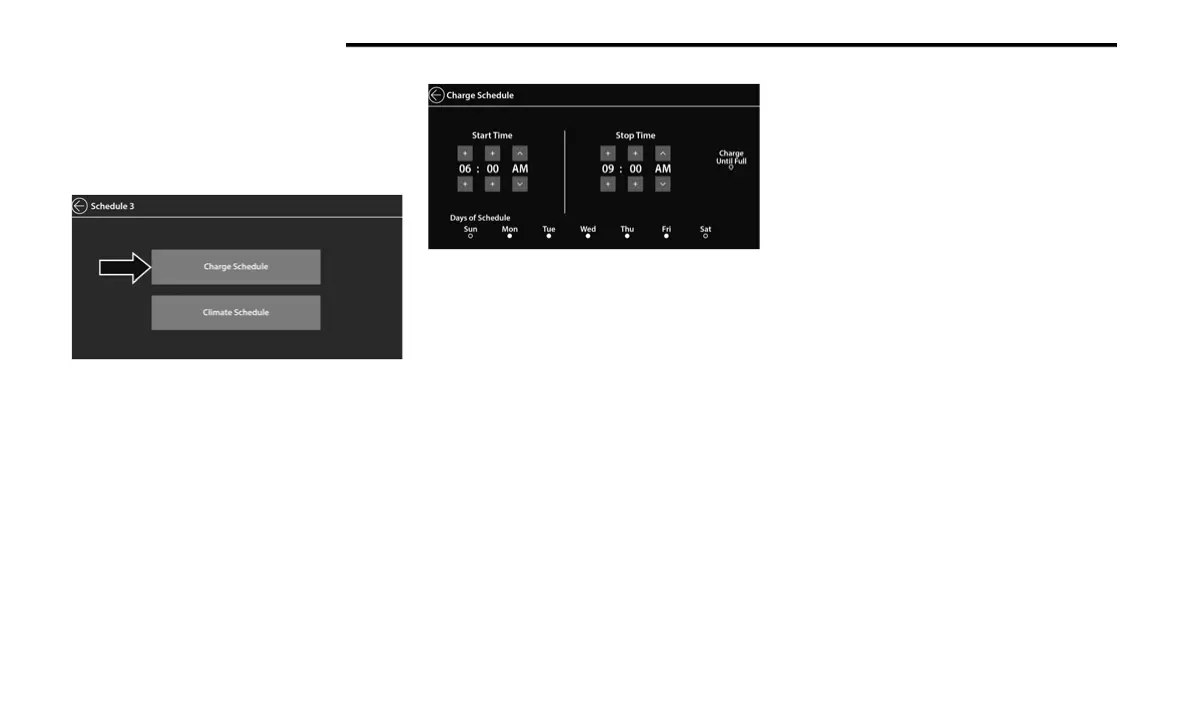
side of the screen.
3. Select “Charge Schedule”.
Select Charge Schedule
4. Select if Scheduled Charging should
“Charge Until Full”.
5. Set the Charge Start Time: Hours, Minutes,
and AM/PM.
NOTE:
This is to occur every week (as long as the
vehicle is connected to the EVSE).
Set Charge Schedule
6. When done, press the back arrow. The
active schedule will be indicated by the
“filled in dot” to the right of the schedule
event line. The Event Action and Time will be
displayed.
7. To add another Scheduled Charging event,
repeat these steps.
NOTE:
A maximum of three independent Scheduled
Charging events can be scheduled at a given
time.
NOTE:
If the charging schedule is not enabled, the
vehicle will charge whenever plugged in. It is
not necessary to set up the charging
schedule to charge the vehicle.
If the vehicle is plugged in outside of the
charging schedule set in the Uconnect
system (and Charge Until Full is not selected),
the vehicle’s battery will not charge. Charging
will only begin immediately if the vehicle is
plugged in within the time and day of the
week set in the schedule. Otherwise,
charging will automatically begin when the
selected charge time/day of the week occurs
or whenever the vehicle is plugged in with no
charge schedule set.
If the vehicle is turned off outside of the
charging window, a radio pop-up message
will be displayed, which provides an option to
begin charging the vehicle immediately. The
pop-up message asks the driver if they would
like to “Charge Now?” and provides other
information, including the next charging
schedule start time and estimated time to
charge the battery to 100%. If within one
hour of selecting “Yes,” the vehicle is
connected to a powered EVSE, the vehicle
will immediately begin to charge (temporarily
ignoring any set charge schedule). To fully
deactivate the charge schedule, refer to the
“Schedules” feature within the E.Hybrid app.
21_RU2_H_SU_EN_USC_t.book Page 20















 To Next Page