GETTING TO KNOW YOUR VEHICLE 19
Power Flow
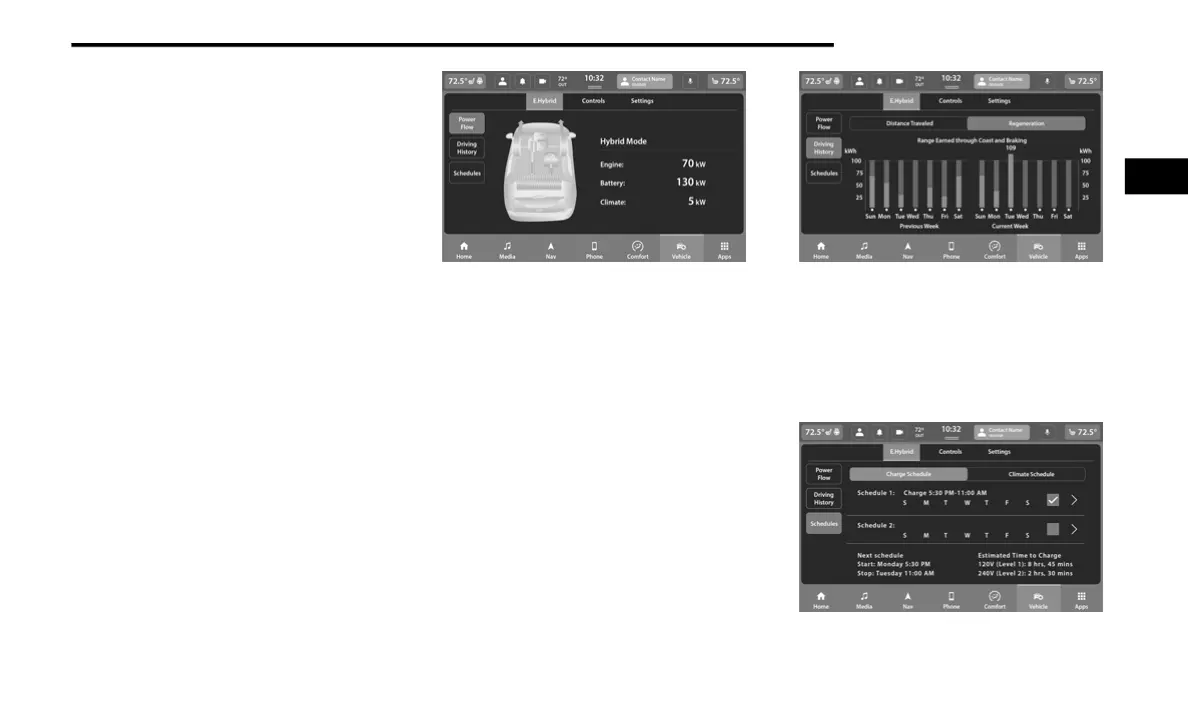
The Power Flow screen shows the current power
readings for all of the following:
Engine - Shows the amount of power (in kW)
the engine is generating. Based on vehicle
operating conditions, this power is used to:
propel the vehicle, provide passenger
compartment heating, power vehicle elec-
trical loads, and charge the high voltage
battery. Engine operation is controlled to
maximize fuel economy.
Battery - Shows the amount of power (in kW)
the high voltage battery is currently
providing/absorbing. A negative kW indicates
the vehicle’s high voltage battery is charging.
Climate - Shows the amount of power (in kW)
the Climate Control system is using to main-
tain the current interior temperature.
Power Flow paths are indicated by the direction
of the arrows on the touchscreen.
Power Flow Screen
Driving History
The Driving History screen shows the miles (km)
driven in both Full Electric and Hybrid modes for
both the previous week and the current week.
The data is displayed in a bar graph: Electric
mode in teal and Hybrid mode in blue.
On the bar graph, miles (km) driven on the same
day in Electric mode (battery only) are always
shown below miles (km) driven in Hybrid mode.
When one day of the week exceeds 100 miles
(160 km) driven, the values of miles (km) driven
in Electric and Hybrid modes will be listed above
the bar graph in respective colors (teal for
Electric and blue for Hybrid).
Driving History Screen
Charging Schedule
To set a charging schedule, select the E.Hybrid
app in the touchscreen and follow these steps:
1. Select “Schedules”.
Schedules Screen
2
21_RU2_H_SU_EN_USC_t.book Page 19















 To Next Page