MAINTENANCE
Periodic maintenance is essential for keeping your air
conditioner at peak operation.
Before carrying out any maintenance , disconnect the
power supply by putting the installation on/ o switch to
o .
INDOOR UNIT
ANTIDUST FILTERS
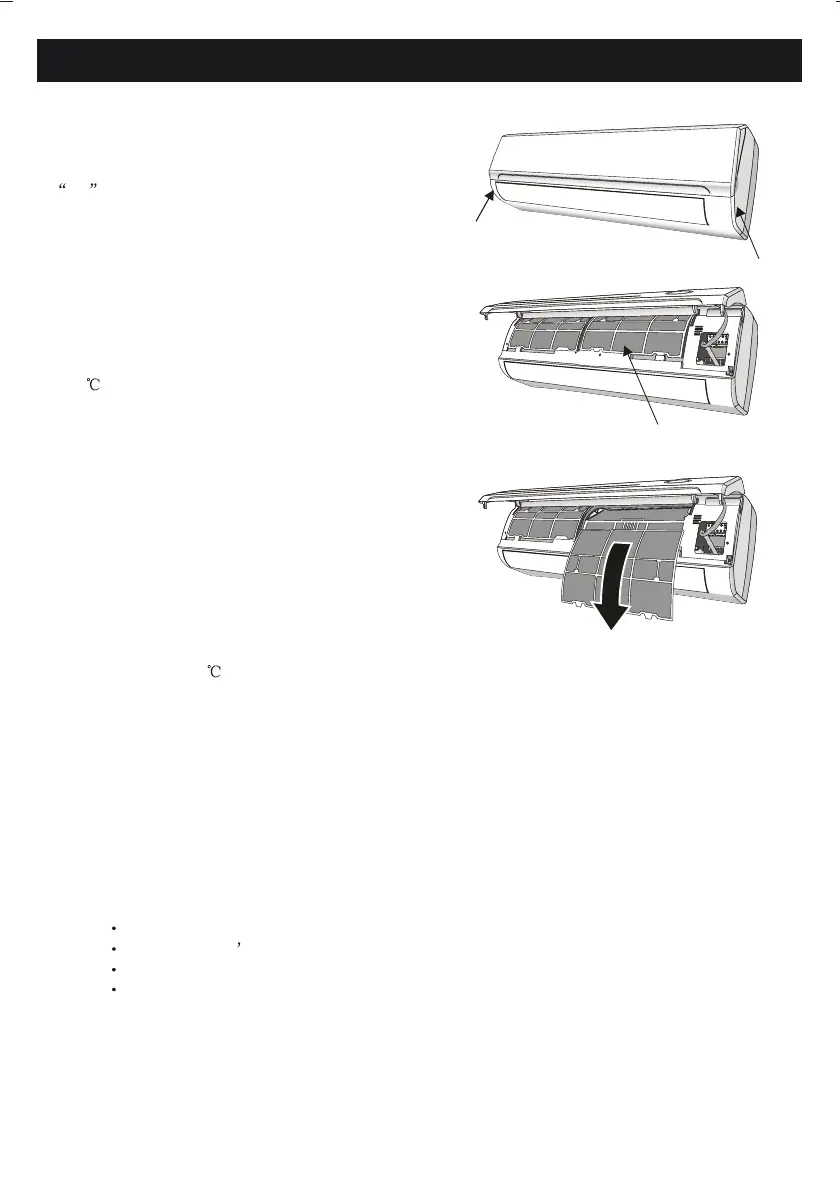
1. Open the front panel following the direction of the
arrow
2. Keeping the front panel raised with one hand, take out
the air lter with the other hand
3. Clean the lter with water ; if the lter is soiled with
oil,it can be washed with warm water (not exceeding
45 ).
Leave to dry in a cool and dry place.
4. Keeping the front panel raised with one hand , insert
the air lter with the other hand
5. Close
The electrostatic and the deodorant lter (if installed)
cannot be washed or regenerated and must be replaced
with new lters once every 6 months.
CLEANING THE HEAT EXCHANGER
1. Open the front panel of the unit and life it till its
greatest stroke and then unhooking it from the hinges
to make the cleaning easier.
2. Clean the indoor unit using a cloth with the water
( not higher than 40 ) and neutral soap . Never use
aggressive solvents or detergents.
3. If the coil of the outdoor unit is clogged , remove
the debris and remove the dust with low air pressure and
wash o with water.
END OF SEASON MAINTENANCE
1. Disconnect the automatic switch or the plug unit.
2. Clean and replace the lters
3. On a sunny day let the conditioner run in fan mode for a few hours , so that the inside of the unit can
dry completely..
REPLACING THE BATTERIES
When:
How:
N.B: Use only new batteries. Remove the batteries from the remote control when the conditioner is not in
operation
WARNING ! Dispose of batteries properly.
antidust lter
24
There is no conrmation beep from the indoor unit.
The LCD doesn t activate.
Remove the cover at back.
Replace the batteries respecting the symbols + and - .



 To Next Page