EMERGENCY FUNCTION & AUTO-RESTART FUNCTION
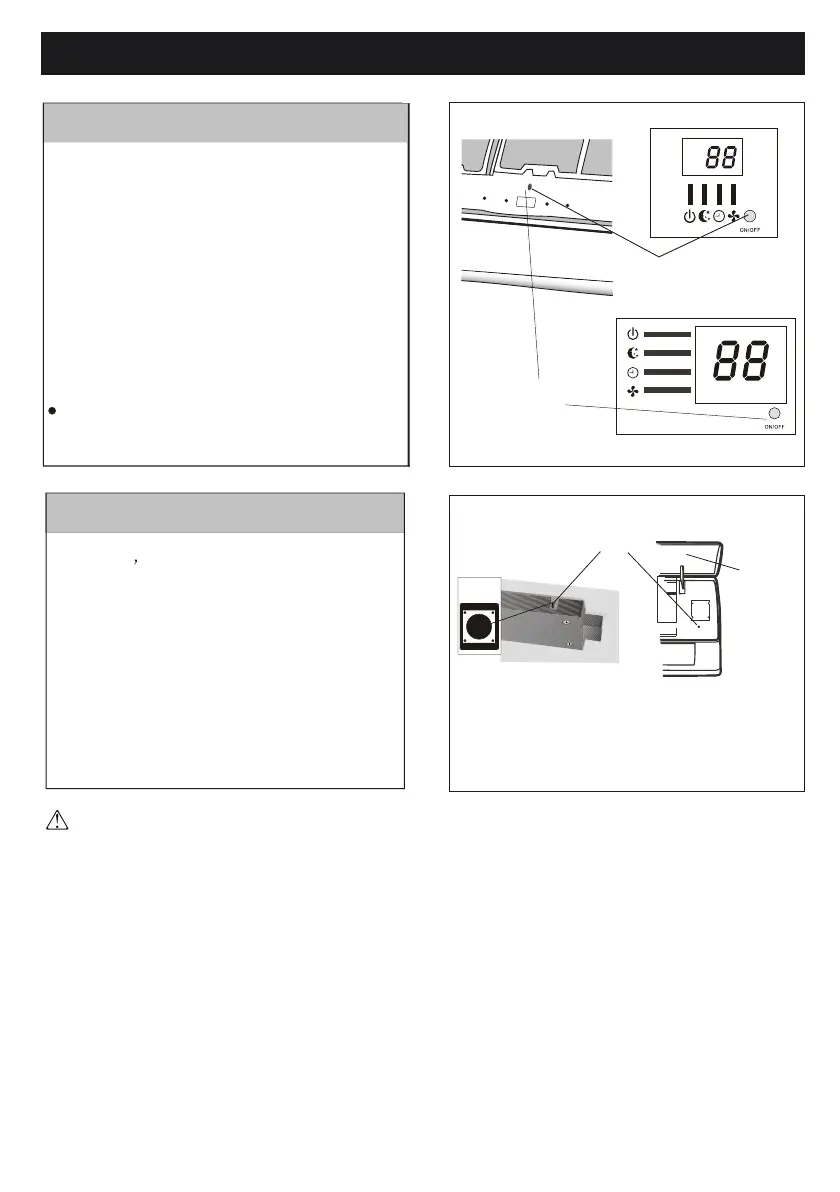
ON/OFF
Emergency
button
The emergency button in some
models could be on the right side
of the unit under the front panel.
The shape and position of the emergency button
may vary according to the model, but the
function is the same.
The unit is preset to auto - restart function by the
manufacturer.With this function the air conditioner
can keep the selected settings after a blackout or a
voltage drop.
Lift the unit s front panel to acess the emergency
button of the air conditioner
1. Press the button once ( one beep ) and the unit
will work in forced cooling function;
2. Press the button twice ( two beeps ) and the
unit will work in forced heating function.
3. To switch o the unit , press
the button again ( a single long beep) . After 30
minutes in emergency function , the unit
will automatically resume operation in FEEL mode.
The FEEL function is described on page 13.
If the remote control is lost, proceed as follows:
display PCB
front panel
To deactivate the AUTO-RESTART function:
1. Switch the air conditioner o & cut o power or un-plug it.
2. Press the emergency button while pluging
it in or restoring power switch.
3. Keep pressing the emergency button for at least
10 seconds until the unit emits four short beeps.
The AUTO-RESTART function is now disabled.
To activate the AUTO - RESTART function
follow the same procedure until the unit emits three
short beeps.
Emergency
button
ON / OFF
POWER
SLEEP
TIMER
RUN
EMERGENCY FUNCTION
AUTO-RESTART FUNCTION
5
Emergency
button



 To Next Page