4.9.25 - OCC1PSX menu
The control provides two timer programs:
schedule 1 and schedule 2 that can be activated.
The rst timer program (schedule 1) provides a means to auto-
matically switch the unit from an occupied mode to an unoccupied
mode: the unit is started during occupied periods.
The second timer program (schedule 2) provides a means to au-
tomatically switch the active setpoint from an occupied setpoint
to an
unoccupied setpoint: cooling setpoint 1 is used during oc-
cupied periods, cooling or heating setpoint 2 during unoccupied
periods.
Each schedule consists of
eight time periods set by the opera-
tor. These time periods can be agged to be in effect or not in
ef
fect on each day of the week plus a holiday period. The day
begins at 00.00 hours and ends at 23.59 hours.
Program is in unoccupied mode unless a schedule time period
is in effect. If two periods overlap and are both active on the
same day, the occupied mode takes priority over the unoccu
-
pied period.
Each of
the eight periods can be displayed and changed with
the aid of a sub-sub-menu. The table on page 17 shows how
to access the period conguration. Method is the same for the
time schedule 1 or the time schedule 2.
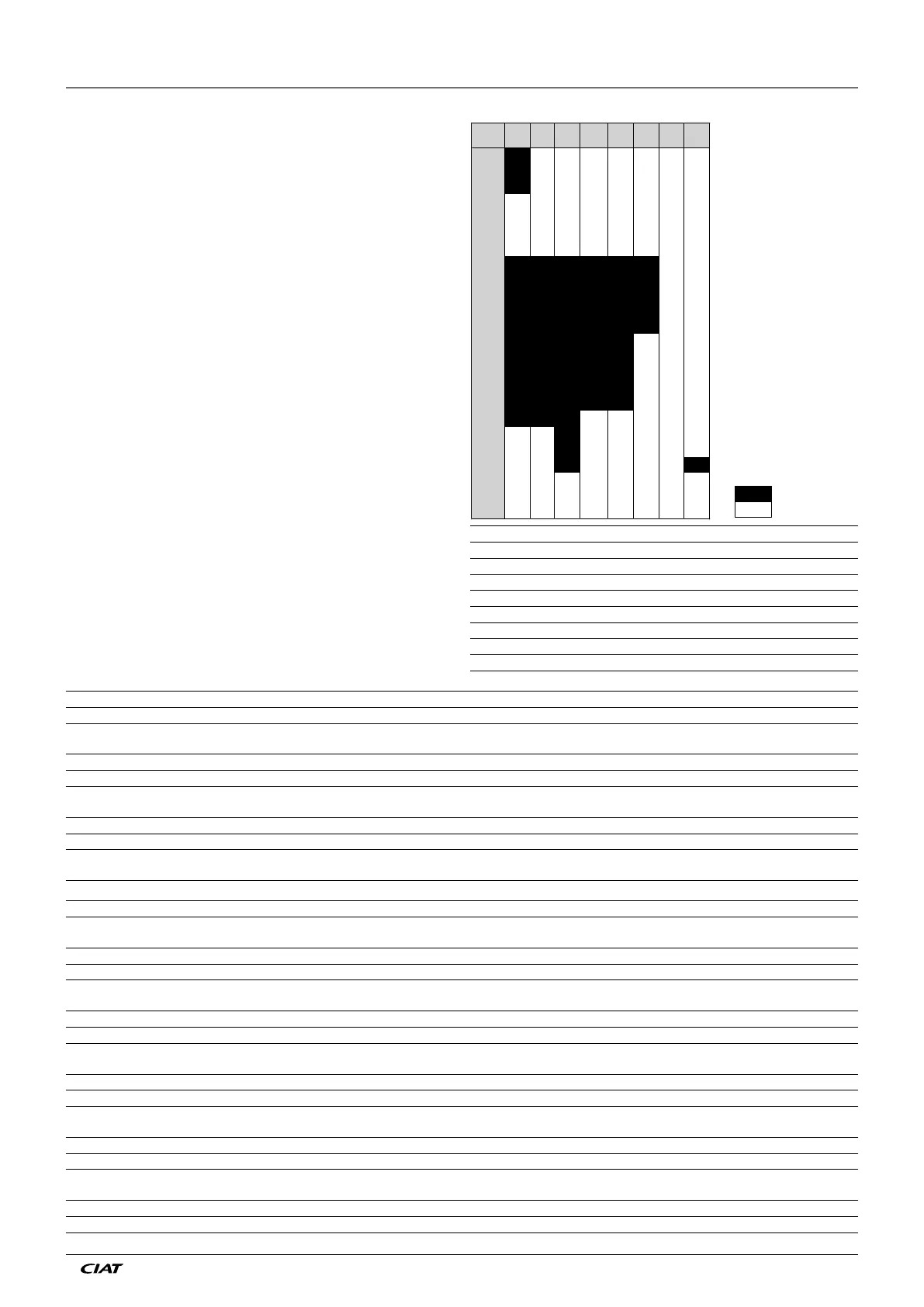
Time schedule type:
23
22
21
P6P3
2
P3
19
P3
1
P3P2P2
17
P4P4P3P2P2
1
P4P4P3P2P2
1
P4P4P3P2P2
14
P4P4P3P2P2
1
P4P4P3P2P2
12
P5P4P4P3P2P2
11
P5P4P4P3P2P2
10
P5P4P4P3P2P2
P5P4P4P3P2P2
8
P5P4P4P3P2P2
7
6
4
P1
2
P1
1
P1
HOLSUNSATFRITHUWESTUEMON
Time
MON: Monday
TUE: Tuesday
WED: Wednesday
THU: Thursday
FRI: Friday
SAT: Saturday
SUN: Sunday
HOL: Holiday
Occupied
Unoccupied
Starts at Stops at Active on
P1: period 1, 0h00, 3h00, Monday
P2: period 2, 7h00, 18h00, Monday + Tuesday
P3: period 3, 7h00, 21h00, Wednesday
P4: period 4, 7h00, 17h00, Thursday + Friday
P5: period 5, 7h00, 12h00, Saturday
P6: period 6, 20h00, 21h00, Holidays
P7: period 7, Not used in this example
P8: period 8, Not used in this example
NAME FORMAT DEFAULT UNIT DESCRIPTION
OVR_EXT 0-4 0 hours Occupied schedule override
DOW1 0/1 11111111 - Period 1 day of the week MTWTFSSH
Monday Tuesday Wednesday Thursday Friday Saturday Sunday Holiday
OCCTOD1 0:00-24:00 00:00 - Occupied
from
UNOCTOD1 0:00-24:00 24:00:00 - Occupied until
DOW2 0/1 0 - Period 2 days of the week MTWTFSSH
Monday Tuesday Wednesday Thursday Friday Saturday Sunday Holiday
OCCTOD2 0:00-24:00 00:00 - Occupied
from
UNOCTOD2 0:00-24:00 00:00 - Occupied until
DOW3 0/1 0 - Period 3 days of the week MTWTFSSH
Monday Tuesday Wednesday Thursday Friday Saturday Sunday Holiday
OCCTOD3 0:00-24:00 00:00 - Occupied
from
UNOCTOD3 0:00-24:00 00:00 - Occupied until
DOW4 0/1 0 - Period 4 days of the week MTWTFSSH
Monday Tuesday Wednesday Thursday Friday Saturday Sunday Holiday
OCCTOD4 0:00-24:00 00:00 - Occupied
from
UNOCTOD4 0:00-24:00 00:00 - Occupied until
DOW5 0/1 0 - Period 5 days of the week MTWTFSSH
Monday Tuesday Wednesday Thursday Friday Saturday Sunday Holiday
OCCTOD5 0:00-24:00 00:00 - Occupied
from
UNOCTOD5 0:00-24:00 00:00 - Occupied until
DOW6 0/1 0 - Period 6 days of the week MTWTFSSH
Monday Tuesday Wednesday Thursday Friday Saturday Sunday Holiday
OCCTOD6 0:00-24:00 00:00 - Occupied
from
UNOCTOD6 0:00-24:00 00:00 - Occupied until
DOW7 0/1 0 - Period 7 days of the week MTWTFSSH
Monday Tuesday Wednesday Thursday Friday Saturday Sunday Holiday
OCCTOD7 0:00-24:00 00:00 - Occupied
from
UNOCTOD7 0:00-24:00 00:00 - Occupied until
DOW8 0/1 0 - Period 8 days of the week MTWTFSSH
Monday Tuesday Wednesday Thursday Friday Saturday Sunday Holiday
OCCTOD8 0:00-24:00 00:00 - Occupied
from
UNOCTOD8 0:00-24:00 00:00 - Occupied until
4 - SETTING UP PRO-DIALOG+ CONTROL
EN - 15 EREBA ACCESS



 To Next Page