Manuale Istruzioni
Instruction Manual
7.2. SOSTITUZIONE NASTRO
INFILLER
7.2. CHANGING THE INFILLER
RIBBON
Quando viene segnalato il messaggio 'E-18 OUT
OF INFILL RIBBON- REPLACE/START' sul display
è necessario procedere all sostituzione del nastro
dell'Infiller.
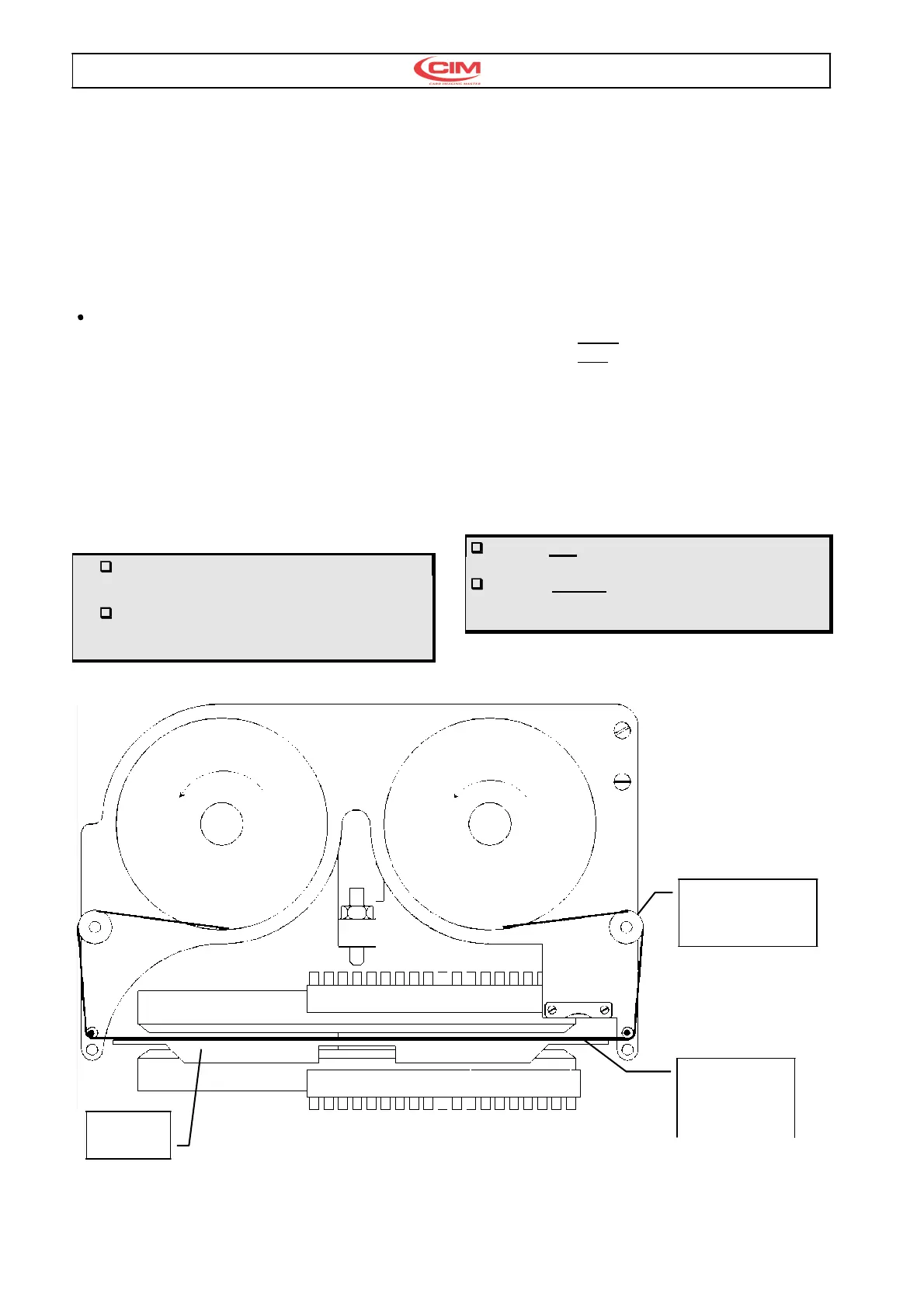
Procedura sostituzione nastro infiller vedi fig. 11
Sollevare il portello frontale di MAXIMA .
•
Svitare il pomello di destra e rimuovere il disco.
•
Svitare il pomello a sinistra e rimuovere il disco.
•
Rimuovere la bobina del nastro consumato.
•
Rimuovere la bobina vuota.
•
Montare la bobina nastro nuovo.
•
Svolgere il nastro sulle guide secondo il
percorso indicato nella figura e collegarlo alla
bobina di sinistra.
•
Rimontare i 2 dischi e avvitare i pomelli.
Per l'infiller superiore il nastro va montato
con la parte opaca (inchiostro) verso il basso.
Per l'infiller inferiore il nastro va montato
con la parte opaca (inchiostro) verso l'alto. vedi
fig.12
When the message 'E-18 OUT OF INFILL
RIBBON- REPLACE/START' is displayed it is
necessary to change the Infiller ribbon.
This process is described below:
•
Lift up the front cover of the MAXIMA.
•
Unscrew the Right knob and remove the disk.
•
Unscrew the Left knob and remove the disk.
•
Remove the used ribbon spooler.
•
Remove the empty spooler.
•
Load the new ribbon spooler.
•
Unwind the ribbon along the guide following the
path indicated in the fig. 11 and attach it to the
left spooler.
•
Reassemble the two disks and tighten the knobs
For the Top Infiller the ribbon is unwound with
the inked
part facing
downwards.
For the Bottom Infiller the ribbon is unwound
with the inked part facing
upwards.
Ref. see fig.12
INFILLER SUPERIORE
INFILLER TOP
Nastro lato opaco
Ribbon dull side
Ponte
Bridge
Fig.11
Il nastro passa
sopra il ponte
The ribbon run
over the bridge



 To Next Page