Using the Control Module (Continued)
The SJ-Series is designed to be unrivaled in its easy operation and minimal maintenance. Leave the Control
Module switch in the "On" position, so that it activates when power is engaged by the pool pump timer or
controls. When doing so, the Control Module returns to operation with its last settings.
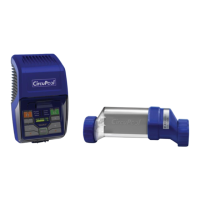
During normal operation, you can select the Chlorine Output Level by pressing button (+) to increase or (-) to
decrease output one increment. Upon each adjustment, the LED on the Output Control button will illuminate,
which indicates activation of the control system, followed by the corresponding change to the Chlorine Output
Level LED's.
A long as you maintain your pool's salinity above the minimum level, and occasionally clean the cell when
necessary, the system’s chlorine generation performance is assured! The system verifies that it is operating
normally when its green Power LED indicator stays lit solidly, and if there is an issue, the yellow Service LED
indicator will alert you if you need to add salt, clean the cell, or if the system has automatically entered its
winter operation mode when cold water conditions exist (see pages 21-22).
SUPER CL MODE:
Generally, it is not necessary to “shock” a saltwater pool. Occasionally however, a large amount of sanitizer
may be required to contend with rising chlorine demand, such as high bather loads, heavy rainfall, or other
water conditions. In this case, simply activate the SUPER CL MODE. Press (+) to boost the Chlorine Output
Level past 100%. The red SUPER CL LED will illuminate, and your system will begin to “super chlorinate” the
water for 72 hours of run time. At the end of the SUPER CL boost period, the Output will reduce back to 100%;
be sure to re-check your pool's water chemistry and make any necessary adjustments.



 To Next Page