Optimus sound level meter - Bluetooth and dBActive quick start guide
10
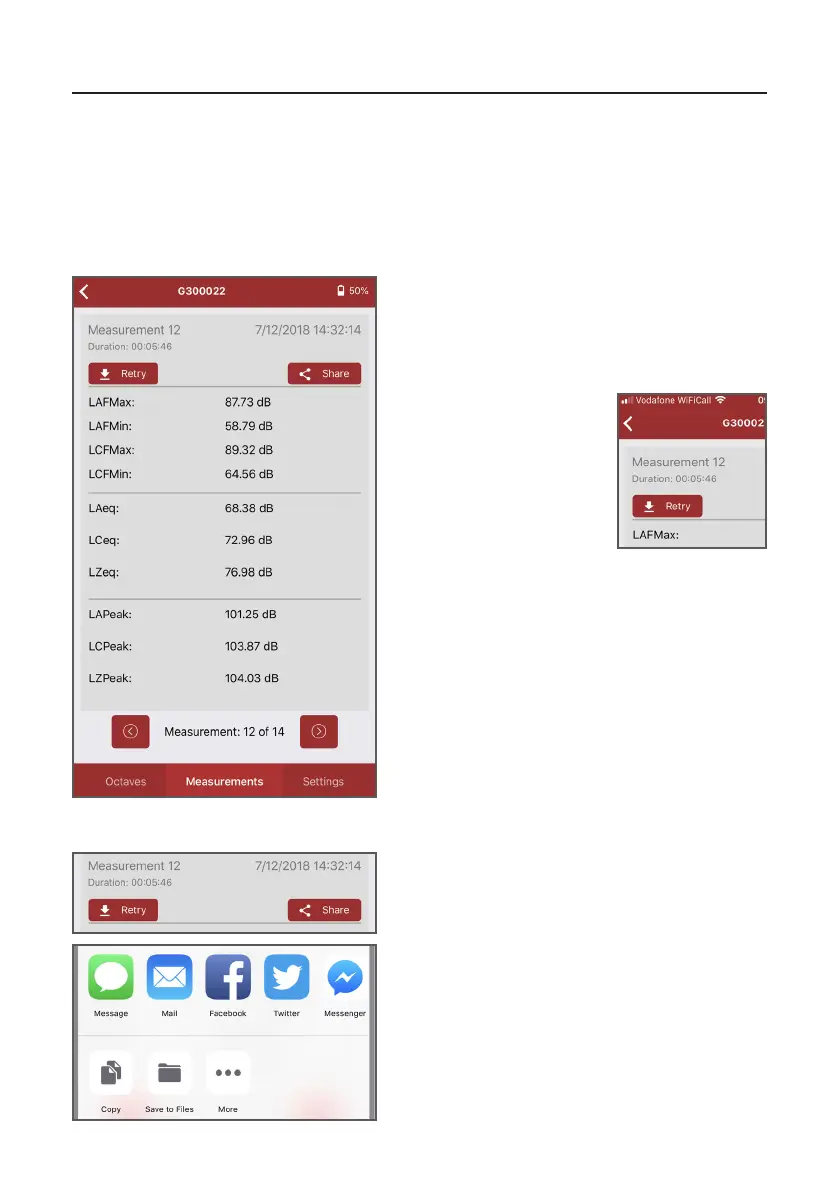
This screen displays the data for all main
noise parameters. You can cycle through
measurements by using the arrows at the
boom of the screen.
2.3 Reviewingmeasurementdata
The ‘Measurements’ screen allows you to review previous measurement data for the
connected instrument. This includes both measurements that have been made on dBAcve
and those that have been made navely on your Opmus+.
2.3.1 Reviewingmeasurements
If you’re experiencing
issues downloading your
measurement data or the app
is displaying measurements
from a previously connected
instrument, press ‘Retry’
to refresh the informaon
displayed.
If you want to share measurement data, press
the ‘Share’ buon.
2.2.2 Sharingmeasurementdata
A popup box will appear lisng the opons
available. The measurement data will be shared
as a text-only list, which you will then be able
to edit as you wish.
Please note: sharing opons will vary depending
on the operang system of your device and the
third-party applicaons you have installed.
Please note: you must ensure that any
measurement data you wish to keep is either
stored on your Opmus+ or downloaded to
a PC using NoiseTools. Measurement data is
not permenantly stored in dBAcve and will
be overwrien once a dierent instrument is
connected to the app.


 To Next Page