Optimus sound level meter - Bluetooth and dBActive quick start guide
11
2.4 Changingyourinstrument’ssengs
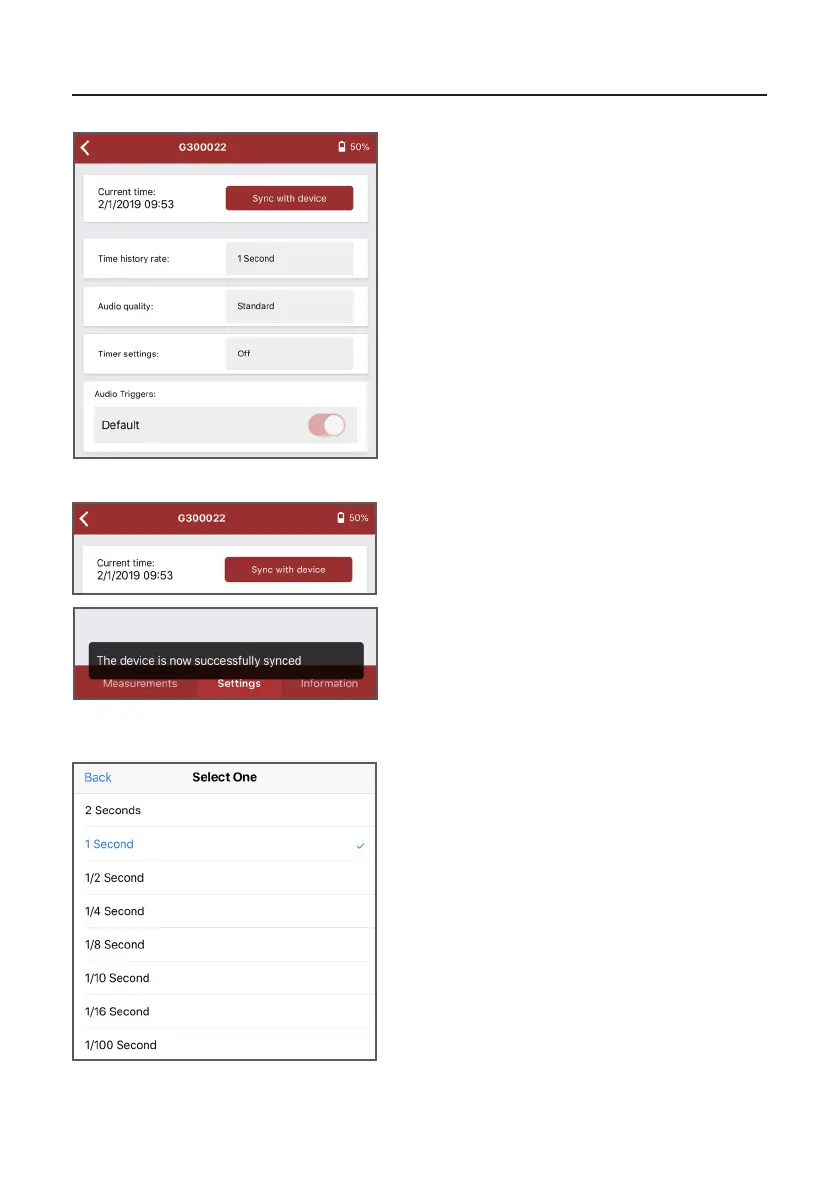
2.4.1 Changingthedateandme
Press on the exisng opon to open a menu,
from which you can select a new value.
2.4.2 Changingmehistoryrate
When using your Opmus+ remotely, you can
change some of its sengs via dBAcve on the
‘Sengs’ screen.
From this menu you can change the date/me of
your instrument, me history rate, audio quality,
and mer sengs. You can also turn audio
triggers on/o.
Press ‘Sync with device’ to syncronise your
instrument’s date/me seng with that of your
mobile device.
Once complete, a nocaon will display at the
boom of the screen.


 To Next Page