Optimus sound level meter - Bluetooth and dBActive quick start guide
9
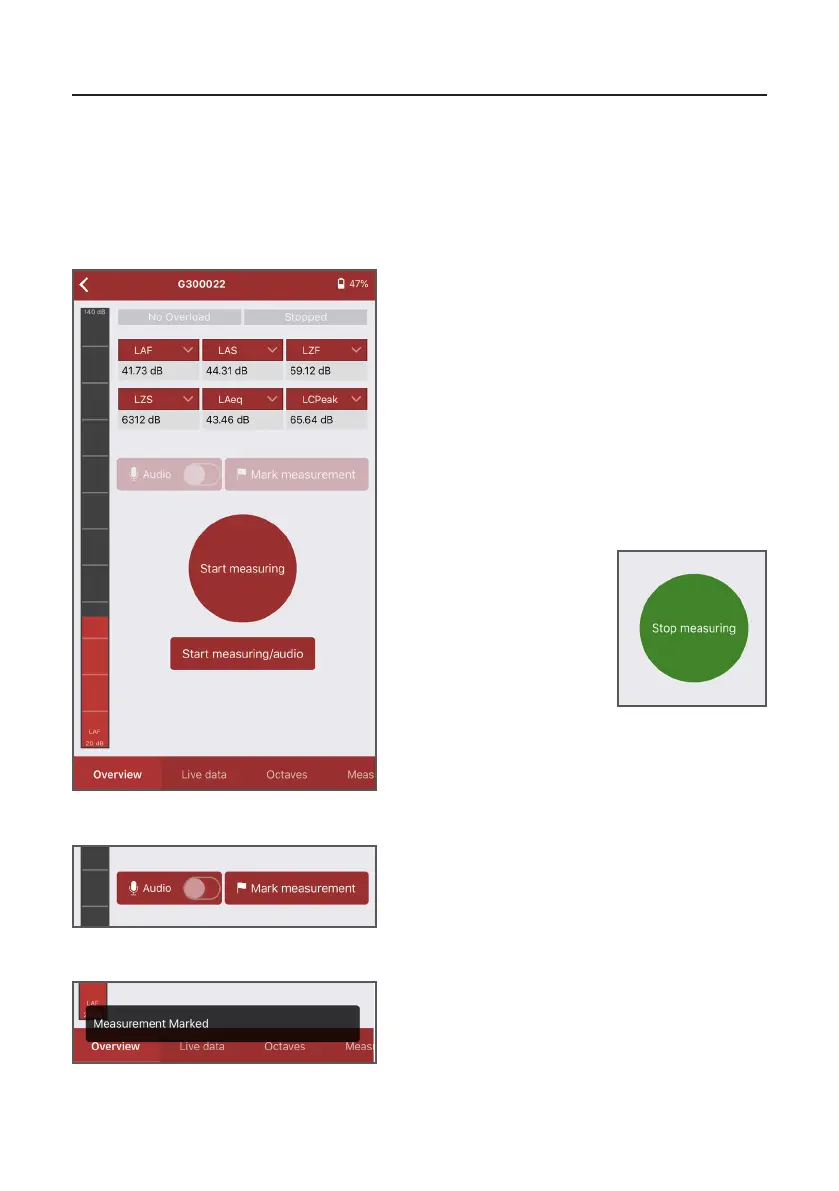
From the overview screen, choose either ‘Start
measuring’ or ‘Start measuring/audio’ to begin a
measurement. If you choose ‘Start measuring/
audio’, the measurement will include an audio
recording of the noise. If you choose ‘Start
measuring’, audio will not be recorded.
Please note: audio recording can be switched
on/o manually during a measurement using
the opon above the start buon. Audio
recording is only available on certain variants of
the Opmus+.
2.2 Starngandstoppingameasurement
As well as being able to view live noise data, dBAcve allows you to start and stop noise
measurements remotely, meaning that your Opmus+ can be used in potenally hazardous
and/or dicult-to-access areas.
2.2.1 Starngandstoppingameasurement
When a measurement is in
process, the red start buon
changes to a green stop
buon. Press this to end
your measurement.
If you need to highlight a specic event during
a measurement for when you come to review
your data in the NoiseTools analysis soware
(supplied with your Opmus+), press ‘Mark
measurement’ when a measurement is in
process.
2.2.2 Markingameasurement
A conrmaon box will appear at the boom
of the screen to let you know that the
measurement has been marked.


 To Next Page