Chapter 2 Installation
Installing the CPE On a Wall
2-10
Cisco 575 LRE CPE Hardware Installation Guide
78-11469-01
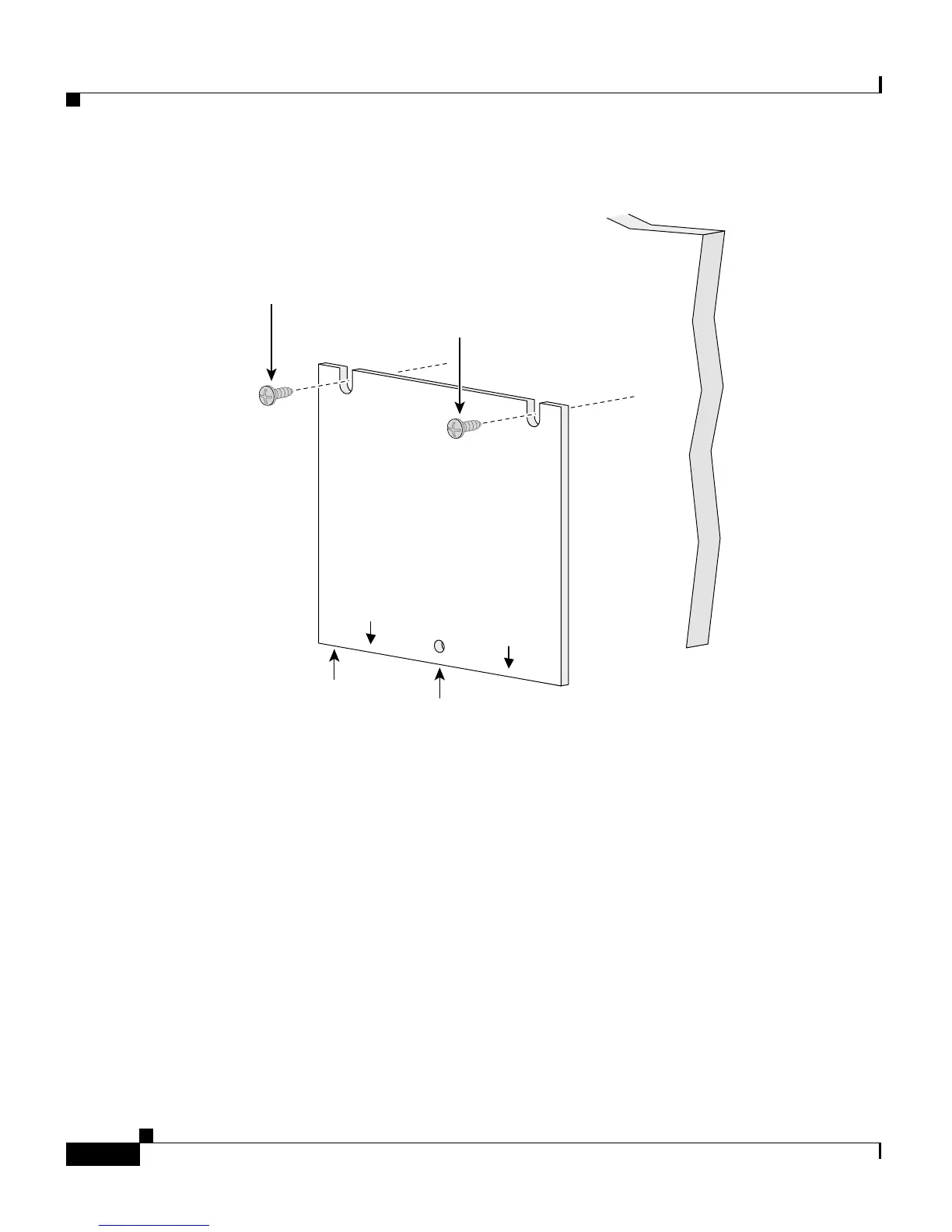
Figure 2-3 Installing the Mounting Screws On a Wall
Step 3
Peel the adhesive strip off the bottom of the screw template.
Step 4 Attach the screw template to the wall.
Step 5 Use a 1/44-inch bit to drill a 1/2-inch-deep hole in the two screw template slots.
Step 6 (Optional) If you wish to attach the cable lock after the cables are installed, drill
a 1/2-inch-deep hole in the screw template hole. For more information, see the
“Attaching the Cable Lock” sectiononpage2-16.
Step 7 Insert two screws in the slots on the screw template, and tighten until they touch
the top of the screw template.
Step 8 Remove the screw template from the wall.
Step 9 Slide the CPE onto the screws until it locks in place. (See Figure 2-4.)
SCREW TEMPLATE
P/N 700-09589-01
THIS SIDE AWAY FROM
MOUNTING SURFACE
CABLE ENTRY
SIDE
Screw
Screw
Screw
template
Cable
lock hole
47503
CABLE ENTRY
SIDE


 To Next Page