8
Access Point Mounting Instructions
OL-166451-01
Mounting an Access Point to a Network or Electrical Box
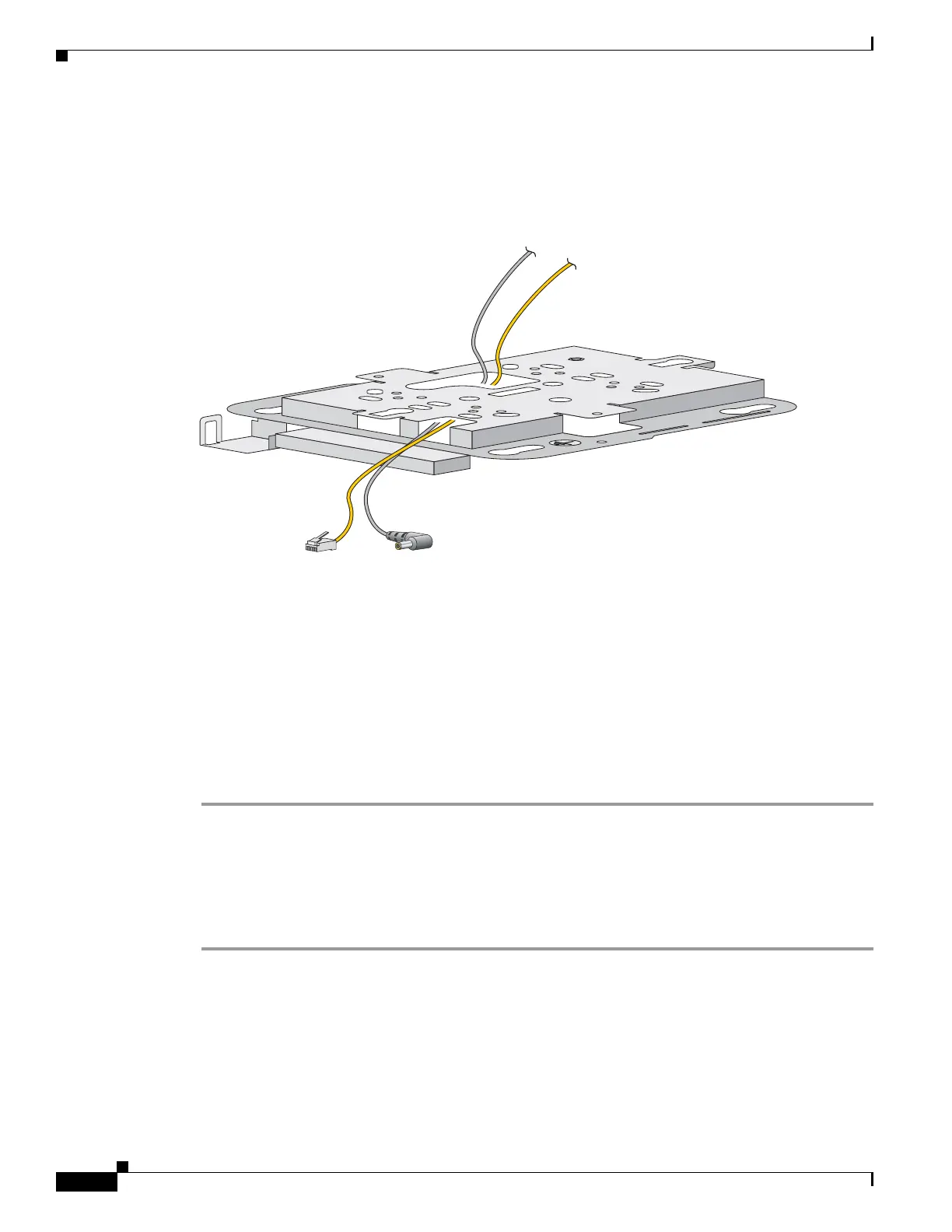
Step 4 Pull approximately 9 inches of cable through the hole. Route the Ethernet and power cables through the
bracket before you attach the bracket to the ceiling or wall. Route the cables through the main cable
access hole and then through the smaller access hole as shown in Figure 8.
Figure 8 Routing the Ethernet and Power Cables
Step 5
(Optional) Use the ground screw to attach the building ground wire to the mounting bracket. See the
“Grounding an Access Point” section on page 10 for general grounding instructions.
Step 6 Position the mounting bracket mounting holes (with indents down) over the pilot holes.
Step 7 Insert a fastener into each mounting hole and tighten.
Step 8 Connect the Ethernet and power cables to the access point.
Step 9 Align the access point feet with the large part of the keyhole mounting slots on the mounting plate. When
positioned correctly, the cable access cover will fit inside the access point connector bay.
Step 10 Gently slide the access point onto the mounting bracket keyhole slots until it clicks into place.
Mounting an Access Point to a Network or Electrical Box
Follow these steps to mount an access point to a network box or an electrical box.
Step 1 Position the universal mounting bracket (AIR-AP-BRACKET-2) over the existing network or electrical
box and align the bracket mounting holes with the box holes.
Step 2 Hold the mounting bracket in place and insert a 6 x 32 x 1/4-in pan head screw into each of the mounting
holes and tighten.
Step 3 Pull approximately 9 inches of Ethernet and power cable through the hole. Route the cables through the
bracket before you attach the bracket to the ceiling. Route the cables through the main cable access hole
and then through the smaller access hole as shown in Figure 8.


 To Next Page