21
Catalyst 2960-S Switch Getting Started Guide
OL-19793-02
Catalyst 2960-S Switch Getting Started Guide
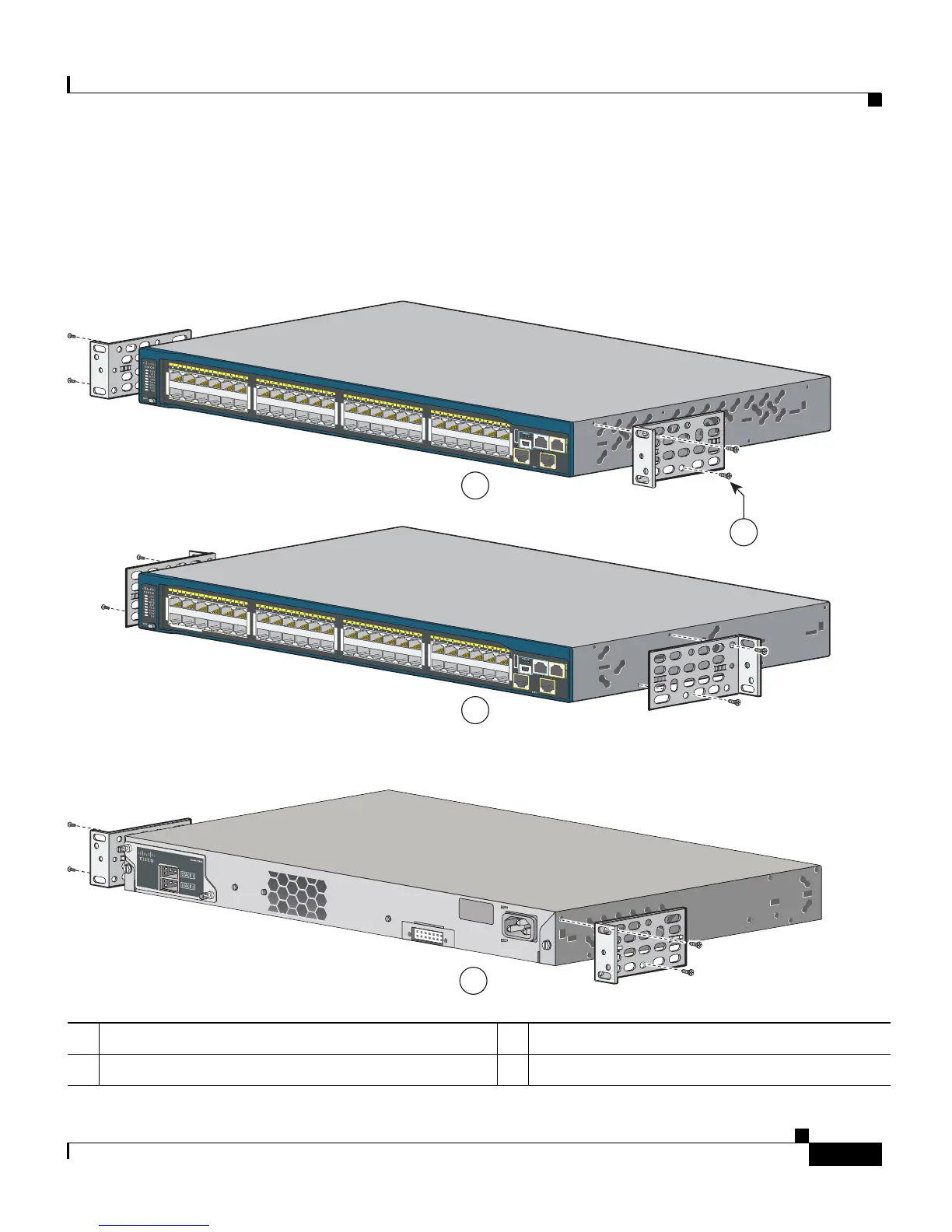
Attaching the Brackets
Use four Phillips flat-head screws to attach the long side of the brackets to
Catalyst 2960-S switches in one of three mounting positions.
1 Front-mounting position 3 Mid-mounting position
2 Number-8 Phillips flat-head screws (48-0655-01) 4 Rear-mounting position
POWER
OVER
ETHERNET 740W
11X
2X
1X
11X
14X
12X
13X
23X
24X
25X
26X
37X
39X
36X
38X
47X
48X
1
2
Catalyst 2960-S
Series
PoE+ 10G
Catalyst 2960-S
Series
PoE+ 10G
RATING
100-240~
12-6A, 50-60Hz
11X
2X
1X
11X
14X
12X
13X
23X
24X
25X
26X
37X
39X
36X
38X
47X
48X
1
2
POWER
OVER
ETHERNET 740W
Catalyst 2960-S
Series
PoE+ 10G
206599
2
1
3
4











 To Next Page