14 4012160 Rev C
Back Panel Description
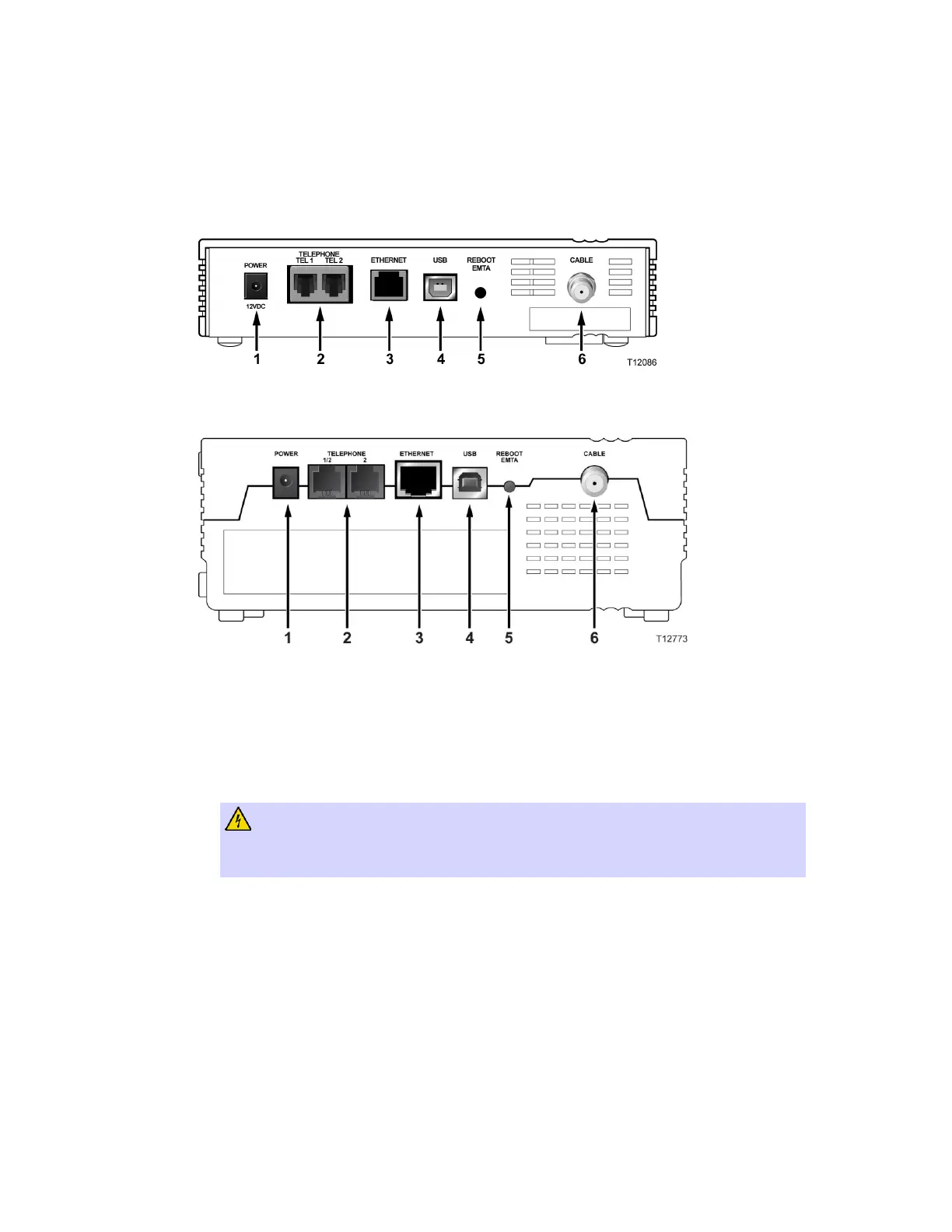
The following illustration shows the description and function of the back panel
components on the DPC2203 and EPC2203.
Standard model
Battery backup model
Important! Do not connect your PC to both the Ethernet and USB ports at the same
time. Your modem will not function properly if both the Ethernet and USB ports are
connected to your PC at the same time.
1 POWER – Connects the cable modem to the AC power supply that is provided
with your cable modem
CAUTION:
Avoid damage to your equipment. Only use the AC power adapter that is
provided with your cable modem.
2 TEL 1/TEL 2 – RJ-11 telephone ports connect to home telephone wiring to
conventional telephones or fax machines
3 ETHERNET – RJ-45 Ethernet port connects to the 10/100baseT Ethernet port on
your PC or your home network
4 USB – 12 Mbps USB 1.1 port connects to the USB port on your PC



 To Next Page